Smart HTTPS icon

Smart HTTPS Chrome Extension Analysis

Privacy, Security & Ad Blockers

Chrome extension ID: cmleijjdpceldbelpnpkddofmcmcaknm

This browser extension automatically attempts to upgrade web traffic from standard HTTP to the secure HTTPS protocol. It remembers sites that do not support HTTPS to optimize performance and includes a whitelist feature for user-defined exceptions.

Developer:Lynn
Version:0.3.5
Size:112KiB
Last updated:

Overview

Installs

30K+

Rating

4.4

34 reviews

Languages

1 locales

Includes English

Market analysis

Review-backed positioning, friction, and market signals for this Chrome extension.

Backed by review samples

Macro category

Privacy, Security & Ad Blockers

Pricing friction

Low review signal

Complaint intensity

Moderate review signal

Listing & review signals
Observed signals from store listing text and review samples.

Listing positioning

Smart HTTPS positions itself as a seamless, 'install and forget' utility that enforces secure connections. It emphasizes a dynamic approach that intelligently falls back to HTTP if HTTPS access is unavailable.

Inferred product pattern

Utility-focused browser security enhancement with an automated redirection loop.

Review-backed pain points

Users have reported that the extension sometimes breaks website elements, such as failing to load CSS files when forced into HTTPS, and occasional failure to enable or function properly after updates.

Observed feature gaps

Lack of consistent updates, potential for breaking legacy sites that use mixed-content layouts, and inconsistent reliability when opening multiple tabs simultaneously.

Tags
SecurityHTTPSPrivacyWeb Browsing
Target users

- Privacy-conscious users

- General web users seeking automated security

Primary use cases

- Automatic HTTPS redirection

- Enforcing secure browsing protocols

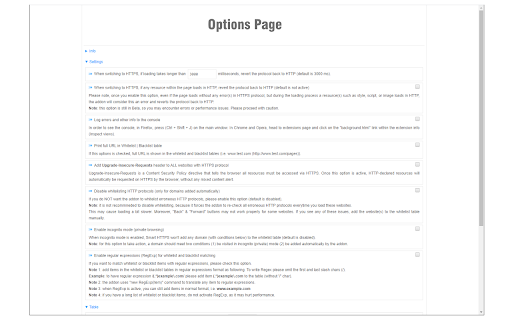
- Excluding specific sites from automatic redirection via whitelisting

Positive themes

- Minimal system resource impact

- Effective fallback mechanism compared to static list-based extensions

- Set-and-forget usability

Negative themes

- Inconsistent functionality across updates

- Resource loading errors (e.g., CSS failing to load over HTTPS)

- Reports of abandonment or lack of maintenance

Observed friction

- Performance complaints detected

- None identified; the extension appears to be a free utility.

Evidence boundary: The evidence is drawn from user reviews documenting functionality, historical performance, and occasional site-breaking behaviors. The sample size is small, and some feedback dates back several years, potentially referencing outdated versions of the extension.
Complaint summaries
Review-backed complaint signals grouped by operational area.

Support

Users expressed frustration over the perceived lack of maintenance and unresolved bugs in older versions.

Reliability

Some users reported that the extension stops working or fails to initialize after certain browser updates.

Privacy

No privacy complaints observed.

Access & pricing

- Free usage observed

- No account requirement observed

- Free plan or free usage claimed

Store listing facts

Listing assets

- Screenshots: 3

- Videos: 0

- Languages: 1

Trust signals

- Developer contact

- Official website

Store metadata

- Version: 0.3.5

- Size: 112KiB

- Last updated:

Store description excerpt
Short excerpt from the public Chrome Web Store listing; full copy is available on the official store page.
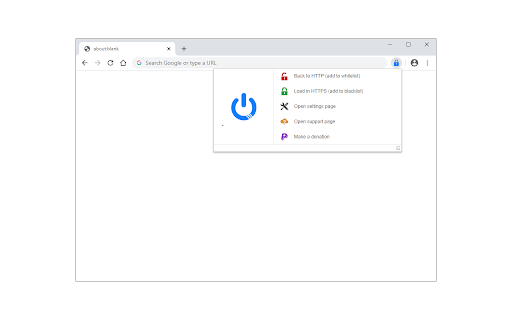
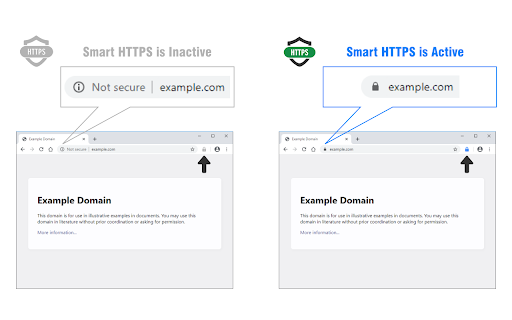
Smart HTTPS is an extension that helps you always use the secure HTTPS protocol if it is supported by the site's server. It automatically changes the HTTP protocol to the secure HTTPS, and if loading errors occur, the extension will revert to the original HTTP protocol. Key features a. Automatically change all HTTP requests to the secure HTTPS. b. All websites (addresses) that do not support HTTPS are remembered to speed up the protocol-check process. Note that you can see and delete these items from the extension's Options page. c. The toolbar button serves as the extension's ON|OFF switch. Blue indicates ON and Gray is OFF. d. Add desired websites to the whitelist (see Options page). Note: to report bugs, please visit the extension homepage (https://mybrowseraddon.com/smart-https.html) and find the bug report form.

Listing SEO keywords

Search intent keywords
Keyword signals for evaluating how users may discover, compare, or search for this extension category.

Core discovery

force httpshttps automatic redirectsecure connection extensionhttp to https chrome

Comparison

HTTPS Everywhere alternativesecure browsing plugin

Problem

website not loadingextension not workingcss not loading

Alternative

privacy browser extensionsweb security tools

Similar extensions

Jump to related discovery paths:

FAQ

What is Smart HTTPS mainly used for?
This browser extension automatically attempts to upgrade web traffic from standard HTTP to the secure HTTPS protocol. It remembers sites that do not support HTTPS to optimize performance and includes a whitelist feature for user-defined exceptions.
What market signals stand out?
Visible niche traction with limited review base. Last known update: 01/24/2026.
What should builders compare before entering this space?
Compare install concentration, rating quality, update recency, screenshots, developer portfolio, listing claims, and review-backed friction signals.
Is this page review-backed?
Backed by review samples. This page combines store metadata with selected review signals, while raw store metrics remain visible for comparison.

Screenshots

Smart HTTPS screenshot

Links

Recommended Chrome extensions

Related listings from the same category, trending peers, and the same publisher portfolio.

Browse tools