Open in PDF Viewer icon

Open in PDF Viewer Chrome Extension Analysis

Automation & Workflow Efficiency

Chrome extension ID: ehndikigeekodlnbohjndjjiikphickb

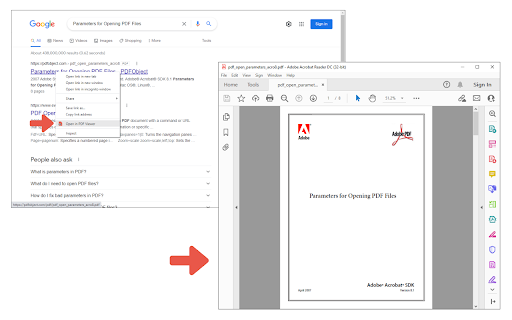
This tool allows users to right-click PDF links to open them directly in a locally installed PDF viewer. It requires the installation of a separate native client patch from GitHub and manual configuration of local application paths to function.

Developer:Lynn
Version:0.1.6
Size:19.0KiB
Last updated:

Overview

Installs

100K+

Rating

3.2

136 reviews

Languages

1 locales

Includes English

Market analysis

Review-backed positioning, friction, and market signals for this Chrome extension.

Backed by review samples

Macro category

Automation & Workflow Efficiency

Pricing friction

Low review signal

Complaint intensity

High review signal

Listing & review signals
Observed signals from store listing text and review samples.

Listing positioning

The extension positions itself as a lightweight utility to bypass browser-based PDF viewers in favor of native desktop applications like Adobe Acrobat. It emphasizes the ability to pass specific arguments to the local viewer for customized opening experiences.

Inferred product pattern

A high-friction utility tool that requires external software patches to bridge web and local environments, currently suffering from significant functional reliability issues.

Review-backed pain points

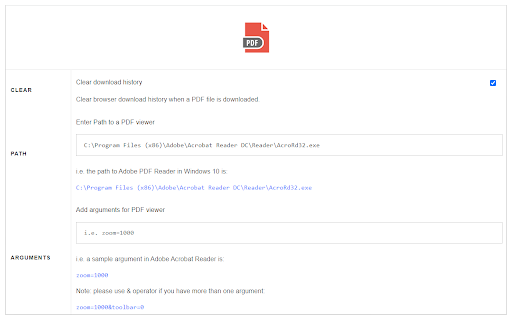
Users report significant friction due to the mandatory external GitHub patch, complex path configuration, and frequent functional failures where the extension downloads HTML pages instead of the intended PDF files.

Observed feature gaps

Lack of a seamless, zero-configuration bridge between the browser and native applications.

Tags
PDF ViewerNative App IntegrationFile ManagementProductivity Tool
Target users

- Desktop PDF users

- Adobe Acrobat users

- Power users

Primary use cases

- Opening PDF links in native desktop applications

- Customizing PDF opening arguments

Positive themes

No positive theme data.

Negative themes

- Complex setup requirements

- Failure to download PDFs (downloads HTML instead)

- Incompatibility with certain browsers and viewers

- Unexpected behavior/ads

Observed friction

- Performance complaints detected

- No pricing friction observed; monetization details are not explicitly stated in the listing.

Evidence boundary: Data extracted from the Chrome Web Store listing and a sample of 1-star reviews. The provided review samples consist exclusively of low-rating entries, which may overrepresent negative sentiment and functional failures.
Complaint summaries
Review-backed complaint signals grouped by operational area.

Support

Users expressed frustration with the high technical barrier to entry and the manual setup required to make the extension work.

Reliability

Significant reliability issues reported, specifically regarding the extension failing to trigger the native application and downloading incorrect file formats (HTML).

Privacy

One user reported the extension displaying ads, but no specific privacy policy violations were documented in the sample.

Access & pricing

- No clear monetization signal

- No account requirement observed

- No clear pricing signal

Store listing facts

Listing assets

- Screenshots: 2

- Videos: 0

- Languages: 1

Trust signals

- Developer contact

- Official website

Store metadata

- Version: 0.1.6

- Size: 19.0KiB

- Last updated:

Store description excerpt
Short excerpt from the public Chrome Web Store listing; full copy is available on the official store page.
Open in PDF Viewer is a simple and lite addon that allows you to easily open desired PDF links in a chosen PDF viewer. Note 1: after installing the addon, you need to connect it with native applications (i.e. adobe acrobat reader) on your machine. To make this connection, a separate patch is provided in GitHub. Please download and install this patch from: https://github.com/alexmarcoo/open-in-native-client/releases Follow the instructions in the above GitHub page to download and install the related patch to your system. After installing, the "Open in PDF Viewer" addon in your browser can communicate with PDF viewer on your machine (Window, Linux, or Mac). The default option for the PDF viewer is adobe acrobat reader. In windows 10, the default location for Adobe Acrobat is "C:\Program Files (x86)\Adobe\Acrobat Reader DC\Reader\AcroRd32.exe". If you have a different OS, or if you install…

Listing SEO keywords

Search intent keywords
Keyword signals for evaluating how users may discover, compare, or search for this extension category.

Core discovery

Open PDF in Adobe AcrobatNative PDF Viewer ExtensionOpen PDF links in desktop appPDF handler Chrome extension

Comparison

Adobe Acrobat ReaderChrome built-in PDF viewer

Problem

PDF downloads as HTMLNative client errorPDF viewer not opening

Alternative

Native file openerPDF desktop integration

Similar extensions

Jump to related discovery paths:

FAQ

What is Open in PDF Viewer mainly used for?
This tool allows users to right-click PDF links to open them directly in a locally installed PDF viewer. It requires the installation of a separate native client patch from GitHub and manual configuration of local application paths to function.
What market signals stand out?
Established adoption with moderate review base. Last known update: 02/16/2026.
What should builders compare before entering this space?
Compare install concentration, rating quality, update recency, screenshots, developer portfolio, listing claims, and review-backed friction signals.
Is this page review-backed?
Backed by review samples. This page combines store metadata with selected review signals, while raw store metrics remain visible for comparison.

Screenshots

Open in PDF Viewer screenshot

Links

Recommended Chrome extensions

Related listings from the same category, trending peers, and the same publisher portfolio.

Browse tools