Secure File Transfer icon

Secure File Transfer Chrome Extension Analysis

Automation & Workflow Efficiency

Chrome extension ID: dgainliijkijnaaoofoidcibjdfjikeb

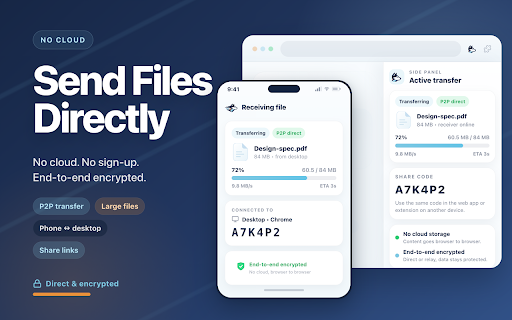
This extension facilitates the transfer of files, URLs, and messages directly between devices without intermediate cloud storage. It uses end-to-end encryption to ensure data security and offers a fallback relay mechanism for connections that cannot be established directly.

Version:1.1.0
Size:348KiB
Last updated:

Overview

Installs

119

Rating

5.0

4 reviews

Languages

52 locales

Includes Deutsch, English, Filipino, Indonesia...

Market analysis

Review-backed positioning, friction, and market signals for this Chrome extension.

Backed by review samples

Macro category

Automation & Workflow Efficiency

Pricing friction

Low review signal

Complaint intensity

Low review signal

Listing & review signals
Observed signals from store listing text and review samples.

Listing positioning

Secure File Transfer is positioned as a privacy-focused, P2P tool for direct browser-to-browser data sharing. It emphasizes the absence of cloud storage, account requirements, and file size limits by leveraging WebRTC technology.

Inferred product pattern

Privacy-centric WebRTC-based utility for P2P data exchange.

Review-backed pain points

No review-backed pain points available.

Observed feature gaps

No major feature gaps observed; the listing explicitly mentions support for custom TURN servers for advanced users.

Tags
P2P TransferFile SharingPrivacy FirstSecure MessagingWebRTC
Target users

- Remote Workers

- Students

- Privacy-conscious users

- IT Professionals

Primary use cases

- Transferring files between personal devices

- Sharing sensitive documents with colleagues

- Quick sharing of links and text messages

- Cross-platform data exchange (Desktop to Mobile)

Positive themes

- Fast performance

- Simple user interface

- No account registration required

- Convenience for cross-device file management

Negative themes

No negative theme data.

Observed friction

- None; the product is free to use.

Evidence boundary: Product information is based on store listing specifications and a small set of highly positive user reviews confirming core claims of ease-of-use and speed. Review volume is very low, limiting the ability to assess long-term reliability or potential edge-case connectivity issues.
Complaint summaries
Review-backed complaint signals grouped by operational area.

Support

No support complaints identified.

Reliability

No reliability complaints identified.

Privacy

No privacy complaints identified.

Access & pricing

- Free usage observed

- No account requirement observed

- Free plan or free usage claimed

Store listing facts

Listing assets

- Screenshots: 1

- Videos: 0

- Languages: 52

Trust signals

- Privacy policy

- Developer contact

- Official website

Store metadata

- Version: 1.1.0

- Size: 348KiB

- Last updated:

Store description excerpt
Short excerpt from the public Chrome Web Store listing; full copy is available on the official store page.
Send files, messages and links directly between devices with end-to-end encryption. No cloud storage, no sign-up, no size limits on P2P connections. Data goes straight from one browser to another via WebRTC – the server never sees your content. Whether you need to send large files to a colleague, quick share a link or move data between your own computers, this secure file transfer extension handles it with a simple share code. 🚀 Quick start 1. Install the Secure File Transfer extension in Chrome 2. Drop a file, paste a URL or type a message 3. Share the code with the recipient 4. They enter the code – the transfer starts automatically 5. Done – no accounts, no waiting, no cloud 📌 Here are 🔟 reasons to choose Secure File Transfer 1️⃣ P2P file sharing – data goes directly between browsers, never touches a server 2️⃣ End-to-end encryption – ECDSA signatures and AES-256-GCM protect every…

Listing SEO keywords

Search intent keywords
Keyword signals for evaluating how users may discover, compare, or search for this extension category.

Core discovery

secure file transferp2p file sharing extensionbrowser to browser file transferencrypted file share

Comparison

WeTransfer alternativeSnapdrop alternative

Problem

how to send large files without cloudsecurely send files between computers

Alternative

file transfer extensionprivate sharing tool

Similar extensions

Jump to related discovery paths:

FAQ

What is Secure File Transfer mainly used for?
This extension facilitates the transfer of files, URLs, and messages directly between devices without intermediate cloud storage. It uses end-to-end encryption to ensure data security and offers a fallback relay mechanism for connections that cannot be established directly.
What market signals stand out?
Early or small audience with limited review base. Last known update: 04/27/2026.
What should builders compare before entering this space?
Compare install concentration, rating quality, update recency, screenshots, developer portfolio, listing claims, and review-backed friction signals.
Is this page review-backed?
Backed by review samples. This page combines store metadata with selected review signals, while raw store metrics remain visible for comparison.

Screenshots

Secure File Transfer screenshot

Links

Recommended Chrome extensions

Related listings from the same category, trending peers, and the same publisher portfolio.

Browse communication
Quillbot: AI Writing Assistant to Grammar Check, Paraphrase & Translate icon

Quillbot: AI Writing Assistant to Grammar Check, Paraphrase & Translate

quillbot

Write better emails, essays and messages with Quillbot's Grammar Checker, Paraphrasing Tool, Generative AI, Summarizer and more!

Installs

5.0M+

Rating

4.7

DeepL: translate and write with AI icon

DeepL: translate and write with AI

team-browser-extensions

Translate while you read and write with DeepL Translate, the world’s most accurate translator.

Installs

4.0M+

Rating

4.7

Email Tracker by Mailtrack® icon

Email Tracker by Mailtrack®

Mailsuite

Free, unlimited email tracker for Gmail, trusted by millions. Accurate, reliable, GDPR-compliant, and Google-audited.

Installs

3.0M+

Rating

4.4

HubSpot Sales icon

HubSpot Sales

signals-extension-publishing

Email tracking, CRM for Gmail, and sales productivity tools in your inbox

Installs

1.0M+

Rating

4.4

Connecteur Antidote icon

Connecteur Antidote

Druide informatique

Intégrez Antidote à votre navigateur pour corriger vos textes en temps réel et consulter ses dictionnaires et guides linguistiques.

Installs

1.0M+

Rating

2.9

Fathom AI Note Taker for Google Meet icon

Fathom AI Note Taker for Google Meet

Fathom

Records, transcribes & summarizes meetings FREE

Installs

500K+

Rating

4.9

GMass: Powerful mail merge for Gmail icon

GMass: Powerful mail merge for Gmail

GMass, Inc.

A powerful mass email and mail merge system for Gmail.

Installs

400K+

Rating

4.8

Magical: Text Expander & Autofill icon

Magical: Text Expander & Autofill

Magical

Magical is a text expander and autofill automation app used by over 100K companies. Expand text like magic and auto-fill forms.

Installs

300K+

Rating

4.4

Compose AI: AI-powered Writing Tool icon

Compose AI: AI-powered Writing Tool

Compose.ai

Accelerate your writing with AI

Installs

300K+

Rating

4.1

L.O.C icon

L.O.C

Loc Mai

L.O.C is a collection of automation tools.

Installs

300K+

Rating

4.3