Open in IE™ icon

Open in IE™ Chrome Extension Analysis

Automation & Workflow Efficiency

Chrome extension ID: dkhhkjpckbmkfdicijemmdaieaagkcco

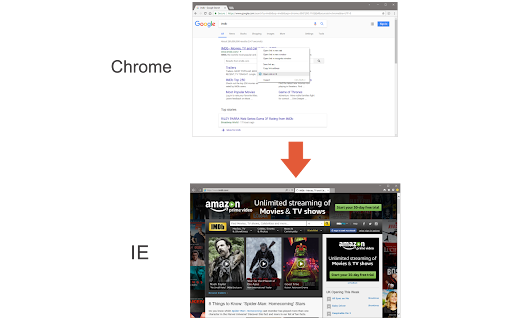
Open in IE allows users to trigger the opening of links in the Internet Explorer browser directly from Chrome via a right-click context menu. It is designed for environments that depend on legacy web protocols or applications incompatible with modern browsers.

Developer:Lynn
Version:0.1.7
Size:31.79KiB
Last updated:

Overview

Installs

10K+

Rating

2.8

18 reviews

Languages

1 locales

Includes English

Market analysis

Review-backed positioning, friction, and market signals for this Chrome extension.

Backed by review samples

Macro category

Automation & Workflow Efficiency

Pricing friction

Low review signal

Complaint intensity

High review signal

Listing & review signals
Observed signals from store listing text and review samples.

Listing positioning

The store listing positions this extension as a bridge for legacy enterprise workflows that require Internet Explorer to render specific sites. It outlines a multi-step installation process requiring both the Chrome extension and a separate native host patch.

Inferred product pattern

Legacy enterprise integration utility requiring external native host installation.

Review-backed pain points

The primary pain point is the complexity of the installation process, specifically the native-client patch, which frequently results in error messages for users.

Observed feature gaps

The extension lacks a streamlined, one-click installation process; it relies on manual configuration of file paths and external software dependencies.

Tags
Legacy BrowserInternet ExplorerBrowser AutomationCompatibility
Target users

- Enterprise users

- Government/Military network users

- Legacy system administrators

Primary use cases

- Opening legacy sites in Internet Explorer

- Accessing enterprise-only applications requiring IE

- Cross-browser workflow bridging

Positive themes

- Successful use in specialized enterprise/government network environments (e.g., MIL networks)

Negative themes

- Native host patch installation failure

- General 'does not work' errors

- Context menu limitations on specific websites

Observed friction

- Performance complaints detected

- None observed; the extension is positioned as a free utility.

Evidence boundary: Evidence based on developer-provided documentation and recurring user reports regarding native host connection errors. Reviews are largely binary, either reporting total functional failure due to setup complexity or successful usage in specific enterprise environments.
Complaint summaries
Review-backed complaint signals grouped by operational area.

Support

Significant frustration expressed regarding the technical setup and failure of the native-client connection.

Reliability

Frequent reports of the extension failing to initialize or connect with the required native-client patch.

Privacy

No specific privacy complaints found.

Access & pricing

- Free usage observed

- No account requirement observed

- Free plan or free usage claimed

Store listing facts

Listing assets

- Screenshots: 1

- Videos: 0

- Languages: 1

Trust signals

- Developer contact

- Official website

Store metadata

- Version: 0.1.7

- Size: 31.79KiB

- Last updated:

Store description excerpt
Short excerpt from the public Chrome Web Store listing; full copy is available on the official store page.
Open in IE™ addon gives you the ability to open any link in an Internet Explorer page from Chrome. Note 1: after installing the addon, you need to connect it with native applications (i.e. IE) on your machine. To make this connection, a separate patch is provided in GitHub. Please download and install this patch from: https://github.com/alexmarcoo/open-in-native-client/releases Follow the instruction on the above GitHub page to download and install the related patch to your system. After installing, the "Open in IE™" addon in your Chrome browser can communicate with IE on your Windows machine. Note 2: before using the addon, please open the option's page and make sure the path to IE is correct based on your Operating System. For example, the path to IE in Windows 10 is: C:\Program Files\Internet Explorer\iexplore.exe Next, please follow the below steps to open desired links in IE. a. Ri…

Listing SEO keywords

Search intent keywords
Keyword signals for evaluating how users may discover, compare, or search for this extension category.

Core discovery

open link in iechrome to internet explorerlegacy browser bridge

Comparison

ie tab alternativeopen in explorer extension

Problem

extension not workingnative client patch error

Alternative

ie tabinternet explorer mode

Similar extensions

Jump to related discovery paths:

FAQ

What is Open in IE™ mainly used for?
Open in IE allows users to trigger the opening of links in the Internet Explorer browser directly from Chrome via a right-click context menu. It is designed for environments that depend on legacy web protocols or applications incompatible with modern browsers.
What market signals stand out?
Visible niche traction with limited review base. Last known update: 02/22/2026.
What should builders compare before entering this space?
Compare install concentration, rating quality, update recency, screenshots, developer portfolio, listing claims, and review-backed friction signals.
Is this page review-backed?
Backed by review samples. This page combines store metadata with selected review signals, while raw store metrics remain visible for comparison.

Screenshots

Open in IE™ screenshot

Links

Recommended Chrome extensions

Related listings from the same category, trending peers, and the same publisher portfolio.

Browse tools