Tab Discard (Suspender) icon

Tab Discard (Suspender) Chrome Extension Analysis

Tab & Bookmark Productivity

Chrome extension ID: eackfaijnihopppechdgblecghggkome

A utility extension that allows users to suspend the active or all inactive tabs to free up system RAM. Suspended tabs are automatically reloaded when the user clicks on them.

Developer:chYer
Version:0.1.6
Size:22.79KiB
Last updated:

Overview

Installs

7K+

Rating

4.7

25 reviews

Languages

1 locales

Includes English

Market analysis

Review-backed positioning, friction, and market signals for this Chrome extension.

Backed by review samples

Macro category

Tab & Bookmark Productivity

Pricing friction

Low review signal

Complaint intensity

Low review signal

Listing & review signals
Observed signals from store listing text and review samples.

Listing positioning

Positions itself as a simple, one-click tool to reduce browser memory usage by suspending inactive tabs. Emphasizes improved browsing performance and ease of use through a toolbar button.

Inferred product pattern

Single-purpose utility for manual system resource management.

Review-backed pain points

Users express a desire for automatic suspension timers and a whitelist to exclude specific tabs from being suspended. One user reported frustration over the extension redirecting them to the developer's website.

Observed feature gaps

Missing auto-suspend scheduling (timers) and a whitelist for specific websites.

Tags
Tab SuspenderRAM OptimizerBrowser PerformanceMemory Management
Target users

- Power users with many open tabs

- Users on low-RAM hardware

- Corporate users with restrictive browser environments

Primary use cases

- Reducing Chrome RAM consumption

- Preventing browser slowdowns due to too many open tabs

- Manual system memory cleanup

Positive themes

- Significant reduction in RAM usage

- Simplicity of one-click operation

- High reliability compared to other suspender tools

Negative themes

- Lack of automation/scheduling features

- Absence of a whitelist/exclusion list

- Unexpected redirects to developer website

Observed friction

- Privacy complaints detected

- No pricing friction observed; the tool appears to be free.

Evidence boundary: Analysis based on the Chrome Web Store listing and a sample of 10 reviews covering performance, feature requests, and security concerns. The review sample size is small relative to the total user count, which may omit some edge-case complaints.
Complaint summaries
Review-backed complaint signals grouped by operational area.

Support

No support complaints observed; developer provides a bug report form on their website.

Reliability

No reliability complaints; users report the tool is fast and efficient.

Privacy

One review mentions a concern regarding the extension taking the user to the developer's website unexpectedly.

Access & pricing

- Free usage observed

- No account requirement observed

- Free plan or free usage claimed

Store listing facts

Listing assets

- Screenshots: 1

- Videos: 0

- Languages: 1

Trust signals

- Developer contact

- Official website

Store metadata

- Version: 0.1.6

- Size: 22.79KiB

- Last updated:

Store description excerpt
Short excerpt from the public Chrome Web Store listing; full copy is available on the official store page.
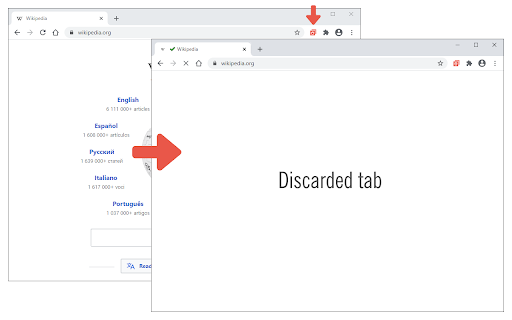
Tab Discard (Suspender) is an extension that lets you easily suspend either all inactive tabs or just the active tab by clicking on the toolbar button. In principle, suspending tabs can reduce the browser memory and enhances your browsing experience. When you click on a suspended tab (make it active) it will be loaded with the previous content automatically. This addon is useful when you have several open tabs, you can suspend them all (free up the memory) with just one click and then visit them one-by-one to unsuspend. This way, your browser will use the least amount of memory and have a better performance. Please right-click on the toolbar button and then select the desired option for suspending tabs (i.e. active or inactive tabs). To report bugs, please visit the addon's homepage (https://mybrowseraddon.com/tab-discard.html) and fill the bug report form.

Listing SEO keywords

Search intent keywords
Keyword signals for evaluating how users may discover, compare, or search for this extension category.

Core discovery

chrome tab suspenderreduce chrome ram usagesuspend inactive tabsbrowser memory optimizer

Comparison

Tab Discard vs The Marvellous Suspenderbest chrome tab suspender

Problem

chrome using too much rambrowser lagging with many tabshow to freeze chrome tabs

Alternative

The Marvellous Suspender alternativechrome://discards alternative

Similar extensions

Jump to related discovery paths:

FAQ

What is Tab Discard (Suspender) mainly used for?
A utility extension that allows users to suspend the active or all inactive tabs to free up system RAM. Suspended tabs are automatically reloaded when the user clicks on them.
What market signals stand out?
Early or small audience with limited review base. Last known update: 05/11/2026.
What should builders compare before entering this space?
Compare install concentration, rating quality, update recency, screenshots, developer portfolio, listing claims, and review-backed friction signals.
Is this page review-backed?
Backed by review samples. This page combines store metadata with selected review signals, while raw store metrics remain visible for comparison.

Screenshots

Tab Discard (Suspender) screenshot

Links

Recommended Chrome extensions

Related listings from the same category, trending peers, and the same publisher portfolio.

Browse tools
Video & Audio Downloader icon

Video & Audio Downloader

chYer

Easily download video & audio streams via toolbar popup.

Installs

80K+

Rating

3.6

AdBlocker for YouTube™ icon

AdBlocker for YouTube™

chYer

Removes all annoying ads and banners from YouTube!

Installs

40K+

Rating

4.1

YouTube Summary with ChatGPT & Claude icon

YouTube Summary with ChatGPT & Claude

Glasp

Summarize YouTube videos, web articles, and PDFs to save time, powered by ChatGPT, Claude, Mistral AI, and Gemini.

Installs

1.0M+

Rating

4.3

Screen Recorder & Screenshot App for Chrome | Scrnli icon

Screen Recorder & Screenshot App for Chrome | Scrnli

scrnli

Screen recorder for Chrome: capture, edit, share screenshots and videos instantly

Installs

1.0M+

Rating

4.7

Transpose ▲▼ pitch ▹ speed ▹ loop icon

Transpose ▲▼ pitch ▹ speed ▹ loop

Tune73

Change the pitch and speed of music and loop sections directly on YouTube, Spotify and many other streaming platforms.

Installs

1.0M+

Rating

4.5

CSFloat Market Checker icon

CSFloat Market Checker

CSFloat Inc.

Shows the float value, paint seed, and more of Counter-Strike (CS:GO & CS2) items on the Steam Market or Inventories

Installs

1.0M+

Rating

3.9

Video Downloader Plus icon

Video Downloader Plus

Video Downloader Plus

Download and save videos from any website instantly. A fast, simple video downloader that just works.

Installs

1.0M+

Rating

4.5

Wordtune: AI Paraphrasing and Grammar Tool icon

Wordtune: AI Paraphrasing and Grammar Tool

Wordtune

Unlock your potential with Wordtune's free AI writer – paraphrase, rewrite, translate, fix grammar, and more.

Installs

1.0M+

Rating

4.6

AIPRM for ChatGPT icon

AIPRM for ChatGPT

AIPRM

AIPRM is your cheat code for ChatGPT. Adds a list of curated prompt templates and advanced features. Try today.

Installs

1.0M+

Rating

3.9

Enhancer for YouTube™ icon

Enhancer for YouTube™

Max RF

Take control of YouTube and boost your user experience!

Installs

1.0M+

Rating

4.7