2FA Authenticator icon

2FA Authenticator Chrome Extension Analysis

Privacy, Security & Ad Blockers

Chrome extension ID: ebhcbenbgjmaebpgbldimndmfomjmphd

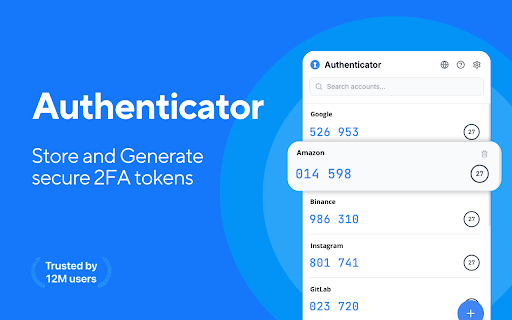
An in-browser TOTP/HOTP utility that lets users manage and retrieve their two-factor authentication codes directly within Chrome. Users can add new accounts by typing keys manually, scanning QR codes via webcam, or uploading saved screenshots of QR codes. The extension stores all sensitive secrets encrypted locally on the device, functioning entirely offline.

Developer:qatofegapi27
Version:1.7.2
Size:1008KiB
Last updated:

Overview

Installs

100K+

Rating

4.5

77 reviews

Languages

55 locales

Includes Deutsch, English, English (Australia), English (United Kingdom)...

Market analysis

Review-backed positioning, friction, and market signals for this Chrome extension.

Backed by review samples

Macro category

Privacy, Security & Ad Blockers

Pricing friction

Low review signal

Complaint intensity

High review signal

Listing & review signals
Observed signals from store listing text and review samples.

Listing positioning

2FA Authenticator is positioned as a secure, fast, and completely offline browser extension for generating two-factor authentication codes directly in Chrome. It emphasizes eliminating the need for a physical mobile device during login procedures. The listing highlights privacy-first local encryption, easy QR code scanning, and zero-cost setup without requiring an account.

Inferred product pattern

Local-only browser security utility capturing user traffic through search optimization and visual cues similar to prominent authenticator tools.

Review-backed pain points

Users encounter critical failures when trying to migrate existing 2FA setups from mobile apps, with the extension often importing only a single credential instead of the entire list. Additionally, some users face situations where generated codes are completely different from their mobile authenticators, raising lockout concerns. A minor performance delay of about 10 seconds on first launch is also noted.

Observed feature gaps

The extension lacks robust multi-account import tools to cleanly migrate lists of credentials from standard formats. Furthermore, there is a clear gap in trusted branding, as several users feel misled by the extension's visual assets resembling official Google products.

Tags
2FA AuthenticatorTwo Factor AuthenticationSecurity ToolTOTP Generator
Target users

- Security-conscious internet users

- Developers and IT professionals

- Users seeking a mobile-free 2FA solution

Primary use cases

- Generating secure TOTP and HOTP codes in-browser

- Importing credentials via QR code screenshot uploads

- Backing up and exporting 2FA keys securely using JSON files

Positive themes

- Convenience of browser-based authentication without retrieving a mobile device

- Quick and straightforward setup for single credentials

- Lightweight extension design

Negative themes

- Impersonation of official Google Authenticator branding

- Failure during bulk importing of multiple accounts (only importing a single credential)

- Generated codes mismatching original physical devices

- Slow cold startup times upon launch

Observed friction

- Performance complaints detected

- The extension is marketed as completely free with no payment prompts or subscription tiers mentioned in the listing or reviews.

Evidence boundary: Extracted from public Chrome Web Store metadata and 10 user review samples focusing on offline operations, branding concerns, code mismatch bugs, and import limitations. Limited to 74 total reviews on the store listing, which restricts full verification of compatibility across all third-party authenticator file formats.
Complaint summaries
Review-backed complaint signals grouped by operational area.

Support

No direct support, account creation, or refund complaints were identified in the reviews, though users voiced distress over potential account lockouts.

Reliability

Users report critical functional issues where multi-account JSON or QR imports fail by only processing the last item in a list. Others reported that generated codes were incorrect, and a 10-second delay was noted during the extension's first-time launch.

Privacy

While no direct data leaks were reported, users raised serious trust and security concerns because the extension's branding and listing assets mimic Google Authenticator, causing fear of a future store ban.

Access & pricing

- Free usage observed

- No account requirement observed

- Free plan or free usage claimed

Store listing facts

Listing assets

- Screenshots: 1

- Videos: 0

- Languages: 55

Trust signals

- Privacy policy

- Developer contact

Store metadata

- Version: 1.7.2

- Size: 1008KiB

- Last updated:

Store description excerpt
Short excerpt from the public Chrome Web Store listing; full copy is available on the official store page.
2FA Authenticator: Your Secure Two-Factor Authentication for Chrome Protect your online accounts with 2FA Authenticator — the ultimate two-factor authentication extension built directly into your Chrome browser. Generate secure TOTP and HOTP codes instantly, without switching devices. 2FA Authenticator makes two-factor authentication simple, fast, and reliable for everyone. 🔐 What 2FA Authenticator Offers: 🛡️ Effortless Two-Factor Authentication ⚡ Enable 2FA Authenticator protection for all your accounts in seconds ⚡ Generate one-time passcodes (OTP) with a single click using 2FA Authenticator ⚡ Support for TOTP and HOTP protocols — the gold standard of two-factor authentication ⚡ Never worry about losing access to your 2FA Authenticator codes again 🔑 Secure Code Generation with 2FA Authenticator 🔒 Generate time-based one-time passwords (TOTP) directly in Chrome 🔒 2FA Authenticator…

Listing SEO keywords

Search intent keywords
Keyword signals for evaluating how users may discover, compare, or search for this extension category.

Core discovery

2fa authenticator chrome extensionbrowser based totp generatoroffline authenticator extensiontwo factor authentication chrome

Comparison

google authenticator vs 2fa authenticatorauthy alternative chromebest browser authenticator

Problem

how to generate 2fa without phonelogin 2fa chrome extensionhow to backup 2fa codes

Alternative

google authenticatorauthymicrosoft authenticator

Similar extensions

Jump to related discovery paths:

FAQ

What is 2FA Authenticator mainly used for?
An in-browser TOTP/HOTP utility that lets users manage and retrieve their two-factor authentication codes directly within Chrome. Users can add new accounts by typing keys manually, scanning QR codes via webcam, or uploading saved screenshots of QR codes. The extension stores all sensitive secrets encrypted locally on the device, functioning entirely offline.
What market signals stand out?
Established adoption with limited review base. Last known update: 05/25/2026.
What should builders compare before entering this space?
Compare install concentration, rating quality, update recency, screenshots, developer portfolio, listing claims, and review-backed friction signals.
Is this page review-backed?
Backed by review samples. This page combines store metadata with selected review signals, while raw store metrics remain visible for comparison.

Screenshots

2FA Authenticator screenshot

Links

Recommended Chrome extensions

Related listings from the same category, trending peers, and the same publisher portfolio.

Browse tools
Video to Audio icon

Video to Audio

qatofegapi27

Convert video to audio in your browser. Drag, drop, download — MP3, M4A or WAV. 100% local, no uploads.

Installs

279

Rating

5.0

Planet Search icon

Planet Search

Free VPN Planet

Enchanced default search engine.

Installs

2.0M+

Rating

3.4

Lightshot (screenshot tool) icon

Lightshot (screenshot tool)

Skillbrains

Simple and convenient screenshot tool. Select an area, edit your screenshot and upload it to the server.

Installs

2.0M+

Rating

4.4

PrintFriendly: Print Clean Pages, Save as PDF & Screenshot, AI Tools icon

PrintFriendly: Print Clean Pages, Save as PDF & Screenshot, AI Tools

PrintFriendly

Print clean web pages, save as PDF, take screenshots, or use reader mode. AI summaries & ad removal. Works on ChatGPT & Gemini.

Installs

1.0M+

Rating

4.6

Mobile simulator - responsive testing tool icon

Mobile simulator - responsive testing tool

François Duprat

Smartphone and tablet simulator on computer with several models to test mobile responsive websites.

Installs

1.0M+

Rating

4.9

Chat with all AI models (Gemini, Claude, DeepSeek…) & AI Agents | AITOPIA icon

Chat with all AI models (Gemini, Claude, DeepSeek…) & AI Agents | AITOPIA

AITOPIA AI Sidebar

AI Agent Marketplace & AI Sidebar with all AI models (Gemini, Claude, DeepSeek & more) and hundreds of AI Agents

Installs

1.0M+

Rating

4.9

Codex icon

Codex

OpenAI

Control Chrome with Codex.

Installs

1.0M+

Rating

3.8

HID Credential Management Extension icon

HID Credential Management Extension

hid-global-chrome-web-store

Browser extension for HID credential management solution.

Installs

1.0M+

Rating

1.3

Keywords Everywhere - Keyword Tool icon

Keywords Everywhere - Keyword Tool

Axeman Technology Solutions LLP

Keyword search volume, cpc and competition for 15+ websites like Google™ Search Console, YouTube™, Amazon™ & more

Installs

1.0M+

Rating

4.5

WebChatGPT: Prompt library with web access icon

WebChatGPT: Prompt library with web access

WebChatGPT

Augment your ChatGPT prompts with relevant web search results through web browsing.

Installs

1.0M+

Rating

4.2