AI Chat Exporter: Save Claude as PDF, MD and more icon

AI Chat Exporter Chrome Extension Analysis

Automation & Workflow Efficiency

Store listing title: AI Chat Exporter: Save Claude as PDF, MD and more

Chrome extension ID: elhmfakncmnghlnabnolalcjkdpfjnin

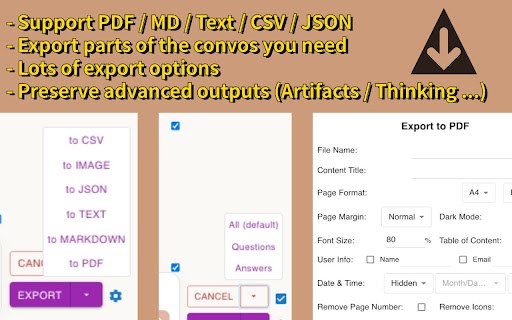
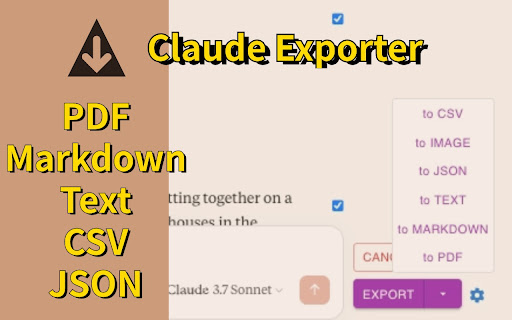
AI Chat Exporter is a Chrome extension designed to export conversations from Claude AI. It allows users to save chats in multiple formats including PDF, Markdown, Text, CSV, and JSON. The extension offers significant customization for exports and aims to preserve all content elements of the conversation, such as code and artifacts.

Developer:Mark
Version:3.1.0
Size:582KiB
Last updated:

Overview

Installs

70K+

Rating

4.9

720 reviews

Languages

31 locales

Includes Deutsch, English, Indonesia, Nederlands...

Market analysis

Review-backed positioning, friction, and market signals for this Chrome extension.

Backed by review samples

Macro category

Automation & Workflow Efficiency

Pricing friction

High review signal

Complaint intensity

High review signal

Listing & review signals
Observed signals from store listing text and review samples.

Listing positioning

This extension positions itself as a utility to easily save Claude AI conversations into various file formats like PDF, Markdown, and CSV. It emphasizes customization options and full content support, including code blocks, artifacts, and thinking processes. The listing highlights ease of use with a two-click export process and a privacy-first approach.

Inferred product pattern

AI chat export utility with a freemium model, offering limited free exports for certain formats and unlimited for others.

Review-backed pain points

Users express frustration with paywalls on features, especially when other free alternatives exist. Some users report the extension becoming inactive and unrestartable. There are also complaints about the inability to export artifacts in mixed formats or to handle 'PASTED' artifacts. A severe accusation of malware and data theft was also raised.

Observed feature gaps

Users have noted that the extension does not seem to export tables/tab pages. There is a desire for the ability to export artifacts as-is all at once (e.g., into a zip file) or individually with one run, especially when dealing with mixed formats. The export of 'PASTED' artifacts is also a noted gap. Some users also mention that it doesn't export full text input sessions if they are longer than the default window and compressed.

Tags
AI Chat ExporterClaude ExportSave Chat
Target users

- AI users

- Claude users

- Content creators

- Developers

- Data analysts

Primary use cases

- Saving AI conversations for record-keeping

- Archiving Claude AI chat logs

- Exporting AI-generated content for editing or analysis

- Sharing AI conversation transcripts

Positive themes

- Tool gets the job done effectively and without fuss

- Good effort that should be rewarded

- Export of text content is great and very helpful

Negative themes

- Concerns about paywalls for features that should be free

- Issues with the extension becoming inactive or not restarting

- Inability to export artifacts in mixed formats or 'PASTED' artifacts

- Concerns about data theft and malware

Observed friction

- Payment required for meaningful usage

- Free-tier complaints detected

- Performance complaints detected

- Privacy complaints detected

- The extension offers free unlimited exports for Markdown, Text, CSV, and JSON, but imposes a limit of 3 free PDF exports per day. Users express dissatisfaction with paid features that they believe should be built-in or free, particularly noting a 'hard paywall' after minimal use for certain functionalities.

Evidence boundary: Listing description and user reviews were analyzed. User reviews provided insights into positive themes, negative themes, pain points, and feature gaps. Monetization, access, and pricing models were inferred from the listing and review data. User reviews are limited in number and may not represent the entire user base. Some severe accusations, like malware, are unverified by external sources. The absence of specific user count data for each review type limits quantification of sentiment.
Complaint summaries
Review-backed complaint signals grouped by operational area.

Support

No specific support complaints were identified. The developer provides an email address for support and bug reporting.

Reliability

Several users reported the extension becoming inactive, failing to restart, or showing an 'inactive' service worker, leading to the inability to use export functions. Issues with image export not working were also noted.

Privacy

A severe accusation of the extension being malware that steals Claude Organization ID and exfiltrates it to an attacker-controlled server was made. The developer states a privacy-first approach, not accessing or saving conversation data.

Access & pricing

- Free entry with paid features

- No clear access signal

- Limited free usage observed

Store listing facts

Listing assets

- Screenshots: 2

- Videos: 0

- Languages: 31

Trust signals

- Privacy policy

- Developer contact

- Official website

Store metadata

- Version: 3.1.0

- Size: 582KiB

- Last updated:

Store description excerpt
Short excerpt from the public Chrome Web Store listing; full copy is available on the official store page.
AI Chat Exporter for Claude lets you save your conversations with Claude AI to your computer. You can save your chats as PDF, Markdown, Text, CSV, or JSON files with just a couple of clicks. With AI Chat Exporter for Claude, you can save your conversations and refer back to them whenever you need! ## Main Features 💼 ### Multiple File Formats 📋 Choose the format that works best for you: - PDF - Perfect for printing or sharing with others - Markdown - Great for editing in note-taking apps - Text - Simple and works everywhere - CSV - Useful for data analysis - JSON - Ideal for developers or data processing ### Customization Options ⚙️ Make your exports look exactly how you want: - Choose which messages to export - Include or exclude timestamps(created, updated, exported) - Adjust Date & Time format - More settings for PDF: - File name & Content title - Light or dark theme - Page format (…

Listing SEO keywords

Search intent keywords
Keyword signals for evaluating how users may discover, compare, or search for this extension category.

Core discovery

Claude exportAI chat savingsave Claude conversationexport Claude to PDFexport Claude to MD

Comparison

Claude chat downloaderAI conversation archive

Problem

cannot save Claude chatClaude chat logexport AI conversation

Alternative

Claude export alternativeAI chat export tool

Similar extensions

Jump to related discovery paths:

FAQ

What is AI Chat Exporter mainly used for?
AI Chat Exporter is a Chrome extension designed to export conversations from Claude AI. It allows users to save chats in multiple formats including PDF, Markdown, Text, CSV, and JSON. The extension offers significant customization for exports and aims to preserve all content elements of the conversation, such as code and artifacts.
What market signals stand out?
Visible niche traction with moderate review base. Last known update: 05/25/2026.
What should builders compare before entering this space?
Compare install concentration, rating quality, update recency, screenshots, developer portfolio, listing claims, and review-backed friction signals.
Is this page review-backed?
Backed by review samples. This page combines store metadata with selected review signals, while raw store metrics remain visible for comparison.

Screenshots

AI Chat Exporter: Save Claude as PDF, MD and more screenshot

Links

Recommended Chrome extensions

Related listings from the same category, trending peers, and the same publisher portfolio.

Browse tools
ChatGPT Exporter - ChatGPT to PDF, MD, and more icon

ChatGPT Exporter - ChatGPT to PDF, MD, and more

Mark

Download ChatGPT convos as PDF, Markdown, Text, etc. Download Chat GPT results to PDF. Easily convert ChatGPT to beautiful PDF.

Installs

100K+

Rating

4.8

WPS浏览器助手:文档在线阅读编辑 icon

WPS浏览器助手:文档在线阅读编辑

金山PDF

PDF、Excel、Word、PPT等文档无需下载即可在线预览,还能对文档进行编辑、打印、转换等处理。

Installs

2.0M+

Rating

3.0

Planet Search icon

Planet Search

Free VPN Planet

Enchanced default search engine.

Installs

2.0M+

Rating

3.4

Lightshot (screenshot tool) icon

Lightshot (screenshot tool)

Skillbrains

Simple and convenient screenshot tool. Select an area, edit your screenshot and upload it to the server.

Installs

2.0M+

Rating

4.4

PrintFriendly: Print Clean Pages, Save as PDF & Screenshot, AI Tools icon

PrintFriendly: Print Clean Pages, Save as PDF & Screenshot, AI Tools

PrintFriendly

Print clean web pages, save as PDF, take screenshots, or use reader mode. AI summaries & ad removal. Works on ChatGPT & Gemini.

Installs

1.0M+

Rating

4.6

Mobile simulator - responsive testing tool icon

Mobile simulator - responsive testing tool

François Duprat

Smartphone and tablet simulator on computer with several models to test mobile responsive websites.

Installs

1.0M+

Rating

4.9

Chat with all AI models (Gemini, Claude, DeepSeek…) & AI Agents | AITOPIA icon

Chat with all AI models (Gemini, Claude, DeepSeek…) & AI Agents | AITOPIA

AITOPIA AI Sidebar

AI Agent Marketplace & AI Sidebar with all AI models (Gemini, Claude, DeepSeek & more) and hundreds of AI Agents

Installs

1.0M+

Rating

4.9

Codex icon

Codex

OpenAI

Control Chrome with Codex.

Installs

1.0M+

Rating

3.8

HID Credential Management Extension icon

HID Credential Management Extension

hid-global-chrome-web-store

Browser extension for HID credential management solution.

Installs

1.0M+

Rating

1.3

Keywords Everywhere - Keyword Tool icon

Keywords Everywhere - Keyword Tool

Axeman Technology Solutions LLP

Keyword search volume, cpc and competition for 15+ websites like Google™ Search Console, YouTube™, Amazon™ & more

Installs

1.0M+

Rating

4.5