Translate for Chrome -Translator, Dictionary icon

Translate for Chrome -Translator, Dictionary Chrome Extension Analysis

AI & Writing Assistants

Chrome extension ID: elpmkbbdldhoiggkjfpgibmjioncklbn

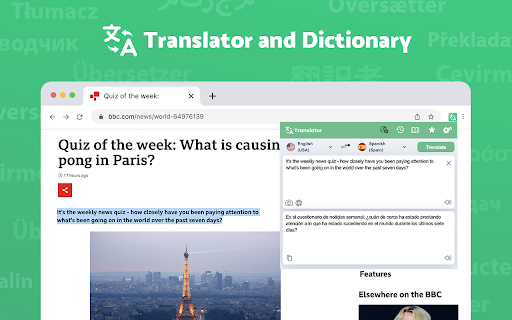
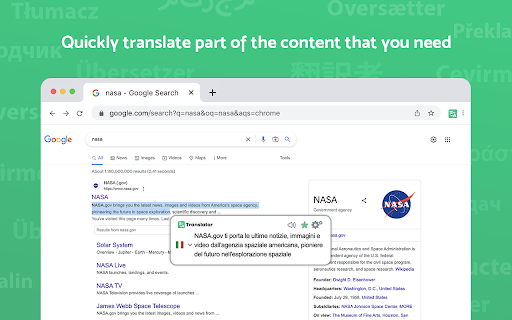
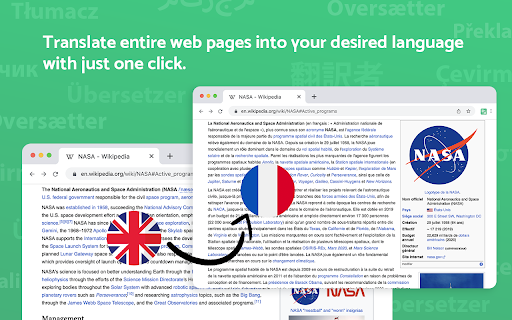
Translate for Chrome is a browser extension that provides on-demand translation for text encountered on any webpage. Users can highlight words or phrases for instant translation, translate full pages, and access a dictionary for word meanings and pronunciation. It supports over 120 languages and includes text-to-speech functionality for both source and translated text.

Developer:Translator App.
Version:1.0.4
Size:760KiB
Last updated:

Overview

Installs

600K+

Rating

4.7

739 reviews

Languages

27 locales

Includes Deutsch, English, English (United States), Nederlands...

Market analysis

Review-backed positioning, friction, and market signals for this Chrome extension.

Backed by review samples

Macro category

AI & Writing Assistants

Pricing friction

Low review signal

Complaint intensity

Moderate review signal

Listing & review signals
Observed signals from store listing text and review samples.

Listing positioning

This Chrome extension positions itself as a comprehensive and user-friendly solution for on-the-fly translation of words, phrases, and entire webpages. It highlights its free nature, support for over 120 languages, and features like text-to-speech and a dictionary for enhanced understanding and pronunciation.

Inferred product pattern

Web-based translation tool with supplementary features like dictionary and TTS.

Review-backed pain points

Users report issues with automatic translation not working after device changes, perceived clunkiness in language settings and navigation, and problems with specific features like image translation stopping working. Some users also find that the extension is merely a wrapper for Google Translate and doesn't offer deeper content understanding.

Observed feature gaps

Some users express confusion about the 'favorites' function and how to utilize it. There is also a desire for the text-to-speech to pronounce the original language for learning purposes, not just the translated language.

Tags
TranslatorDictionaryText To SpeechPage Translator
Target users

- Students

- Language Learners

- International Travelers

- Multilingual professionals

Primary use cases

- Translating web content

- Learning new languages

- Understanding foreign text

- Pronouncing foreign words

Positive themes

- Useful for simple translations

- Good text-to-speech feature

- Supports many languages

Negative themes

- Issues with automatic translation settings

- Functionality not working as expected

- Interface perceived as clunky or difficult to use

- Translation quality concerns

- Specific features not working

Observed friction

- Performance complaints detected

- The extension is completely free with no registration or subscription required.

Evidence boundary: Analysis is based on provided Chrome Web Store listing data and a selection of user reviews. The review sample size is limited, and sentiment may not represent the entire user base. Some reviews are in languages other than English.
Complaint summaries
Review-backed complaint signals grouped by operational area.

Support

No specific complaints about direct support, but users are seeking help with functionality issues.

Reliability

Some users report that specific features, like image translation, have stopped working. Others experience issues with automatic translation not functioning correctly after device changes.

Privacy

The listing states that translation history is stored locally and does not use cloud storage, and no privacy-related complaints were observed in the provided reviews.

Access & pricing

- Free usage observed

- No account requirement observed

- Free plan or free usage claimed

Store listing facts

Listing assets

- Screenshots: 3

- Videos: 0

- Languages: 27

Trust signals

- Privacy policy

- Developer contact

Store metadata

- Version: 1.0.4

- Size: 760KiB

- Last updated:

Store description excerpt
Short excerpt from the public Chrome Web Store listing; full copy is available on the official store page.
Translator is the most effective and user-friendly solution for swiftly translating specific content, be it words, phrases, or even menu items. By simply highlighting the desired word or text, you can instantly view its translation in your preferred language. This convenient browser extension encompasses all these functionalities in one easy-to-use package. Here are the key features: ► Completely free, no registration or subscriptions required. ► Supports over 120 languages. ► Automatically detects the language. ► Offers text-to-speech for 60 languages. ► Provides reverse translation. ► Works on all websites, including Gmail, Facebook, Twitter, and more. ► Boasts a user-friendly and intuitive interface. ► Utilizes a dictionary for word translation (dictionary works offline). Web Translator employs high-quality human text-to-speech (TTS) translation to accurately read and reproduce words…

Listing SEO keywords

Search intent keywords
Keyword signals for evaluating how users may discover, compare, or search for this extension category.

Core discovery

translatetranslatordictionarytext to speechpage translatorlanguage translationchrome extension

Comparison

google translatedeepl translator

Problem

web translationforeign textlanguage barrierpronunciation help

Alternative

translate extensionlanguage learning tool

Similar extensions

Jump to related discovery paths:

FAQ

What is Translate for Chrome -Translator, Dictionary mainly used for?
Translate for Chrome is a browser extension that provides on-demand translation for text encountered on any webpage. Users can highlight words or phrases for instant translation, translate full pages, and access a dictionary for word meanings and pronunciation. It supports over 120 languages and includes text-to-speech functionality for both source and translated text.
What market signals stand out?
Established adoption with moderate review base. Last known update: 10/06/2025.
What should builders compare before entering this space?
Compare install concentration, rating quality, update recency, screenshots, developer portfolio, listing claims, and review-backed friction signals.
Is this page review-backed?
Backed by review samples. This page combines store metadata with selected review signals, while raw store metrics remain visible for comparison.

Screenshots

Translate for Chrome -Translator, Dictionary screenshot

Links

Recommended Chrome extensions

Related listings from the same category, trending peers, and the same publisher portfolio.

Browse education
Paperpile Extension icon

Paperpile Extension

Paperpile

Collect, organize, annotate and cite your research papers in Chrome.

Installs

200K+

Rating

4.6

Rapid Journal Quality Check icon

Rapid Journal Quality Check

jrk.devgit

Displays rankings and h-index for academic journals next to Google Scholar search results.

Installs

200K+

Rating

4.2

OpenDyslexic for Chrome icon

OpenDyslexic for Chrome

OpenDyslexic

Format pages using the OpenDyslexic font and low contrast help

Installs

200K+

Rating

4.1

Google Meet Breakout by Robert Hudek icon

Google Meet Breakout by Robert Hudek

Unknown developer

Only the teacher needs to install. Completely Free and your Data is Private. Google Classroom integration, Slider Control.

Installs

200K+

Rating

4.4

Reverso – Translation, dictionary icon

Reverso – Translation, dictionary

Reverso Technologies Inc.

Translate and learn languages while browsing and watching movies, it’s free.

Installs

200K+

Rating

4.6

Toucan by Babbel - Language Learning icon

Toucan by Babbel - Language Learning

jointoucan.com

Learn a new language just by browsing the internet.

Installs

200K+

Rating

4.6

Add to Google Classroom icon

Add to Google Classroom

Canopy

This extension adds the current site to Google Classroom

Installs

200K+

Rating

4.2

Knowt: Quizlet Import, AI Notes & Flashcards icon

Knowt: Quizlet Import, AI Notes & Flashcards

Knowt

Automatically import flashcards and notes from any video, PDF, article, or flashcard site. Knowt is the fastest way to study.

Installs

100K+

Rating

4.9

ExCITATION – Journal Ranking & Impact Factor for Google Scholar™ icon

ExCITATION – Journal Ranking & Impact Factor for Google Scholar™

Excitation Journal

Show SJR, ABS & ABDC journal rankings in Google Scholar. Sort by citations, detect predatory journals & preview abstracts — free.

Installs

100K+

Rating

4.5

Yomitan Popup Dictionary icon

Yomitan Popup Dictionary

yomidevs

Popup dictionary for language learning

Installs

100K+

Rating

4.8