Reverso – Translation, dictionary icon

Reverso Chrome Extension Analysis

AI & Writing Assistants

Store listing title: Reverso – Translation, dictionary

Chrome extension ID: onhiacboedfinnofagfgoaanfedhmfab

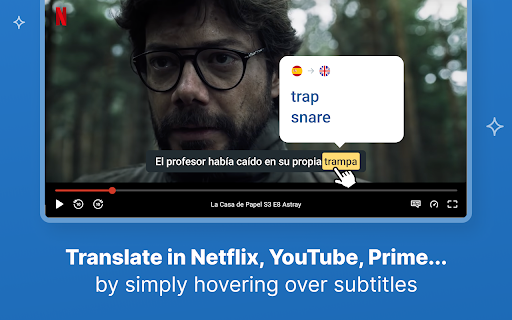
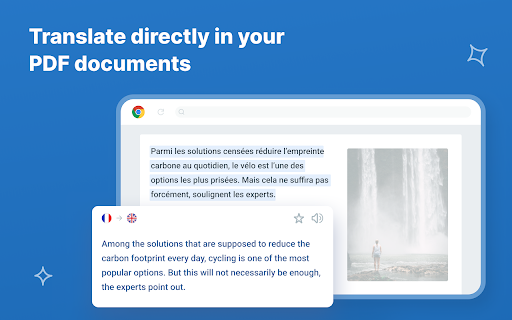
Reverso is a browser extension that offers instant, AI-powered translation of selected text and movie subtitles on platforms like Netflix, YouTube, and Amazon Prime. It aims to facilitate language learning by allowing users to save vocabulary and phrases for later review, with synchronization capabilities across various Reverso products for registered users.

Version:3.10.373
Size:6.13MiB
Last updated:

Overview

Installs

200K+

Rating

4.6

1,352 reviews

Languages

6 locales

Includes Deutsch, English, español, français...

Market analysis

Review-backed positioning, friction, and market signals for this Chrome extension.

Backed by review samples

Macro category

AI & Writing Assistants

Pricing friction

High review signal

Complaint intensity

High review signal

Listing & review signals
Observed signals from store listing text and review samples.

Listing positioning

The listing positions Reverso as a free, AI-powered translation and language learning Chrome extension. It emphasizes its ability to translate text while browsing and watching movies, promising accurate results based on real-life usage examples and offering optional registration for synchronization across devices.

Inferred product pattern

An AI-powered language translation and learning extension that offers a highly restricted free tier, primarily designed to drive users towards a premium subscription for unlimited usage, advanced features, and cross-device synchronization.

Review-backed pain points

Users express significant frustration over the discrepancy between the advertised 'free' nature and the immediate, strict limits on translation usage, which quickly push them towards a paid premium version. Other pain points include general slowness, intrusive notifications, unreliable translation of selected text, and UI glitches like persistent subtitles during media consumption.

Observed feature gaps

A major gap is the actual versus advertised free functionality; users expect full translation without immediate paywalls. There are also inconsistencies in text selection translation on standard web pages, and user experience issues related to UI updates and persistent elements like subtitles. Compatibility with VPNs is also cited as a gap.

Tags
AI TranslationLanguage LearningSubtitle TranslatorContextual DictionaryProductivity Tool
Target users

- Language learners

- Individuals consuming foreign language content (movies, articles)

- Users needing quick contextual translations

Primary use cases

- Instant translation of selected text on web pages

- Real-time translation of movie and video subtitles

- Building and reviewing vocabulary and phrasebooks

Positive themes

- Effective for language learning purposes

- Capable of translating subtitles on major streaming platforms (Netflix, YouTube)

- Convenient for translating text snippets and saving vocabulary

Negative themes

- Misleading advertisement of being 'free' while imposing severe translation limits without premium subscription

- Slow performance and unresponsiveness of the extension

- Intrusive pop-ups and frequent update notifications

- Poor contextual translation quality and inaccurate word choices

- Issues with new UI/layout, such as persistent subtitles or cut-off sentences

- Inability to translate selected text on regular Chrome pages for some users

- Concerns about unnecessary access to page content permissions

Observed friction

- Payment required for meaningful usage

- Free-tier complaints detected

- Account blocking complaints detected

- Performance complaints detected

- Privacy complaints detected

- There is significant pricing friction due to the extension being advertised as 'free' but quickly imposing strict translation limits (e.g., 2-3 lines or 150 characters), compelling users to register or upgrade to a premium version for practical use. This leads to user complaints about misleading claims and immediate paywalling.

Evidence boundary: Analysis is based on the Chrome Web Store listing data, including the title, descriptions, and a sample of 10 user reviews, primarily focusing on 'helpful' and 'low_rating' samples to identify key themes. The analysis relies on a limited sample of 10 reviews out of 1351 total comments. While these samples highlight common themes, they do not represent the full spectrum or statistical distribution of all user feedback.
Complaint summaries
Review-backed complaint signals grouped by operational area.

Support

Some users report critical issues with account access, specifically being unable to connect or log in, with the process redirecting to a blank page. This hinders access to features dependent on user accounts, such as synchronization.

Reliability

Users experience reliability issues including the extension not working at all for selected text translation, being very slow, failing to function when a VPN is active, and encountering persistent UI glitches like movie captions that do not disappear.

Privacy

Concerns have been raised regarding the extension's privacy, with users questioning the necessity of granting full access to page content when its primary function appears to be translating only selected text. This suggests potential over-permissioning.

Access & pricing

- Free entry with paid features

- Login needed for core features

- Limited free usage observed

Store listing facts

Listing assets

- Screenshots: 5

- Videos: 0

- Languages: 6

Trust signals

- Privacy policy

- Developer contact

- Official website

- Support link

Store metadata

- Version: 3.10.373

- Size: 6.13MiB

- Last updated:

Store description excerpt
Short excerpt from the public Chrome Web Store listing; full copy is available on the official store page.
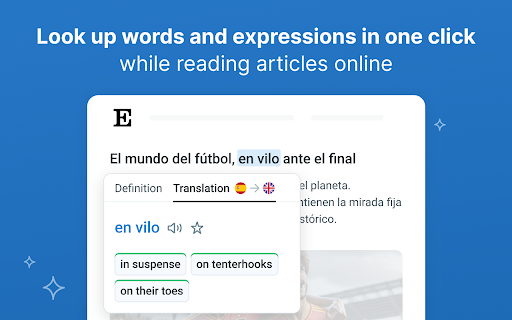
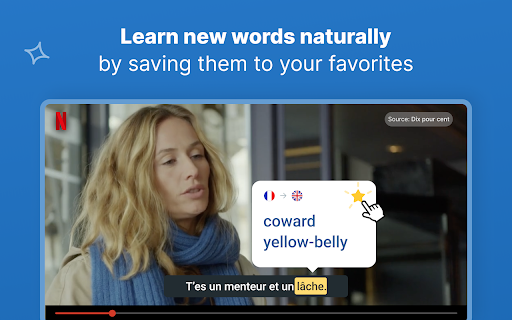
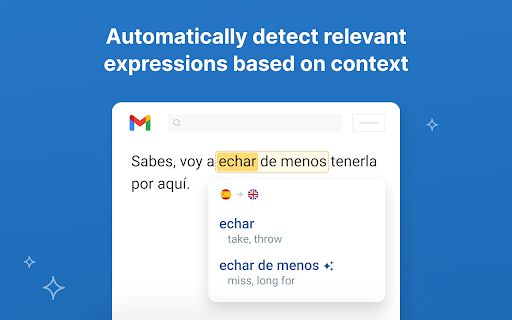
Translate and learn languages while browsing and watching movies. It’s free, and registration is optional. Just select a text, let the magic happen and get accurate translations illustrated by examples of real usage. ENJOY THE ULTIMATE AI-POWERED TRANSLATION • Powerful big data algorithms and machine learning. • The most accurate and relevant results, based on millions of real-life multilingual texts. LEARN WHILE WATCHING YOUR FAVORITE MOVIES • Translate subtitles while you enjoy a movie on Netflix, Amazon Prime, YouTube, and more. • Save your favorite words and expressions to review and memorize them later. LEARN WHILE BROWSING AND READING • Discover translations and pronunciations of words and expressions in foreign languages: Spanish, French, Russian…, in the context of your article or document. • Read, write and speak with more accuracy and confidence. • Save your favorite words and…

Listing SEO keywords

Search intent keywords
Keyword signals for evaluating how users may discover, compare, or search for this extension category.

Core discovery

AI translatorlanguage learning extensionsubtitle translatorcontext dictionaryvocabulary buildertranslation tool

Comparison

Reverso vs ImTranslatorReverso vs Mate Translatebest translation extension

Problem

translation limitsslow extensioninaccurate translationsubtitles stuckChrome extension not working

Alternative

translation extension alternativefree translator applanguage learning tool substitute

Similar extensions

Jump to related discovery paths:

FAQ

What is Reverso mainly used for?
Reverso is a browser extension that offers instant, AI-powered translation of selected text and movie subtitles on platforms like Netflix, YouTube, and Amazon Prime. It aims to facilitate language learning by allowing users to save vocabulary and phrases for later review, with synchronization capabilities across various Reverso products for registered users.
What market signals stand out?
Established adoption with substantial review base. Last known update: 12/14/2025.
What should builders compare before entering this space?
Compare install concentration, rating quality, update recency, screenshots, developer portfolio, listing claims, and review-backed friction signals.
Is this page review-backed?
Backed by review samples. This page combines store metadata with selected review signals, while raw store metrics remain visible for comparison.

Screenshots

Reverso – Translation, dictionary screenshot

Links

Recommended Chrome extensions

Related listings from the same category, trending peers, and the same publisher portfolio.

Browse education
Certificate Enrollment for ChromeOS icon

Certificate Enrollment for ChromeOS

google.com

Request a certificate for your device.

Installs

300K+

Rating

4.4

rikaikun icon

rikaikun

Erek Speed

rikaikun shows the reading and English definition of Japanese words when you hover over Japanese text in the browser.

Installs

200K+

Rating

4.7

xFanatical Safe Doc icon

xFanatical Safe Doc

xFanatical

xFanatical Safe Doc smooths the way for schools managing Google Workspace for Education features (Docs, Sheets, Slides, Classroom,…

Installs

200K+

Rating

1.4

Mouse Tooltip Translator - PDF & Netflix YouTube dual subs icon

Mouse Tooltip Translator - PDF & Netflix YouTube dual subs

ttop324

Mouse Tooltip Translator translate mouseover text using google translate. Support OCR, TTS, manga translator & pdf translator.

Installs

200K+

Rating

4.6

Paperpile Extension icon

Paperpile Extension

Paperpile

Collect, organize, annotate and cite your research papers in Chrome.

Installs

200K+

Rating

4.6

Rapid Journal Quality Check icon

Rapid Journal Quality Check

jrk.devgit

Displays rankings and h-index for academic journals next to Google Scholar search results.

Installs

200K+

Rating

4.2

OpenDyslexic for Chrome icon

OpenDyslexic for Chrome

OpenDyslexic

Format pages using the OpenDyslexic font and low contrast help

Installs

200K+

Rating

4.1

Google Meet Breakout by Robert Hudek icon

Google Meet Breakout by Robert Hudek

Unknown developer

Only the teacher needs to install. Completely Free and your Data is Private. Google Classroom integration, Slider Control.

Installs

200K+

Rating

4.4

Toucan by Babbel - Language Learning icon

Toucan by Babbel - Language Learning

jointoucan.com

Learn a new language just by browsing the internet.

Installs

200K+

Rating

4.6

Add to Google Classroom icon

Add to Google Classroom

Canopy

This extension adds the current site to Google Classroom

Installs

200K+

Rating

4.2