Copy As Plain Text icon

Copy As Plain Text Chrome Extension Analysis

Automation & Workflow Efficiency

Chrome extension ID: eneajgkmdhmjmloiabgkpkiooaejmlpk

Copy As Plain Text is a browser extension that allows users to strip HTML and styles from selected web text before it reaches the clipboard. It simplifies the process of cleaning text for use in other applications via the browser's native context menu.

Developer:Yubi
Version:0.1.6
Size:15.75KiB
Last updated:

Overview

Installs

30K+

Rating

4.1

48 reviews

Languages

1 locales

Includes English

Market analysis

Review-backed positioning, friction, and market signals for this Chrome extension.

Backed by review samples

Macro category

Automation & Workflow Efficiency

Pricing friction

Low review signal

Complaint intensity

Moderate review signal

Listing & review signals
Observed signals from store listing text and review samples.

Listing positioning

The product is positioned as a lite utility for quickly removing text formatting during the copy process. It emphasizes accessibility through a right-click context menu and a dedicated toolbar button.

Inferred product pattern

Single-purpose utility tool focused on a specific clipboard modification.

Review-backed pain points

Users are highly frustrated by the removal of line breaks, which converts paragraphs into a single massive block of text. Some users also report the extension stopping completely or failing intermittently.

Observed feature gaps

Lack of a 'preserve line breaks' setting, no customizable keyboard shortcuts, and no floating tooltip menu on text selection.

Tags
Plain Text CopyClipboard ToolFormatting CleanerProductivity
Target users

- Students

- Researchers

- Content Writers

- Data Entry Professionals

Primary use cases

- Stripping formatting from web pages for clean documents

- Removing styles from truncated or weirdly formatted text

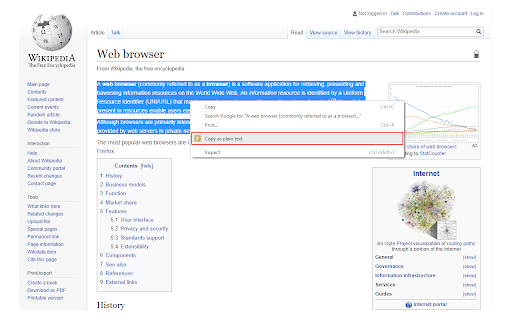
- Quickly copying plain text via right-click menu

Positive themes

- Effective formatting removal

- Successful handling of weirdly formatted text

Negative themes

- Loss of carriage returns and line breaks

- Inconsistent reliability and intermittent failures

- Lack of support for specific formats like Canva PDFs

Observed friction

- Performance complaints detected

- No pricing friction observed as the product appears to be free.

Evidence boundary: Data extracted from store listing and 10 representative user reviews. Review sample size is small relative to the total user base.
Complaint summaries
Review-backed complaint signals grouped by operational area.

Support

No direct support complaints found, though the developer provides a bug report form on their homepage.

Reliability

Users report inconsistency, with some stating it works only half the time or has stopped working entirely.

Privacy

No privacy or security complaints observed.

Access & pricing

- Free usage observed

- No account requirement observed

- Free plan or free usage claimed

Store listing facts

Listing assets

- Screenshots: 1

- Videos: 0

- Languages: 1

Trust signals

- Developer contact

- Official website

Store metadata

- Version: 0.1.6

- Size: 15.75KiB

- Last updated:

Store description excerpt
Short excerpt from the public Chrome Web Store listing; full copy is available on the official store page.
Copy As Plain Text is a lite extension that lets you easily copy any text without formatting to the clipboard via the right-click context-menu item. Simply browse a website and select a desired text, then right-click and select - Copy as plain text - from the context-menu. The selected text will be copied to the clipboard without any formatting. Alternatively, you can press the toolbar button to copy the plain text to the clipboard. Please note that, to paste the clipboard you can use (Ctrl + V) or right-click and select - Paste - from the context-menu. To report bugs, please fill out the bug report form on the addon's homepage (https://mybrowseraddon.com/copy-as-plain-text.html).

Listing SEO keywords

Search intent keywords
Keyword signals for evaluating how users may discover, compare, or search for this extension category.

Core discovery

copy plain textremove text formattingstrip formatting chromecopy without styles

Comparison

copy as plain text vs copy without formattingbest plain text copy extension

Problem

how to copy text without formattingremove web styles from clipboardpaste plain text chrome

Alternative

plain text clipboard alternativeformat cleaner extension

Similar extensions

Jump to related discovery paths:

FAQ

What is Copy As Plain Text mainly used for?
Copy As Plain Text is a browser extension that allows users to strip HTML and styles from selected web text before it reaches the clipboard. It simplifies the process of cleaning text for use in other applications via the browser's native context menu.
What market signals stand out?
Visible niche traction with limited review base. Last known update: 06/13/2026.
What should builders compare before entering this space?
Compare install concentration, rating quality, update recency, screenshots, developer portfolio, listing claims, and review-backed friction signals.
Is this page review-backed?
Backed by review samples. This page combines store metadata with selected review signals, while raw store metrics remain visible for comparison.

Screenshots

Copy As Plain Text screenshot

Links

Recommended Chrome extensions

Related listings from the same category, trending peers, and the same publisher portfolio.

Browse tools