Change Geolocation (Location Guard) icon

Change Geolocation (Location Guard) Chrome Extension Analysis

Privacy, Security & Ad Blockers

Chrome extension ID: lejoknkbcogjceoniealiipllomkpioe

This browser extension allows users to manually override the geographic coordinates reported by the browser's Geolocation API. It provides a control interface for setting specific latitude and longitude values, intended to help users mask their physical location from websites.

Developer:Yubi
Version:0.1.9
Size:43.51KiB
Last updated:

Overview

Installs

60K+

Rating

3.1

84 reviews

Languages

1 locales

Includes English

Market analysis

Review-backed positioning, friction, and market signals for this Chrome extension.

Backed by review samples

Macro category

Privacy, Security & Ad Blockers

Pricing friction

Low review signal

Complaint intensity

High review signal

Listing & review signals
Observed signals from store listing text and review samples.

Listing positioning

The extension positions itself as a simple tool to modify browser geolocation data for privacy and testing purposes. It relies on a basic toggle mechanism to activate or deactivate location spoofing, with configurable latitude and longitude settings.

Inferred product pattern

Basic, single-function utility with limited efficacy against modern, multi-layer geolocation detection methods.

Review-backed pain points

Users consistently report that the tool fails to spoof location effectively, with many noting that websites still detect their real location, especially when using advanced detection methods or IP-based geolocation.

Observed feature gaps

The extension lacks capability to handle IP-based geolocation, lacks depth in spoofing 'aggressive' non-spoofable geodata tags, and some users note it does not compare favorably to comprehensive solutions like Vytal.

Tags
GeolocationPrivacyLocation SpoofingIP ProtectionBrowser Privacy
Target users

- Privacy-conscious users

- Web developers

- Testers of location-aware applications

Primary use cases

- Masking physical location

- Testing geolocation-sensitive websites

Positive themes

- Simple interface

- Easy to toggle ON/OFF

Negative themes

- Inability to bypass 'aggressive' location detection

- Failure to impact IP-based location

- General failure to change reported coordinates

- Redirection to advertising pages

Observed friction

- Performance complaints detected

- No specific pricing friction reported, but users expressed frustration with perceived ad-heavy behavior when attempting to access settings.

Evidence boundary: Evidence is drawn from 84 store reviews, predominantly highlighting significant functional failures in spoofing capabilities and reliance on basic API overrides. Review sample size is relatively small compared to the total user base, and sentiment may be skewed by users expecting complex IP-spoofing functionality which the tool does not provide.
Complaint summaries
Review-backed complaint signals grouped by operational area.

Support

Users report the product simply does not function as advertised, leading to dissatisfaction with efficacy rather than specific support channel failures.

Reliability

Extensive reports that the tool fails to change geolocation across various test sites and streaming services.

Privacy

No direct privacy complaints, but the tool is criticized for failing to provide the privacy protection it claims to offer.

Access & pricing

- Ad-supported model observed

- No account requirement observed

- Free plan or free usage claimed

Store listing facts

Listing assets

- Screenshots: 2

- Videos: 1

- Languages: 1

Trust signals

- Developer contact

- Official website

Store metadata

- Version: 0.1.9

- Size: 43.51KiB

- Last updated:

Store description excerpt
Short excerpt from the public Chrome Web Store listing; full copy is available on the official store page.
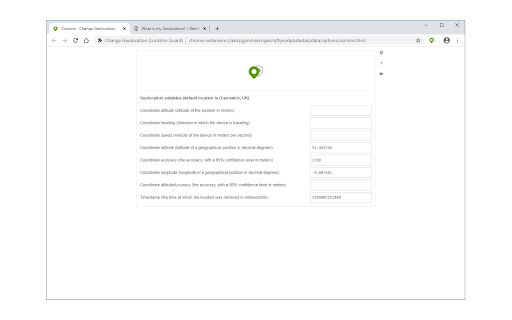
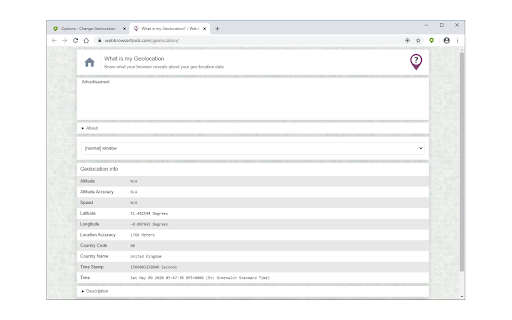
Change Geolocation (Location Guard) is a browser extension that let you easily change your geographic location to the desired value and protect your privacy. Simply open the addon's options page and set the latitude and longitude for where you want the geolocation to be (the default location is Greenwich, UK). Next, reload a page and check your location (i.e. webbrowsertools.com/geolocation/). Please note that besides latitude and longitude you can set other variables in the geolocation API (see options page). Moreover, pressing on the toolbar icon will activate or deactivate the addon. Note: toolbar button serves as an ON|OFF switch to activate and deactivate the addon. The green color is for ON and the grey color is for the OFF state. To report bugs, please fill out the bug report form on the addon's homepage (https://mybrowseraddon.com/change-geolocation.html).

Listing SEO keywords

Search intent keywords
Keyword signals for evaluating how users may discover, compare, or search for this extension category.

Core discovery

fake my locationchrome location spoofingchange geolocation extensionspoof browser coordinateshide location in chrome

Comparison

Change Geolocation vs Vytalbest location spoofer extension

Problem

extension not workingwebsite detecting real locationcannot spoof location

Alternative

Vytal extensionlocation guard alternative

Similar extensions

Jump to related discovery paths:

FAQ

What is Change Geolocation (Location Guard) mainly used for?
This browser extension allows users to manually override the geographic coordinates reported by the browser's Geolocation API. It provides a control interface for setting specific latitude and longitude values, intended to help users mask their physical location from websites.
What market signals stand out?
Visible niche traction with limited review base. Last known update: 02/23/2026.
What should builders compare before entering this space?
Compare install concentration, rating quality, update recency, screenshots, developer portfolio, listing claims, and review-backed friction signals.
Is this page review-backed?
Backed by review samples. This page combines store metadata with selected review signals, while raw store metrics remain visible for comparison.

Screenshots

Change Geolocation (Location Guard) screenshot

Links

Website: mybrowseraddon.com

Videos: Watch

Recommended Chrome extensions

Related listings from the same category, trending peers, and the same publisher portfolio.

Browse tools