
YouTube Auto HD + FPS Chrome Extension Analysis
Niche Lifestyle & Gaming HacksChrome extension ID: fcphghnknhkimeagdglkljinmpbagone
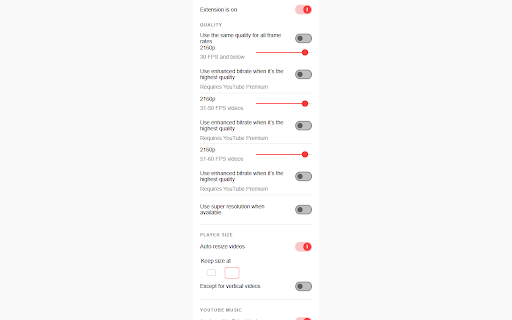
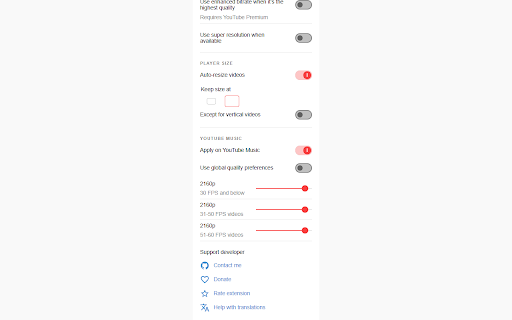
This extension automatically enforces specific video resolution and frame rate settings on YouTube, preventing the platform from defaulting to lower quality. It includes features for video resizing and maintains custom settings across various playback environments.
Overview
Installs
200K+
Rating
★ 4.3
1,401 reviews
Languages
69 locales
Includes Deutsch, English, English (Australia), English (United Kingdom)...
Market analysis
Review-backed positioning, friction, and market signals for this Chrome extension.
Macro category
Niche Lifestyle & Gaming Hacks
Pricing friction
Low review signal
Complaint intensity
Moderate review signal
Listing positioning
The extension positions itself as an automated utility for YouTube users who want to override default video quality settings based on frame rate and hardware capacity. It emphasizes functionality for both standard YouTube pages and embedded video players.
Inferred product pattern
Single-purpose browser utility for media playback modification.
Review-backed pain points
Users frequently report that quality settings revert to standard resolutions (like 1080p) during video rewinding or seeking, and some users encounter unresponsive configuration menus.
Observed feature gaps
The extension struggles with consistency when interacting with YouTube's newer 'Enhanced Bitrate' or 'Premium' features during playback manipulation.
- YouTube power users
- Users with limited bandwidth
- Users seeking consistent playback quality
- Auto-setting video resolution
- Handling frame-rate-specific quality profiles
- Forcing high-definition playback
- Effective prevention of low-resolution auto-play
- Good functionality on browsers like Brave
- Open-source nature mentioned as a positive
- Extension stops working or resets to low resolution when seeking/rewinding
- UI glitches where settings become unresponsive
- Reports of unintended changes to YouTube UI layout
- Performance complaints detected
- None; the extension is free to use.
Support
Users express frustration with lack of updates to fix long-standing bugs, particularly regarding rewinding behavior.
Reliability
High frequency of reports regarding the extension 'breaking' or failing to apply settings after YouTube platform updates.
Privacy
No verified privacy breaches; however, some users have expressed unsubstantiated suspicions regarding safety.
- Free usage observed
- No account requirement observed
- Free plan or free usage claimed
Store listing facts
- Screenshots: 2
- Videos: 0
- Languages: 69
- Privacy policy
- Developer contact
- Official website
- Support link
- Version: 1.17.3
- Size: 1.73MiB
- Last updated:
Listing SEO keywords
Core discovery
Comparison
Problem
Alternative
Similar extensions
Jump to related discovery paths:
FAQ
Screenshots
Links
Website: github.com
Privacy policy: https://avi12.com/youtube-auto-hd
Support links: https://github.com/avi12/youtube-auto-hd/issues/new/choose