Web Scrobbler icon

Web Scrobbler Chrome Extension Analysis

Niche Lifestyle & Gaming Hacks

Chrome extension ID: hhinaapppaileiechjoiifaancjggfjm

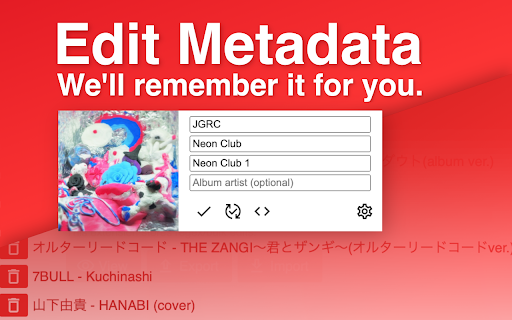
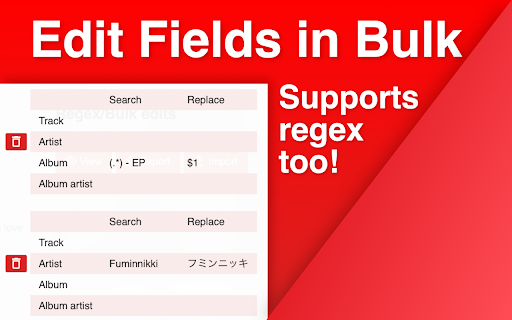
This extension automatically detects and sends music playback data from web-based players to external scrobbling services. It includes features for manual metadata overrides and optional desktop notifications for currently playing tracks.

Version:3.22.0
Size:769KiB
Last updated:

Overview

Installs

200K+

Rating

3.8

2,928 reviews

Languages

17 locales

Includes Deutsch, English, English (United Kingdom), Indonesia...

Market analysis

Review-backed positioning, friction, and market signals for this Chrome extension.

Backed by review samples

Macro category

Niche Lifestyle & Gaming Hacks

Pricing friction

Low review signal

Complaint intensity

High review signal

Listing & review signals
Observed signals from store listing text and review samples.

Listing positioning

Web Scrobbler positions itself as a community-driven tool for tracking music playback history across various online services. It emphasizes its compatibility with platforms like Last.fm, Libre.fm, and ListenBrainz, while providing manual correction features for song metadata.

Inferred product pattern

Community-maintained open-source utility for music metadata synchronization.

Review-backed pain points

Users frequently report that the extension stops working randomly, requires re-installation to function, and fails to accurately parse album/artist metadata from YouTube Music.

Observed feature gaps

Lack of granular control over which videos are scrobbled, absence of reliable background performance, and poor UI/UX for manual metadata edits.

Tags
Music TrackingLast.fmScrobblingYouTube MusicMetadata Sync
Target users

- Last.fm power users

- Music enthusiasts

- YouTube Music listeners

Primary use cases

- Automatic music listening history tracking

- Manual correction of song/album metadata

- Cross-platform scrobble synchronization

Positive themes

- Essential tool for Last.fm integration

- Useful for correcting poorly formatted song titles

- Broad support for multiple music platforms

Negative themes

- Frequent detection failures on YouTube Music

- Inconsistent album and artist metadata parsing

- Aggressive default scrobbling of non-music videos

- Persistence issues after uninstallation

Observed friction

- Performance complaints detected

- None identified; the product is free.

Evidence boundary: Data derived from user feedback highlighting recurring technical instability, specifically regarding metadata parsing on YouTube Music, and community support frustration. Reviews are skewed toward users experiencing technical failures; performance of stable versions may be underrepresented.
Complaint summaries
Review-backed complaint signals grouped by operational area.

Support

Users express frustration that developers direct complaints to GitHub instead of addressing issues within the extension or store comments.

Reliability

High frequency of reports regarding broken detection, intermittent service failures, and the need for repetitive re-installation.

Privacy

Minor complaints regarding intrusive notifications, but no significant data privacy concerns reported.

Access & pricing

- Free usage observed

- Account required for core usage

- Free plan or free usage claimed

Store listing facts

Listing assets

- Screenshots: 4

- Videos: 0

- Languages: 17

Trust signals

- Privacy policy

- Developer contact

Store metadata

- Version: 3.22.0

- Size: 769KiB

- Last updated:

Store description excerpt
Short excerpt from the public Chrome Web Store listing; full copy is available on the official store page.
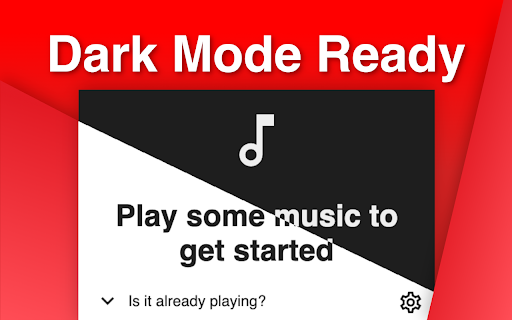
Web Scrobbler helps online music listeners to scrobble their playback history. The extension is developed by a great number of contributors. Join our Discord server: https://discord.com/invite/u99wNWw IF THE EXTENSION STOPS WORKING, REPORT ON GITHUB ONLY: https://github.com/web-scrobbler/web-scrobbler/issues. Supported services: Last.fm Libre.fm ListenBrainz Usage You should click on a notification that is shown when the extension is loaded first time. Then, you should grant access to your accounts. The scrobbler status is shown on the right side of the address bar. Optionally you can enable desktop notifications of now playing songs. You can manually correct the song title by clicking on the scrobbler icon, if the song doesn't get recognized. Just click on the question mark icon and fill correct song info. See the options page for more information.

Listing SEO keywords

Search intent keywords
Keyword signals for evaluating how users may discover, compare, or search for this extension category.

Core discovery

Last.fm scrobblerYouTube Music scrobblemusic listening trackerauto scrobbler extension

Comparison

alternatives to web scrobblerLast.fm extension

Problem

web scrobbler not workingYouTube music scrobble bug

Alternative

Open ScrobblerUniversal Scrobbler

Similar extensions

Jump to related discovery paths:

FAQ

What is Web Scrobbler mainly used for?
This extension automatically detects and sends music playback data from web-based players to external scrobbling services. It includes features for manual metadata overrides and optional desktop notifications for currently playing tracks.
What market signals stand out?
Established adoption with substantial review base. Last known update: 06/02/2026.
What should builders compare before entering this space?
Compare install concentration, rating quality, update recency, screenshots, developer portfolio, listing claims, and review-backed friction signals.
Is this page review-backed?
Backed by review samples. This page combines store metadata with selected review signals, while raw store metrics remain visible for comparison.

Screenshots

Web Scrobbler screenshot

Links

Recommended Chrome extensions

Related listings from the same category, trending peers, and the same publisher portfolio.

Browse fun