Music Equalizer & Bass Booster – Sound Enhancer for Chrome icon

Music Equalizer & Bass Booster Chrome Extension Analysis

Automation & Workflow Efficiency

Store listing title: Music Equalizer & Bass Booster – Sound Enhancer for Chrome

Chrome extension ID: fedoeoceggohfajbhbadkfhgckjkieop

This Chrome extension provides audio processing capabilities directly within the browser, allowing users to adjust volume and equalization settings for active tabs. It aims to improve listening experiences for music, videos, and podcasts through accessible UI controls.

Developer:Gene Carroll
Version:2.3.45
Size:216KiB
Last updated:

Overview

Installs

500K+

Rating

4.8

1,100 reviews

Languages

28 locales

Includes Deutsch, English, English (United Kingdom), English (United States)...

Market analysis

Review-backed positioning, friction, and market signals for this Chrome extension.

Backed by review samples

Macro category

Automation & Workflow Efficiency

Pricing friction

Low review signal

Complaint intensity

Moderate review signal

Listing & review signals
Observed signals from store listing text and review samples.

Listing positioning

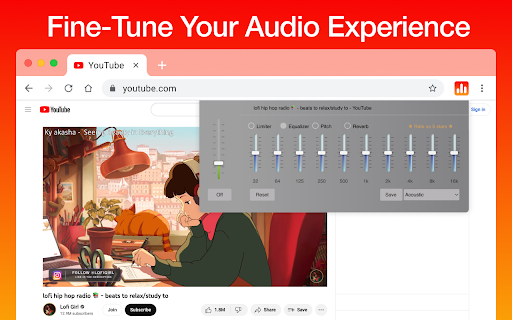
The store listing positions this extension as a lightweight, user-friendly tool for fine-tuning browser audio. It emphasizes genre-specific presets, a 10-band equalizer, and a bass booster as core value propositions for music and media consumers.

Inferred product pattern

A functional browser-based audio utility that relies on Chrome's webRequest/audio APIs, suffering from intermittent stability issues during state management.

Review-backed pain points

Users frequently report that the extension settings do not persist, sound output periodically fails when the equalizer is active, and the interface becomes unresponsive or lags during use.

Observed feature gaps

Lack of reliable setting persistence, issues with multi-tab management causing bugs, and inconsistent performance of advanced audio features like pitch or reverb controls.

Tags
Audio EqualizerBass BoosterBrowser AudioSound EnhancerVolume Control
Target users

- Casual media listeners

- YouTube and podcast consumers

- Chromebook users

Primary use cases

- Boosting volume for quiet media

- Adjusting sound profiles via genre presets

- Equalizing browser audio output

Positive themes

- Effective volume boosting for comfortable listening

- Simple interface for quick audio adjustments

Negative themes

- Settings resetting or failing to save

- Lag, freezing, and UI unresponsiveness

- Audio output issues (no sound when enabled)

Observed friction

- Performance complaints detected

- No payment or pricing friction identified as the product appears to be free.

Evidence boundary: Extracted from 11 user reviews covering functionality, stability, and UI performance. Review sample size is relatively small compared to the total user base, and reports may be biased toward users experiencing technical issues.
Complaint summaries
Review-backed complaint signals grouped by operational area.

Support

Users express frustration with lack of feature explanation and technical malfunctions, though no formal support tickets were highlighted.

Reliability

High frequency of reports regarding settings not saving, the extension hanging or freezing, and audio output bugs that necessitate disabling the tool.

Privacy

None observed.

Access & pricing

- Free usage observed

- No account requirement observed

- Free plan or free usage claimed

Store listing facts

Listing assets

- Screenshots: 1

- Videos: 0

- Languages: 28

Trust signals

- Developer contact

Store metadata

- Version: 2.3.45

- Size: 216KiB

- Last updated:

Store description excerpt
Short excerpt from the public Chrome Web Store listing; full copy is available on the official store page.
🎧 Boost Your Browsing Audio with Music Equalizer & Bass Booster! 🎶 Take full control of your browser's audio! Our Chrome extension lets you fine-tune the sound of any website using genre-based presets, a powerful bass booster, and a sleek interface. 🔊 Main features: ✅Bass booster for deeper, richer sound ✅Presets for genres like rock, jazz, dance, acoustic, Latin, and more ✅Volume control and 10-band equalizer sliders ✅One-click sound enhancement ✅Auto-disable in normal mode ⚙️ Whether you're listening to music, watching YouTube, or streaming a podcast — this equalizer transforms your sound experience. 🌐 Lightweight and secure, it works directly in your browser tab — no external apps or tools needed. 👉 Try it now and enjoy immersive audio with every click! 🛡️ Permissions explained: "Read and change all your data on the websites you visit" — needed to detect and control sound playi…

Listing SEO keywords

Search intent keywords
Keyword signals for evaluating how users may discover, compare, or search for this extension category.

Core discovery

chrome audio equalizerbass booster extensionbrowser sound enhancerequalizer for youtube

Comparison

best chrome equalizeraudio equalizer alternatives

Problem

extension freezingaudio not workingsettings not saving

Alternative

volume booster extensionsound controller chrome

Similar extensions

Jump to related discovery paths:

FAQ

What is Music Equalizer & Bass Booster mainly used for?
This Chrome extension provides audio processing capabilities directly within the browser, allowing users to adjust volume and equalization settings for active tabs. It aims to improve listening experiences for music, videos, and podcasts through accessible UI controls.
What market signals stand out?
Established adoption with substantial review base. Last known update: 05/09/2025.
What should builders compare before entering this space?
Compare install concentration, rating quality, update recency, screenshots, developer portfolio, listing claims, and review-backed friction signals.
Is this page review-backed?
Backed by review samples. This page combines store metadata with selected review signals, while raw store metrics remain visible for comparison.

Screenshots

Music Equalizer & Bass Booster – Sound Enhancer for Chrome screenshot

Recommended Chrome extensions

Related listings from the same category, trending peers, and the same publisher portfolio.

Browse tools