
Magnifying Glass (Hover Zoom) Chrome Extension Analysis
Automation & Workflow EfficiencyChrome extension ID: gfcbebjdigncefnokoncehghgfndjcgn
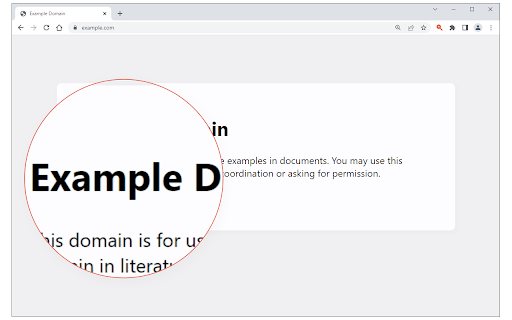
Magnifying Glass (Hover Zoom) provides a circular overlay that enlarges web page content as the user moves their mouse. It is designed to be a non-intrusive utility for users needing quick visual access to small text or detailed images.
Overview
Installs
50K+
Rating
★ 4.4
61 reviews
Languages
1 locales
Includes English
Market analysis
Review-backed positioning, friction, and market signals for this Chrome extension.
Macro category
Automation & Workflow Efficiency
Pricing friction
Low review signal
Complaint intensity
Moderate review signal
Listing positioning
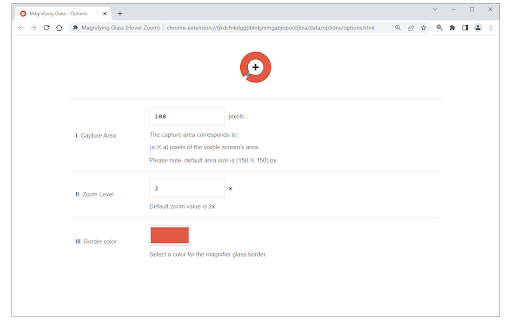
The store listing positions this extension as a lightweight, user-friendly magnifier that toggles via a toolbar button. It emphasizes a simple "on/off" mechanism and an options page to customize the zoom level and area coverage.
Inferred product pattern
Simple, standalone utility extension with basic UI controls.
Review-backed pain points
Users are frustrated by the inability to zoom on live video, the limitations of the circular lens shape for reading paragraphs, and difficulty positioning the lens accurately relative to the mouse cursor.
Observed feature gaps
Lack of rectangular/square lens shapes, absence of keyboard shortcuts for activation, no functionality for full-screen mode, and inability to capture/download zoomed content.
- Web users needing accessibility tools
- Chromebook users
- Users viewing small-print web content
- Reading small text on websites
- Inspecting image details
- Magnifying specific page areas for better visibility
- Easy to use
- Minimal memory consumption
- Simple activation via toolbar icon
- Effective at magnifying static images
- Does not work on live video (shows static images)
- Magnified image quality/resolution is low
- Circular shape is not ideal for reading text
- Difficult to steer due to cursor placement
- Occasional compatibility issues with latest Chrome versions
- Performance complaints detected
- None; the extension is free and does not display pricing friction.
Support
Some users report the tool fails to initialize or show the icon in updated Chrome versions, but there are no reports of negative support interactions.
Reliability
Users note that the tool fails on dynamic/video content, provides low-resolution magnification, and can be ephemeral or difficult to control.
Privacy
None observed in available data.
- Free usage observed
- No account requirement observed
- Free plan or free usage claimed
Store listing facts
- Screenshots: 2
- Videos: 1
- Languages: 1
- Developer contact
- Official website
- Version: 0.1.8
- Size: 41.08KiB
- Last updated:
Listing SEO keywords
Core discovery
Comparison
Problem
Alternative
Similar extensions
Jump to related discovery paths:
FAQ
Screenshots
Links
Website: mybrowseraddon.com
Videos: Watch