
Screenshot Capture Chrome Extension Analysis
Automation & Workflow EfficiencyChrome extension ID: giabbpobpebjfegnpcclkocepcgockkc
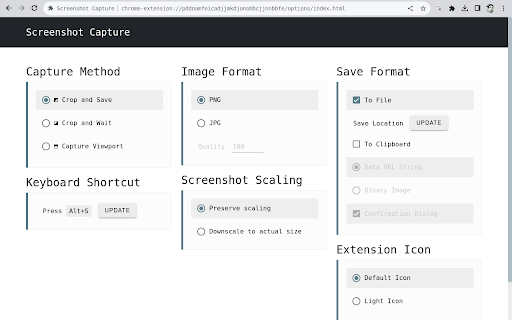
Screenshot Capture is a lightweight browser tool that allows users to capture the visible viewport, crop specific areas, and save results as image files or binary clipboard data. It is marketed as an unobtrusive, developer-friendly utility with configurable shortcuts and automatic saving capabilities.
Overview
Installs
100K+
Rating
★ 4.1
150 reviews
Languages
1 locales
Includes English
Market analysis
Review-backed positioning, friction, and market signals for this Chrome extension.
Macro category
Automation & Workflow Efficiency
Pricing friction
Low review signal
Complaint intensity
Moderate review signal
Listing positioning
The extension positions itself as a secure, privacy-focused, and minimal screenshot utility that requires no special permissions. It emphasizes its open-source nature and provides basic capture-to-file or clipboard functionality without hidden data collection.
Inferred product pattern
Minimalist open-source utility focused on privacy and basic functionality.
Review-backed pain points
Users consistently report the inability to capture areas beyond the current viewport, limiting the tool to static screen snaps rather than long-page screenshots.
Observed feature gaps
The primary gap is the absence of a 'scrolling capture' or 'full page' feature, which is a common expectation for this class of tools.
- Privacy-conscious users
- Developers
- General web users
- Viewport capturing
- Cropping sections of a webpage
- Copying images to clipboard for quick sharing
- Simple and easy to use
- Minimalist interface
- Privacy-conscious without unnecessary data collection
- Lack of full-page scrolling capture
- Inconsistent reliability across browser updates
- Issues with UI visibility on dark themes
- Performance complaints detected
- None; the tool is open-source and free.
Support
Users report sporadic periods where the extension becomes unresponsive or stops working after Chrome updates.
Reliability
Some users report the extension occasionally becoming unresponsive or failing to function following browser updates.
Privacy
None; reviews actually highlight the lack of intrusive data collection as a positive.
- Free usage observed
- No account requirement observed
- Free plan or free usage claimed
Store listing facts
- Screenshots: 1
- Videos: 1
- Languages: 1
- Developer contact
- Official website
- Support link
- Version: 3.1
- Size: 96.83KiB
- Last updated:
Listing SEO keywords
Core discovery
Comparison
Problem
Alternative
Similar extensions
Jump to related discovery paths:
FAQ
Screenshots
Links
Website: chromewebstore.google.com
Support links: https://github.com/simov/screenshot-capture/issues
Videos: Watch