Markdown Viewer icon

Markdown Viewer Chrome Extension Analysis

Developer & Designer Tools

Chrome extension ID: ckkdlimhmcjmikdlpkmbgfkaikojcbjk

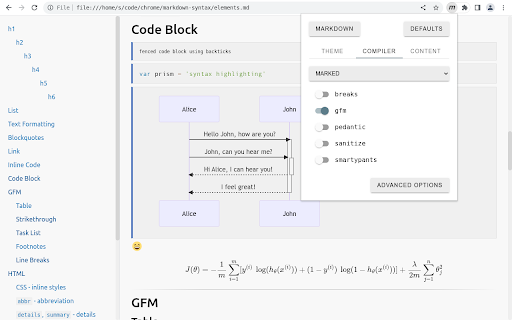
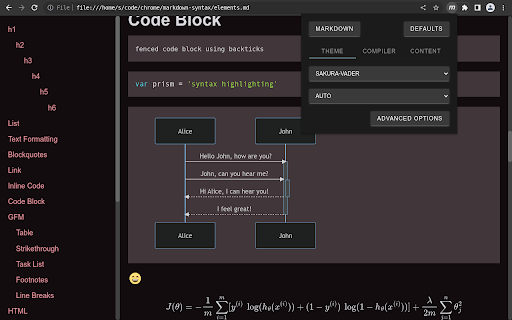
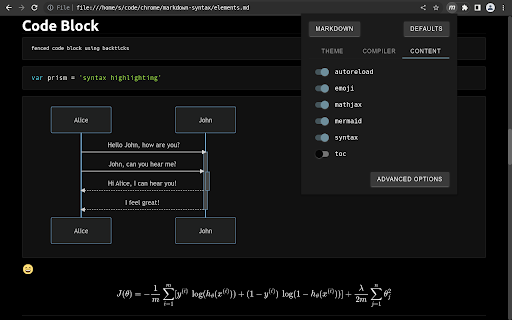
Markdown Viewer is a Chrome extension that renders markdown files directly within the browser. It supports local and remote file URLs, offering features such as multiple markdown parsers, over 30 themes, syntax highlighting for code blocks, table of contents generation, and support for mathematical formulas and diagrams.

Developer:simov.github.io
Version:5.3
Size:2.36MiB
Last updated:

Overview

Installs

400K+

Rating

4.3

401 reviews

Languages

1 locales

Includes English

Market analysis

Review-backed positioning, friction, and market signals for this Chrome extension.

Backed by review samples

Macro category

Developer & Designer Tools

Pricing friction

Low review signal

Complaint intensity

High review signal

Listing & review signals
Observed signals from store listing text and review samples.

Listing positioning

This Chrome extension positions itself as a secure and versatile tool for rendering markdown files locally or remotely. It highlights features like dark mode, themes, autoreload, diagram support, and syntax highlighting, aiming to provide a comprehensive markdown viewing experience.

Inferred product pattern

Local/Remote File Renderer

Review-backed pain points

Users frequently report that the extension fails to render markdown files as expected, displaying raw syntax or incorrect formatting. Many users find the initial setup and documentation to be unclear, making it difficult to get the extension working. Specific issues include problems with tables, headings, and bold text rendering.

Observed feature gaps

While the listing mentions themes and custom themes, users have expressed a desire for custom CSS support. Additionally, some users struggle with understanding how to get the extension to render markdown files correctly, suggesting a gap in intuitive user interface or onboarding.

Tags
Markdown ViewerLocal File RendererCode PreviewSyntax Highlighting
Target users

- Developers

- Technical Writers

- Students

- Anyone who frequently works with markdown files

Primary use cases

- Viewing local markdown files

- Previewing markdown content from remote URLs

- Ensuring consistent markdown rendering across different environments

- Quickly reviewing documentation written in markdown

Positive themes

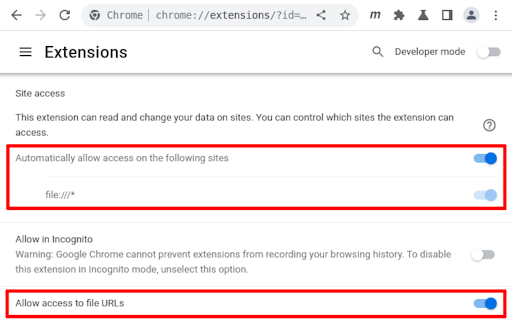
- Works great after enabling file URLs in settings.

Negative themes

- Extension does not work out-of-the-box and lacks clear instructions.

- Markdown syntax is displayed instead of rendered content.

- Formatting is not rendered correctly, including headings, bold text, and tables.

- Documentation is considered useless for new users and does not provide clear starting guidance.

- The 'Add' button in options does not work.

- Inconsistent version information between the store page and Chrome.

- Blank pages sometimes load.

- Lack of support for custom CSS/themes.

Observed friction

- The extension is free and open source, with no observed pricing friction in reviews.

Evidence boundary: Evidence was gathered from the Chrome Web Store listing and user reviews. Reviews were analyzed for positive themes, negative themes, pain points, and feature gaps. The number of reviews analyzed is limited, and a comprehensive sentiment distribution across all users may not be fully captured. Some reviews were in languages other than English and were not included in the detailed analysis.
Complaint summaries
Review-backed complaint signals grouped by operational area.

Support

Several users reported issues with documentation and setup, indicating a lack of clear support or onboarding for new users. Some also noted that certain buttons within the extension's options did not function.

Reliability

Users reported instances where markdown files did not render correctly or where blank pages loaded, indicating reliability issues with the rendering engine or its interaction with different markdown inputs.

Privacy

No privacy-related complaints were observed in the provided reviews.

Access & pricing

- Free usage observed

- No clear access signal

- Free plan or free usage claimed

Store listing facts

Listing assets

- Screenshots: 5

- Videos: 1

- Languages: 1

Trust signals

- Developer contact

- Official website

- Support link

Store metadata

- Version: 5.3

- Size: 2.36MiB

- Last updated:

Store description excerpt
Short excerpt from the public Chrome Web Store listing; full copy is available on the official store page.
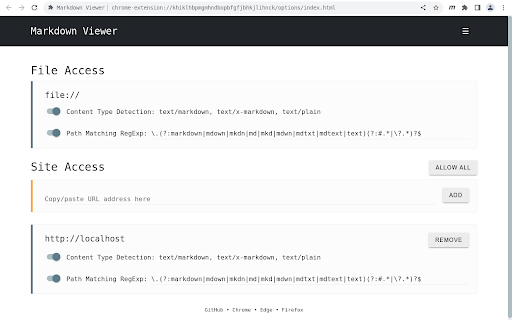
✔ Secure by design ✔ Render local and remote file URLs ✔ Granular access to remote origins ✔ Multiple markdown parsers ✔ Full control over the compiler options ✔ 30+ Themes ✔ Custom theme support ✔ GitHub Flavored Markdown (GFM) ✔ Auto reload on file change ✔ Syntax highlighted code blocks ✔ Table of Contents (ToC) ✔ MathJax formulas ✔ Mermaid diagrams ✔ Convert emoji shortnames ✔ Remember scroll position ✔ Markdown Content-Type detection ✔ Configurable Markdown file path detection ✔ Settings synchronization ✔ Raw and rendered markdown views ✔ Free and Open Source ✚ Full Documentation ✔ https://github.com/simov/markdown-viewer

Listing SEO keywords

Search intent keywords
Keyword signals for evaluating how users may discover, compare, or search for this extension category.

Core discovery

markdown viewerchrome extensionlocal markdowngithub markdownmarkdown previewmarkdown renderer

Comparison

markdown editorobsidiantyporavscode markdown

Problem

render markdownshow markdownmarkdown syntaxmarkdown formatting

Alternative

markdown parsermarkdown convertertext editor

Similar extensions

Jump to related discovery paths:

FAQ

What is Markdown Viewer mainly used for?
Markdown Viewer is a Chrome extension that renders markdown files directly within the browser. It supports local and remote file URLs, offering features such as multiple markdown parsers, over 30 themes, syntax highlighting for code blocks, table of contents generation, and support for mathematical formulas and diagrams.
What market signals stand out?
Established adoption with moderate review base. Last known update: 05/02/2024.
What should builders compare before entering this space?
Compare install concentration, rating quality, update recency, screenshots, developer portfolio, listing claims, and review-backed friction signals.
Is this page review-backed?
Backed by review samples. This page combines store metadata with selected review signals, while raw store metrics remain visible for comparison.

Screenshots

Markdown Viewer screenshot

Links

Recommended Chrome extensions

Related listings from the same category, trending peers, and the same publisher portfolio.

Browse tools
Screenshot Capture icon

Screenshot Capture

simov.github.io

Capture viewport, crop & save to file, copy to clipboard as binary or data URL

Installs

100K+

Rating

4.1

Ad Blocker: Stands AdBlocker icon

Ad Blocker: Stands AdBlocker

Stands

Stands AdBlocker – it's a free ad blocker for YouTube, Twitch, Pop-Ups, Video Ads, and websites. Block ads everywhere with Stands!

Installs

3.0M+

Rating

4.8

Google Input Tools icon

Google Input Tools

cloud-input-team

Input Tools lets you type in the language of your choice.

Installs

3.0M+

Rating

4.0

Microsoft Bing Search with Rewards icon

Microsoft Bing Search with Rewards

Microsoft Corporation

Use the Microsoft Rewards extension to find new ways to earn every day, easily track your points and set your default search to Bing

Installs

3.0M+

Rating

4.4

Google Scholar Button icon

Google Scholar Button

scholar-chrome-extensions

Lookup scholarly articles as you browse the web.

Installs

3.0M+

Rating

4.6

ЮБуст - VPN для YouTube. Обход блокировки Ютуб без ВПН. VPN для браузера icon

ЮБуст - VPN для YouTube. Обход блокировки Ютуб без ВПН. VPN для браузера

Uboost

Ускоритель Ютуб без ВПН, VPN для браузера Яндекс, Chrome, Opera, Edge. Обход замедления Ютуба.

Installs

2.0M+

Rating

4.2

Pie Adblock - A Powerful Free Ad Blocker icon

Pie Adblock - A Powerful Free Ad Blocker

Pie Extensions

Pie Adblock blocks ads & pop-ups, plus YouTube & Twitch video ads. You can customize your ad experience with Pie!

Installs

2.0M+

Rating

4.9

Smallpdf—Edit, Convert, Compress, & AI Summarize PDF icon

Smallpdf—Edit, Convert, Compress, & AI Summarize PDF

Smallpdf AG

Easy-to-use PDF tools to compress, convert, merge, chat to, split, e-sign, and edit PDF files in your browser.

Installs

2.0M+

Rating

4.6

Google Dictionary (by Google) icon

Google Dictionary (by Google)

dictionary-extension-dev

View definitions easily as you browse the web.

Installs

2.0M+

Rating

4.4

AI Chat for Search icon

AI Chat for Search

AI Chat for Search Team

Display AI Chat response alongside search engine results

Installs

2.0M+

Rating

4.6