LINE Share icon

LINE Share Chrome Extension Analysis

Social Media Growth & Marketing

Chrome extension ID: gljjiokipgajokbgfmoekcdmfceoijjh

LINE Share is an official browser extension by LY Corporation designed to help users share web content and text selections directly to their LINE account or timeline. It functions primarily as a link-sharing bridge rather than a full-featured messaging client.

Developer:LY Corporation
Version:1.0.9
Size:29.11KiB
Last updated:

Overview

Installs

200K+

Rating

4.0

1,872 reviews

Languages

6 locales

Includes English, Indonesia, ไทย, 中文(台灣)...

Market analysis

Review-backed positioning, friction, and market signals for this Chrome extension.

Backed by review samples

Macro category

Social Media Growth & Marketing

Pricing friction

Low review signal

Complaint intensity

Moderate review signal

Listing & review signals
Observed signals from store listing text and review samples.

Listing positioning

The extension is positioned as a productivity utility for LINE users, facilitating one-click sharing of web pages and text to chats or the LINE Keep storage service. It serves as a companion tool for users to bridge browser content with their mobile LINE accounts.

Inferred product pattern

Single-purpose web sharing utility and browser companion app.

Review-backed pain points

Users express significant frustration because they mistakenly expect a full LINE messaging client rather than just a sharing utility; many dislike forced promotional text appended to their shares.

Observed feature gaps

Absence of real-time chat/messaging capabilities within the extension remains the most cited point of confusion and dissatisfaction among users.

Tags
Social SharingBrowser ExtensionLine Integration
Target users

- Active LINE app users

- Web researchers

- Mobile-desktop cross-platform users

Primary use cases

- Sharing URL links to LINE chat

- Saving web content to LINE Keep

- Sharing selected text snippets

Positive themes

- Integration with mobile LINE app

- Convenience of one-click sharing

Negative themes

- Lack of full chat functionality

- Unwanted promotional links included in shared messages

- Expectation of a full desktop chat client

Observed friction

- Performance complaints detected

- No pricing friction; the tool is free, though users report dissatisfaction with marketing/promotional link behavior.

Evidence boundary: Analysis is based on public reviews highlighting a major mismatch between user expectations of a desktop chat client and the actual functionality of a link-sharing extension. Review data is heavily skewed toward users who were disappointed that the extension does not include full chat capabilities.
Complaint summaries
Review-backed complaint signals grouped by operational area.

Support

Complaints focus on feature expectations (missing chat) rather than official support interactions.

Reliability

Reports of browser freezing, sync issues, and incompatibility with certain operating systems.

Privacy

None noted; primary complaints involve UX and scope of functionality.

Access & pricing

- Free usage observed

- Login needed for core features

- Free plan or free usage claimed

Store listing facts

Listing assets

- Screenshots: 3

- Videos: 0

- Languages: 6

Trust signals

- Privacy policy

- Developer contact

Store metadata

- Version: 1.0.9

- Size: 29.11KiB

- Last updated:

Store description excerpt
Short excerpt from the public Chrome Web Store listing; full copy is available on the official store page.
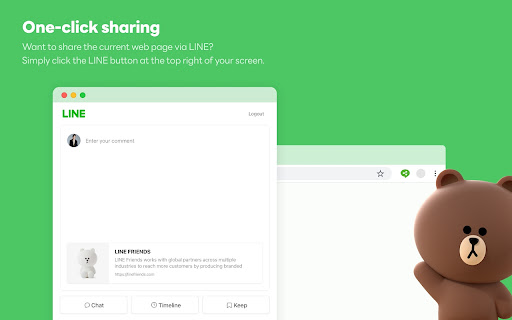
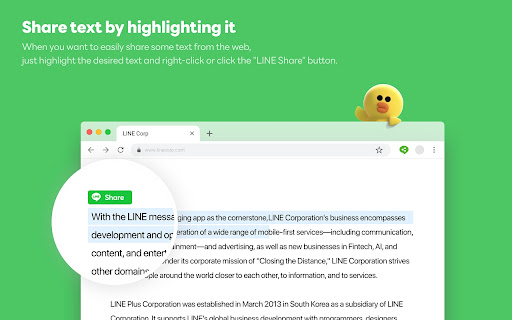
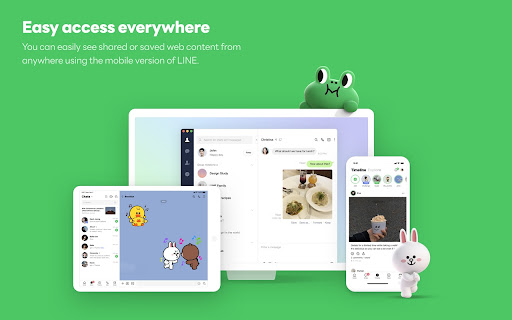
With just one click, you can share web pages and text with your LINE friends or save them in Keep. 1. One-click sharing Want to share the current web page via LINE? Simply click the LINE button at the top right of your screen. You can easily share it in chat or Timeline, or save it to Keep to view later on your mobile device. 2. Share text by highlighting it When you want to easily share some text from the web, just highlight the desired text and right-click or click the "LINE Share" button. Note that you can enable or disable the "LINE Share" button by right-clicking the app's icon at the top right of your screen. 3. Easy access everywhere You can easily see shared or saved web content from anywhere using the mobile version of LINE.

Listing SEO keywords

Search intent keywords
Keyword signals for evaluating how users may discover, compare, or search for this extension category.

Core discovery

LINE Chrome extensionShare to LINELINE web sharing tool

Comparison

LINE web versionWhatsApp desktop alternative

Problem

LINE extension not workingno chat feature

Alternative

LINE messengerdesktop chat apps

Similar extensions

Jump to related discovery paths:

FAQ

What is LINE Share mainly used for?
LINE Share is an official browser extension by LY Corporation designed to help users share web content and text selections directly to their LINE account or timeline. It functions primarily as a link-sharing bridge rather than a full-featured messaging client.
What market signals stand out?
Established adoption with substantial review base. Last known update: 04/15/2024.
What should builders compare before entering this space?
Compare install concentration, rating quality, update recency, screenshots, developer portfolio, listing claims, and review-backed friction signals.
Is this page review-backed?
Backed by review samples. This page combines store metadata with selected review signals, while raw store metrics remain visible for comparison.

Screenshots

LINE Share screenshot

Links

Recommended Chrome extensions

Related listings from the same category, trending peers, and the same publisher portfolio.

Browse social