
Cookie Editor Chrome Extension Analysis
Developer & Designer ToolsChrome extension ID: hpggkibcoihnkijdjikppfkhbfepjohl
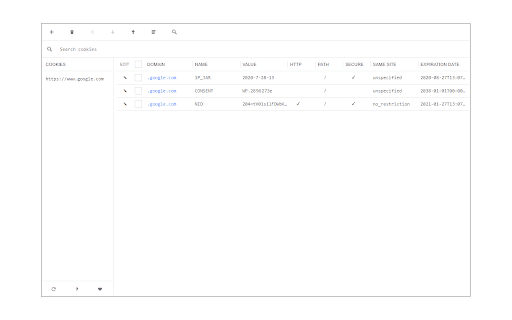
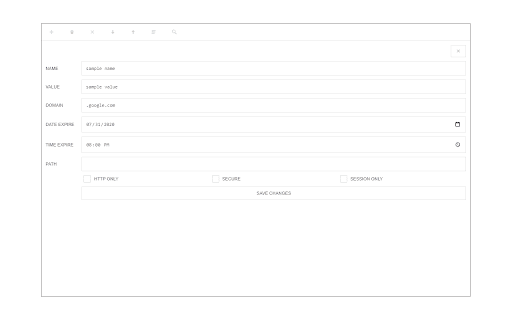
Cookie Editor is a browser extension that allows users to add, edit, or remove cookies for any website. It provides a detailed view of cookie properties such as domain, name, and value, and includes a dark mode feature.
Overview
Installs
5K+
Rating
★ 2.7
3 reviews
Languages
1 locales
Includes English
Market analysis
Review-backed positioning, friction, and market signals for this Chrome extension.
Macro category
Developer & Designer Tools
Pricing friction
Low review signal
Complaint intensity
High review signal
Listing positioning
The extension positions itself as a simple and versatile tool for managing website cookies. It offers multiple ways to access the interface, including a toolbar popup, a new tab, or a standalone window.
Inferred product pattern
A lightweight developer utility for cookie manipulation that is currently facing trust issues due to visual changes.
Review-backed pain points
Users reported concerns regarding unexpected changes to the extension icon which led to security distrust, and difficulty navigating large cookie lists due to lack of scrolling in certain browsers.
Observed feature gaps
The tool lacks functionality to selectively delete cookies while preserving 'important' or login-related cookies, and lacks proper scrolling support in some browser popup environments.
- Web Developers
- QA Testers
- Privacy Enthusiasts
- Editing website cookies
- Debugging cookie-based sessions
- Managing browser cookie data
- Lightweight performance
- Modern user interface
- Security and trust concerns
- UI usability and scrolling issues
- Lack of advanced cookie filtering
- Privacy complaints detected
- No pricing information was provided in the listing or reviews.
Support
No support-specific complaints were observed.
Reliability
A user reported a usability issue regarding the inability to scroll through large cookie lists in the Edge browser.
Privacy
A user expressed significant distrust and suspected the extension was hacked due to an unannounced change in the toolbar icon.
- No clear monetization signal
- No account requirement observed
- No clear pricing signal
Store listing facts
- Screenshots: 2
- Videos: 1
- Languages: 1
- Developer contact
- Official website
- Version: 0.1.6
- Size: 49.79KiB
- Last updated:
Listing SEO keywords
Core discovery
Comparison
Problem
Alternative
Similar extensions
Jump to related discovery paths:
FAQ
Screenshots
Links
Website: mybrowseraddon.com
Videos: Watch