TVer PiP & Theater Mode icon

TVer PiP & Theater Mode Chrome Extension Analysis

Niche Lifestyle & Gaming Hacks

Chrome extension ID: ihgbphpfanhmcppiakmhjaeobjnlagfd

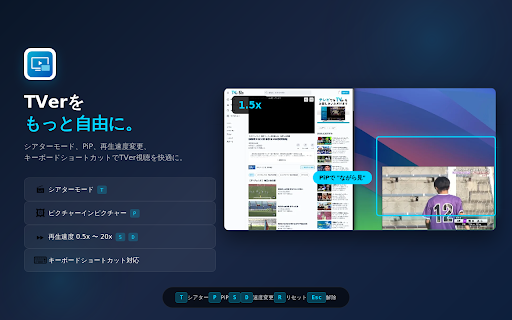
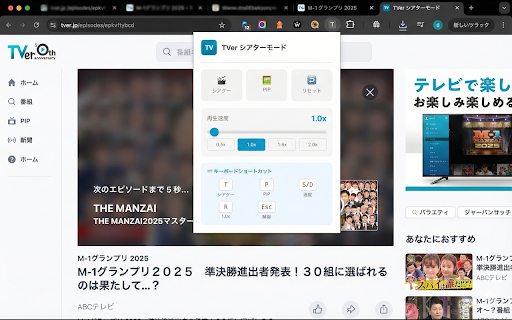
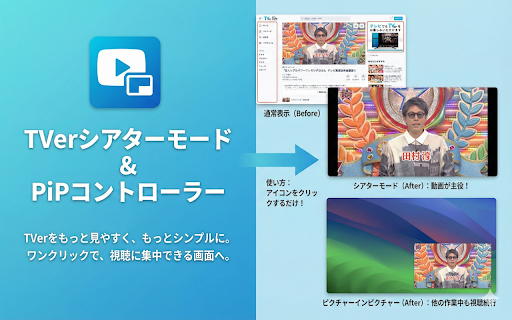
This extension adds custom playback controls to the TVer website, including adjustable playback speed (up to 20x), audio volume boosting, and keyboard shortcuts. It allows users to watch content in a floating window or an immersive 'Theater Mode' within the browser without requiring native full-screen mode.

Developer:FocusUtility
Version:1.8.1
Size:589KiB
Last updated:

Overview

Installs

266

Rating

4.0

3 reviews

Languages

1 locales

Includes 日本語

Market analysis

Review-backed positioning, friction, and market signals for this Chrome extension.

Backed by review samples

Macro category

Niche Lifestyle & Gaming Hacks

Pricing friction

Low review signal

Complaint intensity

Moderate review signal

Listing & review signals
Observed signals from store listing text and review samples.

Listing positioning

The product positions itself as a viewer enhancement tool for the TVer streaming service, aiming to improve accessibility and freedom of use. It highlights specific utility features like Theater Mode, Picture-in-Picture (PiP) with subtitle support, and playback speed controls to cater to multitasking users.

Inferred product pattern

Single-purpose utility extension focused on enhancing existing media player UI for a specific website.

Review-backed pain points

Users have reported technical issues with subtitle integration in PiP mode and UI responsiveness issues during Theater Mode usage.

Observed feature gaps

The core functionality of Theater Mode interaction and specific subtitle rendering in PiP mode appear to be intermittent or buggy based on user reports.

Tags
TVerPicture In PictureVideo EnhancementProductivity
Target users

- TVer users

- Multitaskers

- Keyboard-centric power users

Primary use cases

- Watching video while working in other tabs

- Increasing playback speed for efficient viewing

- Boosting volume for quiet programs

- Navigating video playback via keyboard shortcuts

Positive themes

- Easier multitasking with PiP

- Improved viewing experience compared to native TVer

- Effective use of Theater Mode for focused viewing

Negative themes

- Subtitles failing to display in PiP mode

- Inability to interact with player controls during Theater Mode

Observed friction

- Performance complaints detected

- None; the extension is free to use.

Evidence boundary: The data is based on the store listing features and a small sample of user reviews highlighting both the utility of the extension and specific technical bugs. Review sample size is small, which may not represent the full user base experience.
Complaint summaries
Review-backed complaint signals grouped by operational area.

Support

No specific support complaints identified; issues reported are feature-related.

Reliability

Users noted reliability issues specifically regarding subtitle visibility in PiP and control responsiveness in Theater Mode.

Privacy

None.

Access & pricing

- Free usage observed

- No account requirement observed

- Free plan or free usage claimed

Store listing facts

Listing assets

- Screenshots: 3

- Videos: 0

- Languages: 1

Trust signals

- Developer contact

Store metadata

- Version: 1.8.1

- Size: 589KiB

- Last updated:

Store description excerpt
Short excerpt from the public Chrome Web Store listing; full copy is available on the official store page.
TVer シアターモード & 視聴エンハンサー TVerをもっと見やすく、もっと自由に。 ━━━━━━━━━━━━━━━━━━━━━━━━━ v1.8.1 アップデート内容 ━━━━━━━━━━━━━━━━━━━━━━━━━ ・オーディオブースト(音量増幅)機能を追加(100%〜300%) ・ポップアップと再生ページ間の通信エラーハンドリングを強化 ・SPA遷移時のシアターモード再適用の安定性を改善 ・定期チェック処理のクリーンアップを改善し、不要な動作を抑制 ━━━━━━━━━━━━━━━━━━━━━━━━━ v1.8 アップデート内容 ━━━━━━━━━━━━━━━━━━━━━━━━━ 軽微なバグ修正 エラーハンドリング強化、設定管理の最適化 ━━━━━━━━━━━━━━━━━━━━━━━━━ v1.7 アップデート内容 ━━━━━━━━━━━━━━━━━━━━━━━━━ 【字幕付きPiP対応】 ・字幕ONの場合はDocument PiPを使用し、字幕を表示したまま小窓で視聴可能 ・字幕OFFの場合は従来の高速・安定したNative PiPを自動選択 ・PiPウィンドウ内で再生/一時停止、10秒スキップ、シークバー操作が可能 【パフォーマンス改善】 ・MutationObserverの最適化によりサイトの読み込み速度が向上 ・ボタン注入のデバウンス処理で安定性アップ 【UI改善】 ・PiP中はオーバーレイで状態を表示 この拡張機能は、TVerの再生画面に「シアターモード」「ピクチャーインピクチャー」「再生速度変更」「オーディオブースト」「キーボードショートカット」を追加します。 ワンクリック、またはキー操作だけで、視聴に集中できる画面をつくれます。 ※本拡張機能はTVer公式の提供・承認によるものではありません。 ━━━━━━━━━━━━━━━━━━━━ 主な機能 ━━━━━━━━━━━━━━━━━━━━ シアターモード ブラウザ内で動画をほぼ全画面表示。OSレベルのフルスクリーンにせず、タブ切り替えもしやすいレイアウトです。ヘッダーやナビゲーションを自動で隠し、…

Listing SEO keywords

Search intent keywords
Keyword signals for evaluating how users may discover, compare, or search for this extension category.

Core discovery

TVer PiP extensionTVer theater modeTVer playback speedTVer video enhancer

Comparison

TVer player toolsTVer chrome extension features

Problem

TVer PiP subtitle issueTVer theater mode broken

Alternative

video enhancement extensionsbrowser video controllers

Similar extensions

Jump to related discovery paths:

FAQ

What is TVer PiP & Theater Mode mainly used for?
This extension adds custom playback controls to the TVer website, including adjustable playback speed (up to 20x), audio volume boosting, and keyboard shortcuts. It allows users to watch content in a floating window or an immersive 'Theater Mode' within the browser without requiring native full-screen mode.
What market signals stand out?
Early or small audience with limited review base. Last known update: 03/16/2026.
What should builders compare before entering this space?
Compare install concentration, rating quality, update recency, screenshots, developer portfolio, listing claims, and review-backed friction signals.
Is this page review-backed?
Backed by review samples. This page combines store metadata with selected review signals, while raw store metrics remain visible for comparison.

Screenshots

TVer PiP & Theater Mode screenshot

Recommended Chrome extensions

Related listings from the same category, trending peers, and the same publisher portfolio.

Browse entertainment
Xiaohongshu for Desktop icon

Xiaohongshu for Desktop

Seiri

Experience Xiaohongshu for desktop like never before: Chrome extension that brings exciting and creative content to your screen

Installs

50K+

Rating

3.4

Auto Youtube Shorts Scroller icon

Auto Youtube Shorts Scroller

Tyson3101

Automatically scrolls to the next Youtube Short when one ends!

Installs

50K+

Rating

3.9

小电视空降助手 icon

小电视空降助手

hanyd

恰饭?桌子都给你掀了(/= _ =)/~┴┴ 带你精准空降到赞助广告结束或者高能时刻,自动跳过视频中的赞助广告、订阅提醒等片段。你也可以亲自标记视频中的广告并上传,所有人都会从您的贡献中受益。

Installs

50K+

Rating

4.9

Bro-Mon 🐾 Browser Monsters - Web Surf Game icon

Bro-Mon 🐾 Browser Monsters - Web Surf Game

Sweezy

Join Bro-Mon game for epic web fun! Catch wild monsters while surfing the web on your browser. #SurfAndSnatch

Installs

50K+

Rating

4.9

Crunchyroll: Picture in Picture [QVI] icon

Crunchyroll: Picture in Picture [QVI]

Awesome Extensions

Extension to watch Crunchyroll in Picture in Picture mode. Enables a floating window for your favorite videos.

Installs

50K+

Rating

4.2

VLC online - multimedia player icon

VLC online - multimedia player

Winfy

Play most multimedia files, and various streaming protocols with this VLC distributed online.

Installs

50K+

Rating

3.0

Dideo icon

Dideo

dideo

Watch Youtube, Aparat, etc videos without restrictions

Installs

50K+

Rating

4.3

치즈 나이프 - 치지직 CHZZK 도구 모음 icon

치즈 나이프 - 치지직 CHZZK 도구 모음

argo

치지직에 유용한 기능과 도구를 추가합니다.

Installs

40K+

Rating

4.9

Streaming enhanced Netflix Disney Prime Video icon

Streaming enhanced Netflix Disney Prime Video

Dreamliner

Skip ads, intros, credits and add adjust speed, etc. on Netflix, Prime video, Disney+, Crunchyroll and HBO max.

Installs

40K+

Rating

4.7

ThemeSong for YouTube Music™ (Enhancer) icon

ThemeSong for YouTube Music™ (Enhancer)

Graphite Eater

Enhancer for YouTube Music™. Dynamic Themes, Visualizers, Side Panel Mini Player, Lyrics, Sleep Timer, Notifications, and more!

Installs

40K+

Rating

4.9