Bye Bye, Google AI: Turn off Google AI Overviews, Discussions and Ads icon

Bye Bye, Google AI Chrome Extension Analysis

Privacy, Security & Ad Blockers

Store listing title: Bye Bye, Google AI: Turn off Google AI Overviews, Discussions and Ads

Chrome extension ID: imllolhfajlbkpheaapjocclpppchggc

A browser extension that filters Google search pages by hiding specific elements like AI-generated overviews and sponsored content. It uses CSS 'display: none' logic to remove visual clutter from the search interface.

Developer:geekinchief
Version:2.12
Size:175KiB
Last updated:

Overview

Installs

100K+

Rating

4.3

530 reviews

Languages

1 locales

Includes English (United States)

Market analysis

Review-backed positioning, friction, and market signals for this Chrome extension.

Backed by review samples

Macro category

Privacy, Security & Ad Blockers

Pricing friction

Low review signal

Complaint intensity

High review signal

Listing & review signals
Observed signals from store listing text and review samples.

Listing positioning

The extension is positioned as a customization tool to declutter Google Search results. It allows users to manually toggle the visibility of AI overviews, advertisements, shopping blocks, and video sections using CSS-based hiding.

Inferred product pattern

A CSS-based utility extension designed to modify the visual layout of Google Search by hiding specific DOM elements.

Review-backed pain points

Users report that the extension frequently breaks after Chrome or Google updates, often leaving large empty white spaces where content used to be, or failing to hide the AI elements entirely.

Observed feature gaps

The tool hides the AI overview but does not restore the original 'featured snippets' that the AI components have replaced.

Tags
Google Search FilterAI RemoverAd BlockerContent Cleaner
Target users

- Google Search users

- Privacy-conscious web users

- Minimalist searchers

Primary use cases

- Removing AI overviews from Google Search

- Hiding sponsored shopping blocks

- Decluttering search result pages

Positive themes

No positive theme data.

Negative themes

- Frequent breakage due to Google updates

- Incomplete removal leaving white spaces

- Failure to restore original search features

- Browser incompatibility

Observed friction

- Performance complaints detected

- No pricing friction observed in reviews.

Evidence boundary: Evidence derived from the product's long description and a sample of recent user reviews highlighting functional breakage. The provided review sample is composed entirely of low-rating reviews, which may overrepresent current technical failures compared to the overall user base.
Complaint summaries
Review-backed complaint signals grouped by operational area.

Support

No specific support complaints observed.

Reliability

High frequency of reliability complaints; users state the extension regularly stops working due to changing CSS selectors and causes layout issues like large white spaces.

Privacy

No privacy complaints observed.

Access & pricing

- No clear monetization signal

- No account requirement observed

- No clear pricing signal

Store listing facts

Listing assets

- Screenshots: 1

- Videos: 0

- Languages: 1

Trust signals

- Privacy policy

- Developer contact

Store metadata

- Version: 2.12

- Size: 175KiB

- Last updated:

Store description excerpt
Short excerpt from the public Chrome Web Store listing; full copy is available on the official store page.
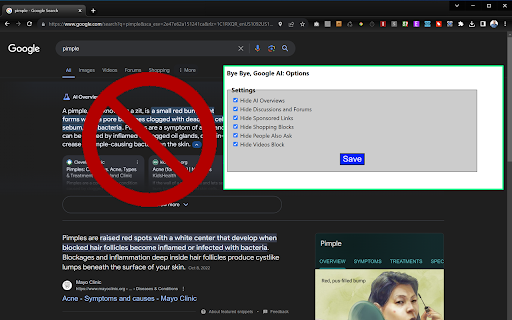
Don't like the new Google AI overviews appearing in your search results? Perhaps you don't like the discussions section or the shopping blocks or even the sponsored links? This extension lets you hide them. It simply uses CSS to set those areas of the page to be hidden (display="none"). AI overviews are hidden by default but the options menu lets you choose what else you might want to hide: Videos, Discussion blocks, shopping blocks, "readers also ask" and sponsored blocks are also available to hide. Note that, if Google changes its CSS, we'll have to update the extension to keep pace. You can also search the Google web results tab from your address bar by hitting w + space and then entering your query. Version 2.11: Adds Croatian language support. Version 2.1: Adds new "What people are saying" section as an option. Version 2.0: Eliminates new mid-page (after the first result) AI Overvi…

Listing SEO keywords

Search intent keywords
Keyword signals for evaluating how users may discover, compare, or search for this extension category.

Core discovery

hide google ai overviewsremove google ai searchdisable google ai summariesgoogle search cleaner

Comparison

AI overviews vs featured snippets

Problem

google ai overview annoyinghide google search adsgoogle search clutter

Alternative

AI remover extensiongoogle search declutter

Similar extensions

Jump to related discovery paths:

FAQ

What is Bye Bye, Google AI mainly used for?
A browser extension that filters Google search pages by hiding specific elements like AI-generated overviews and sponsored content. It uses CSS 'display: none' logic to remove visual clutter from the search interface.
What market signals stand out?
Established adoption with moderate review base. Last known update: 06/05/2026.
What should builders compare before entering this space?
Compare install concentration, rating quality, update recency, screenshots, developer portfolio, listing claims, and review-backed friction signals.
Is this page review-backed?
Backed by review samples. This page combines store metadata with selected review signals, while raw store metrics remain visible for comparison.

Screenshots

Bye Bye, Google AI: Turn off Google AI Overviews, Discussions and Ads screenshot

Links

Recommended Chrome extensions

Related listings from the same category, trending peers, and the same publisher portfolio.

Browse tools