Search My Site icon

Search My Site Chrome Extension Analysis

Automation & Workflow Efficiency

Chrome extension ID: lpindjgaboknodgncclibigdhfgbcjdg

Search My Site is a lightweight utility that enables users to restrict browser search queries to specific, pre-configured websites. By typing a designated shortcut in the address bar, users can instantly focus their search within chosen domains.

Developer:geekinchief
Version:1.3
Size:18.6KiB
Last updated:

Overview

Installs

188

Rating

0 reviews

Languages

1 locales

Includes English

Market analysis

Review-backed positioning, friction, and market signals for this Chrome extension.

No review samples found

Macro category

Automation & Workflow Efficiency

Pricing friction

Low review signal

Complaint intensity

Low review signal

Listing & review signals
Observed signals from store listing text and review samples.

Listing positioning

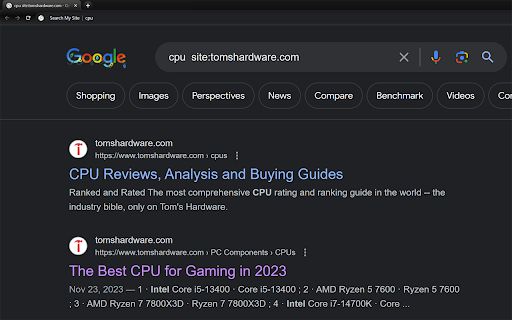
The extension positions itself as a tool to streamline web searching by allowing users to trigger site-specific Google searches via the Chrome omnibox. It uses a custom shortcut key to automatically append the 'site:' operator to queries.

Inferred product pattern

A minimal utility focused on modifying browser omnibox behavior for faster, site-specific search execution.

Review-backed pain points

Review-backed data is not available.

Observed feature gaps

Review-backed data is not available.

Tags
Omnibox SearchSearch ShortcutWorkflow Tool
Target users

- Power Users

- Researchers

- Knowledge Workers

Primary use cases

- Domain-specific Google searching

- Streamlining search workflows via omnibox shortcuts

Positive themes

- Review-backed data is not available.

Negative themes

- Review-backed data is not available.

Observed friction

- No pricing information provided in the store listing.

Evidence boundary: Data extracted from the Chrome Web Store listing, including title and functional description. No user reviews were available to provide sentiment or qualitative feedback.
Complaint summaries
Review-backed complaint signals grouped by operational area.

Support

No review-backed complaint data available.

Reliability

No review-backed complaint data available.

Privacy

No review-backed complaint data available.

Access & pricing

- No clear monetization signal

- No account requirement observed

- No clear pricing signal

Store listing facts

Listing assets

- Screenshots: 1

- Videos: 0

- Languages: 1

Trust signals

- Privacy policy

- Developer contact

Store metadata

- Version: 1.3

- Size: 18.6KiB

- Last updated:

Store description excerpt
Short excerpt from the public Chrome Web Store listing; full copy is available on the official store page.
Type in the letter "s " to limit your omnibox search to the site or sites of your choice (configured in options). Adds site:[SITENAME] to the google search.

Listing SEO keywords

Search intent keywords
Keyword signals for evaluating how users may discover, compare, or search for this extension category.

Core discovery

omnibox search shortcutsite search extensiongoogle site operator shortcutcustom search engine shortcut

Comparison

custom search enginessite search tools

Problem

restrict search to websitegoogle site search shortcut

Alternative

search shortcut extensionomnibox productivity tool

Similar extensions

Jump to related discovery paths:

FAQ

What is Search My Site mainly used for?
Search My Site is a lightweight utility that enables users to restrict browser search queries to specific, pre-configured websites. By typing a designated shortcut in the address bar, users can instantly focus their search within chosen domains.
What market signals stand out?
Early or small audience with limited review base. Last known update: 03/13/2025.
What should builders compare before entering this space?
Compare install concentration, rating quality, update recency, screenshots, developer portfolio, listing claims, and review-backed friction signals.
Is this page review-backed?
No review samples found. This page combines store metadata with selected review signals, while raw store metrics remain visible for comparison.

Screenshots

Search My Site screenshot

Links

Recommended Chrome extensions

Related listings from the same category, trending peers, and the same publisher portfolio.

Browse workflow
Bye Bye, Google AI: Turn off Google AI Overviews, Discussions and Ads icon

Bye Bye, Google AI: Turn off Google AI Overviews, Discussions and Ads

geekinchief

Filter Google search results to hide AI overviews, ads, discussions or videos. You choose.

Installs

100K+

Rating

4.3

Pop up blocker for Chrome™ - Poper Blocker icon

Pop up blocker for Chrome™ - Poper Blocker

dingosolutions

Block popups, ads, cookie requests, trackers, notifications, ads on social media & more. A clean browsing experience starts today.

Installs

2.0M+

Rating

4.8

Momentum icon

Momentum

Momentum

Transform your browser into a beautifully designed tab that helps you feel calm, keep focus, and stay energized.

Installs

2.0M+

Rating

4.5

Google Scholar PDF Reader icon

Google Scholar PDF Reader

scholar-chrome-extensions

Supercharge your paper reading: follow references, skim outline, jump to figures, cite and save.

Installs

2.0M+

Rating

4.1

Keeper® Password Manager & Digital Vault icon

Keeper® Password Manager & Digital Vault

Keeper Security

Generate strong passwords, autofill and protect your confidential info with zero-knowledge encryption.

Installs

2.0M+

Rating

4.8

AI Grammar Checker & Paraphraser – LanguageTool icon

AI Grammar Checker & Paraphraser – LanguageTool

lt-extension-publisher

Instantly Enhance Your Texts with LanguageTool’s Grammar Checker and Paraphrasing Tool

Installs

2.0M+

Rating

4.7

Snow Web Application Metering icon

Snow Web Application Metering

snow_chrome_extensions

This extension tracks web application use for the purpose of license compliance and cost optimization. www.snowsoftware.com/browser

Installs

2.0M+

Rating

1.3

Sound Booster - increase volume up icon

Sound Booster - increase volume up

Sound-ultimate.com

Volume Booster helps boost sound video or music on any tab! Increase volume and bass booster, equalizer. Volume control.

Installs

2.0M+

Rating

4.5

Evernote Web Clipper icon

Evernote Web Clipper

Evernote

Use the Evernote extension to save things you see on the web into your Evernote account.

Installs

2.0M+

Rating

4.7

Microsoft Defender Browser Protection icon

Microsoft Defender Browser Protection

Microsoft Corporation

Protect yourself against online threats, like phishing and malicious websites, with real-time protection from Microsoft.

Installs

2.0M+

Rating

4.1