
オクリンクプラス Webページスクリーンショット機能 Chrome Extension Analysis
Automation & Workflow EfficiencyChrome extension ID: impenancelenbicfndonhfnegiikfpec
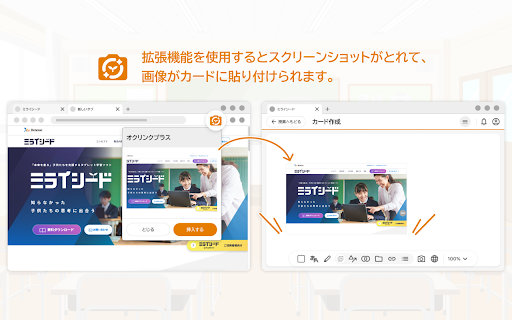
A specialized browser utility designed to capture active web page screenshots and seamlessly insert them into Okulink Plus digital learning cards. It automates the process of saving, uploading, and linking external web resources for classroom activities.
Overview
Installs
500K+
Rating
★ 3.0
2 reviews
Languages
1 locales
Includes 日本語
Market analysis
Review-backed positioning, friction, and market signals for this Chrome extension.
Macro category
Automation & Workflow Efficiency
Pricing friction
Low review signal
Complaint intensity
Moderate review signal
Listing positioning
Positions itself as a direct workflow helper for Benesse's Okulink Plus educational platform. It allows users to quickly capture screenshots of web pages and embed them alongside their URLs directly into Okulink Plus cards.
Inferred product pattern
An ecosystem-locked companion utility designed to improve digital asset creation inside a proprietary Japanese educational suite.
Review-backed pain points
Users experience initial setup friction where the extension does not function immediately after installation. To resolve this, they must completely close and reopen the Okulink Plus interface, an essential step missing from the official tutorial.
Observed feature gaps
The extension lacks automatic page-refresh triggers or script reinjection upon installation, which leads to initial failures on already-open Okulink Plus tabs. Additionally, the documentation/tutorial fails to instruct users on browser tab refreshing.
- Teachers using Okulink Plus
- Students using Okulink Plus
- Schools integrated with Benesse educational services
- Inserting web screenshots as visual cards in Okulink Plus
- Embedding active web links directly alongside captured images for quick access
- Review-backed positive themes are not available due to limited high-rating review data.
- Initial startup failure
- Incorrect setup instructions in the official tutorial
- Performance complaints detected
- No pricing complaints or friction points are observed in the reviews; the tool is offered as a free companion extension.
Support
There are requests for the developer (Benesse Corporation) to update the misleading onboarding tutorial, though no direct complaints about helpdesk support responsiveness are noted.
Reliability
The extension does not work immediately post-installation on active Chrome or Edge sessions, requiring a manual reload/restart of the target platform page.
Privacy
No privacy or security complaints have been reported.
- Free usage observed
- Login needed for core features
- Free plan or free usage claimed
Store listing facts
- Screenshots: 1
- Videos: 0
- Languages: 1
- Privacy policy
- Developer contact
- Version: 2.1.0
- Size: 18.29KiB
- Last updated:
Listing SEO keywords
Core discovery
Problem
Similar extensions
Jump to related discovery paths:
FAQ
Screenshots
Links
Privacy policy: https://www.benesse.co.jp/privacy/