
Incognito This Tab for Google Chrome™ Chrome Extension Analysis
Privacy, Security & Ad BlockersChrome extension ID: jajmadiegnbnkgolmlpkdpfdibjckblp
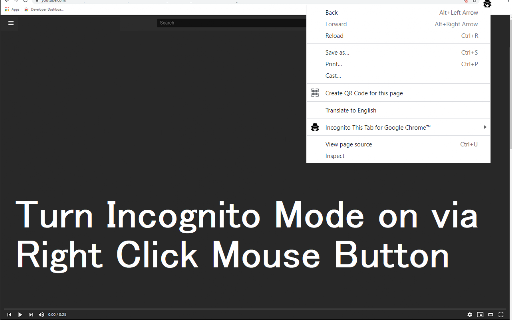
A browser utility that provides a quick-access shortcut to open the active webpage inside a new Google Chrome incognito window. It aims to save users time by eliminating the need to manually copy URLs and open private browsing windows.
Overview
Installs
100K+
Rating
★ 4.2
22 reviews
Languages
37 locales
Includes Deutsch, English, English (United States), Filipino...
Market analysis
Review-backed positioning, friction, and market signals for this Chrome extension.
Macro category
Privacy, Security & Ad Blockers
Pricing friction
Low review signal
Complaint intensity
Moderate review signal
Listing positioning
The store listing positions this extension as a simple, one-click solution to protect browsing privacy by opening the current active tab in an incognito window. It emphasizes its ease of use in preventing Chrome from saving local browsing and search history. Additionally, it explicitly disclaims any official affiliation, endorsement, or licensing by Google.
Inferred product pattern
An ad-supported browser utility wrapper that simplifies native private browsing features.
Review-backed pain points
Users complain about intrusive ads served on the configuration page, which can be misleading and mimic installer prompts. Additionally, some users face issues with broken hotkeys/shortcuts and bouncing developer support emails.
Observed feature gaps
The most prominent user-requested feature gap is the option to automatically close the original standard tab at the same time the new incognito window is launched.
- Privacy-conscious web browsers
- Users frequently switching between standard and private browsing modes
- Casual internet users seeking a quick private browsing shortcut
- Quickly opening an active webpage in an incognito window to prevent local history recording
- Accessing website sessions cleanly without copying and pasting links manually
- One-click simplicity that works seamlessly for most users
- Value of being a completely free tool
- Saves time and simplifies daily browsing workflows
- Intrusive and deceptive ads on the extension's configuration screen
- Broken shortcut functionalities in newer updates
- Missing option to automatically close the original standard tab
- Performance complaints detected
- The extension is free to use, but monetization via ads on the configuration page causes user frustration, with some users expressing a preference for a paid, ad-free tier.
Support
Users report that the developer contact email is bouncing back, rendering bug reports and feedback submission impossible.
Reliability
Updates have occasionally broken keyboard shortcut functionalities, and some users generic-state that the extension 'does not work' for them.
Privacy
While there are no direct complaints of tracking, one user flagged security concerns regarding deceptive third-party software ads displayed on the configuration interface.
- Ad-supported model observed
- No account requirement observed
- Free plan or free usage claimed
Store listing facts
- Screenshots: 2
- Videos: 0
- Languages: 37
- Privacy policy
- Developer contact
- Official website
- Support link
- Version: 3.0.0
- Size: 36.25KiB
- Last updated:
Listing SEO keywords
Core discovery
Comparison
Problem
Alternative
Similar extensions
Jump to related discovery paths:
FAQ
Screenshots

Links
Website: incognito-this-tab.freebusinessapps.net
Privacy policy: https://www.freebusinessapps.net/privacy
Support links: https://incognito-this-tab.freebusinessapps.net/contact