Screen Recorder for Google Chrome™ icon

Screen Recorder for Google Chrome™ Chrome Extension Analysis

Video & Image Downloaders

Chrome extension ID: eclbecdgdoahkliaijlpkigldlkojjdn

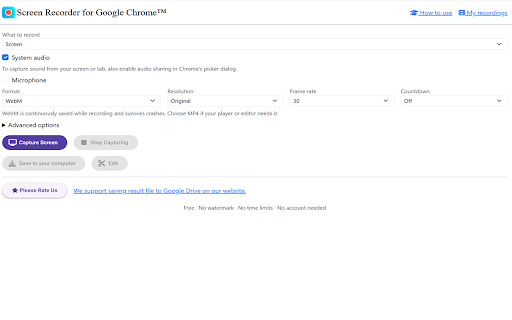
This extension allows users to record their browser screen activities directly within Chrome. It is marketed as a free tool for users needing to create quick video demonstrations or capture browser-based workflows.

Version:4.3.7
Size:1.45MiB
Last updated:

Overview

Installs

600K+

Rating

4.2

18,008 reviews

Languages

41 locales

Includes Deutsch, English, Filipino, Indonesia...

Market analysis

Review-backed positioning, friction, and market signals for this Chrome extension.

Backed by review samples

Macro category

Video & Image Downloaders

Pricing friction

Low review signal

Complaint intensity

High review signal

Listing & review signals
Observed signals from store listing text and review samples.

Listing positioning

The store listing positions this product as a simple, free browser-based solution for capturing and recording computer screens. It highlights ease of use for creating tutorials and software help videos, with the ability to save files to local storage or Google Drive.

Inferred product pattern

Basic, browser-based recording utility with significant stability and reliability limitations.

Review-backed pain points

Users frequently report that the extension stops recording unexpectedly, especially during long sessions, and fails to save files correctly or provides files without proper extensions. Audio quality is consistently cited as poor or non-functional.

Observed feature gaps

Lack of audio source selection (mic vs. internal audio), limited file format support (typically limited to webm), and lack of a floating window interface, requiring users to open a new tab to record.

Tags
Screen RecorderBrowser UtilityVideo CaptureScreen Capture
Target users

- Content Creators

- Software Educators

- Remote Workers

- Students

Primary use cases

- Recording software tutorials

- Capturing instructional videos

- Saving browser-based screen activity

Positive themes

- Easy installation

- Simple to start recording

- Basic utility for quick captures

Negative themes

- Automatic recording termination

- Unreliable audio capture

- File format compatibility issues

- System crashes

- Loss of long-duration recordings

Observed friction

- Performance complaints detected

- No payment complaints identified; the product is marketed as free.

Evidence boundary: Evidence is based on a significant sample of user reviews highlighting critical reliability issues and functional bugs regarding long-form recording stability and file output. The evidence is derived from user reviews and does not encompass internal technical logs or the entirety of the user base's experience.
Complaint summaries
Review-backed complaint signals grouped by operational area.

Support

Users report a complete lack of technical support for functional failures and bugs.

Reliability

Severe reliability issues, including spontaneous recording stops, Chrome browser crashes, and failure to save large files after long recordings.

Privacy

No specific privacy or data security complaints were identified in the review sample.

Access & pricing

- Free usage observed

- No account requirement observed

- Free plan or free usage claimed

Store listing facts

Listing assets

- Screenshots: 1

- Videos: 0

- Languages: 41

Trust signals

- Privacy policy

- Developer contact

- Official website

- Support link

Store metadata

- Version: 4.3.7

- Size: 1.45MiB

- Last updated:

Store description excerpt
Short excerpt from the public Chrome Web Store listing; full copy is available on the official store page.
Screen Recorder for Google Chrome™ — Free, Unlimited, Private Record your screen, webcam and voice right inside Chrome — no watermark, no time limits, no sign-up, and nothing uploaded to a server. Everything happens on your own device. With over 600,000 users and a long track record, Screen Recorder has been rebuilt from the ground up to be faster, more reliable, and far more capable, while keeping the one-click simplicity people love. Whether you're an educator recording a lecture, a support agent explaining a bug, a knowledge worker sending an async update, or a student capturing a class, Screen Recorder gives you everything you need in one place — capture, edit, caption and save — for free. WHAT YOU CAN RECORD • Your full screen, a single window, or one Chrome tab — pick exactly what to share. • Screen + webcam: add a round, movable webcam bubble on top of your recording, with positi…

Listing SEO keywords

Search intent keywords
Keyword signals for evaluating how users may discover, compare, or search for this extension category.

Core discovery

Chrome screen recorderrecord browser activityfree screen capture extensiononline video recorder

Comparison

Loom alternativebrowser screen recorder comparison

Problem

screen recording stoppedextension crashing chromeno sound in recording

Alternative

best screen recorder for chromereliable browser recorder

Similar extensions

Jump to related discovery paths:

FAQ

What is Screen Recorder for Google Chrome™ mainly used for?
This extension allows users to record their browser screen activities directly within Chrome. It is marketed as a free tool for users needing to create quick video demonstrations or capture browser-based workflows.
What market signals stand out?
Established adoption with very deep review base. Last known update: 06/16/2026.
What should builders compare before entering this space?
Compare install concentration, rating quality, update recency, screenshots, developer portfolio, listing claims, and review-backed friction signals.
Is this page review-backed?
Backed by review samples. This page combines store metadata with selected review signals, while raw store metrics remain visible for comparison.

Screenshots

Screen Recorder for Google Chrome™ screenshot

Links

Recommended Chrome extensions

Related listings from the same category, trending peers, and the same publisher portfolio.

Browse workflow
ePub Reader for Google Chrome™ icon

ePub Reader for Google Chrome™

Quick Simple Apps

View ePUB files right in your browser.

Installs

300K+

Rating

3.2

Snow Web Application Metering icon

Snow Web Application Metering

snow_chrome_extensions

This extension tracks web application use for the purpose of license compliance and cost optimization. www.snowsoftware.com/browser

Installs

2.0M+

Rating

1.3

Sound Booster - increase volume up icon

Sound Booster - increase volume up

Sound-ultimate.com

Volume Booster helps boost sound video or music on any tab! Increase volume and bass booster, equalizer. Volume control.

Installs

2.0M+

Rating

4.5

Evernote Web Clipper icon

Evernote Web Clipper

Evernote

Use the Evernote extension to save things you see on the web into your Evernote account.

Installs

2.0M+

Rating

4.7

Microsoft Defender Browser Protection icon

Microsoft Defender Browser Protection

Microsoft Corporation

Protect yourself against online threats, like phishing and malicious websites, with real-time protection from Microsoft.

Installs

2.0M+

Rating

4.1

Визуальные закладки icon

Визуальные закладки

Yandex

Визуальные закладки – это страница, на которой собраны ваши любимые сайты

Installs

2.0M+

Rating

3.4

Web Signer icon

Web Signer

Softplan Websigner Developers

Extensão para assinatura digital no browser

Installs

2.0M+

Rating

2.9

Screen Recorder icon

Screen Recorder

Erich Behrens

Record a video from the camera or capture it from the screen (desktop, specific application window or browser tab)

Installs

2.0M+

Rating

3.8

Адаптер Рутокен Плагин icon

Адаптер Рутокен Плагин

АО "Актив-Софт"

Позволяет использовать Рутокен Плагин

Installs

2.0M+

Rating

2.5

Content Server Browser Web Extension icon

Content Server Browser Web Extension

OpenText Corporation

Content Server Browser Web Extension for Chrome

Installs

2.0M+

Rating

2.7