Mockeys - Mock Typing Extension icon

Mockeys Chrome Extension Analysis

Automation & Workflow Efficiency

Store listing title: Mockeys - Mock Typing Extension

Chrome extension ID: jfpgnjlpeigcdmdakhpjfdcekminjabo

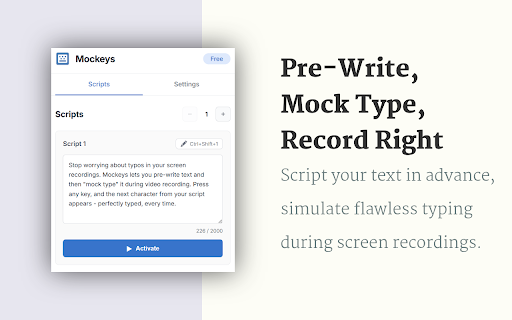
Mockeys is a Chrome extension that allows users to simulate typing pre-written text into any web-based text field. It is designed to help creators record tutorials, software demos, and presentations without the need for manual typing.

Developer:michal.wlosik
Version:1.0.1
Size:369KiB
Last updated:

Overview

Installs

38

Rating

5.0

3 reviews

Languages

1 locales

Includes English

Market analysis

Review-backed positioning, friction, and market signals for this Chrome extension.

Backed by review samples

Macro category

Automation & Workflow Efficiency

Pricing friction

Low review signal

Complaint intensity

Low review signal

Listing & review signals
Observed signals from store listing text and review samples.

Listing positioning

The product is positioned as a 'secret weapon' for content creators to facilitate seamless video recordings. It promises to allow users to fake typing live on camera by using pre-written scripts. The listing emphasizes authenticity through features like a typo simulator and ease of use via keyboard shortcuts.

Inferred product pattern

A specialized utility tool for video production workflows that automates text entry to improve recording efficiency.

Review-backed pain points

No review-backed pain points identified due to limited review volume.

Observed feature gaps

No feature gaps observed from reviews; the listing describes a specialized feature set including typo simulation and script slots.

Tags
Mock TypingContent CreationVideo RecordingTyping Simulator
Target users

- Content Creators

- YouTube Educators

- Software Developers

- Online Course Instructors

- Technical Presenters

Primary use cases

- Recording YouTube tutorials

- Software product walkthroughs

- Live coding presentations

- Webinar demonstrations

Positive themes

- General satisfaction

Negative themes

No negative theme data.

Observed friction

- No pricing friction observed; the product is marketed as free forever.

Evidence boundary: Data extracted from the Chrome Web Store listing and a single positive review. The review sample size is extremely small, providing minimal insight into user sentiment or long-term reliability.
Complaint summaries
Review-backed complaint signals grouped by operational area.

Support

No support complaints observed.

Reliability

No reliability or performance complaints observed.

Privacy

No privacy complaints observed; the listing claims all scripts are stored locally with minimal permissions.

Access & pricing

- Free usage observed

- No account requirement observed

- Free plan or free usage claimed

Store listing facts

Listing assets

- Screenshots: 2

- Videos: 0

- Languages: 1

Trust signals

- Privacy policy

- Developer contact

- Official website

Store metadata

- Version: 1.0.1

- Size: 369KiB

- Last updated:

Store description excerpt
Short excerpt from the public Chrome Web Store listing; full copy is available on the official store page.
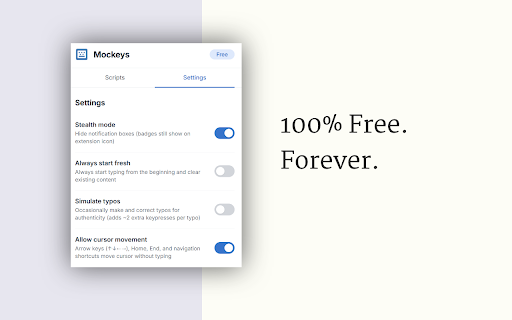
Pre-write your text, then fake-type it live on camera. Perfect typing in every take. The secret weapon for content creators. How It Works ✅ Write your text in advance in one of the script slots ✅ Click where you want to type ✅ Hit the keyboard shortcut to activate ✅ Press any keys—your pre-written text appears instead ✅ To viewers, it looks like you're typing live It's that simple. Key Features ⌨️ Three Script Slots — Keep multiple scripts ready for different segments 🎯 Keyboard Shortcuts — Activate instantly with Ctrl+Shift+S/D/F 🎭 Typo Simulator — Optionally add realistic typos and corrections for authenticity 🔄 Cursor Movement — Arrow keys still work normally for navigation 🔇 Stealth Mode — Hide all notifications during recording ✅ Works Everywhere — Google Docs, Notion, VS Code Web, CodePen, GitHub Codespaces, and any text field Perfect For - YouTube tutorials and coding videos…

Listing SEO keywords

Search intent keywords
Keyword signals for evaluating how users may discover, compare, or search for this extension category.

Core discovery

mock typing extensionfake typing for videoscripted typing tooltyping simulator for tutorials

Comparison

typing simulatorautomated typing tool

Problem

typos during recordingslow typing in tutorialsscreen recording difficulty

Alternative

keystroke simulatortext automation tool

Similar extensions

Jump to related discovery paths:

FAQ

What is Mockeys mainly used for?
Mockeys is a Chrome extension that allows users to simulate typing pre-written text into any web-based text field. It is designed to help creators record tutorials, software demos, and presentations without the need for manual typing.
What market signals stand out?
Early or small audience with limited review base. Last known update: 01/31/2026.
What should builders compare before entering this space?
Compare install concentration, rating quality, update recency, screenshots, developer portfolio, listing claims, and review-backed friction signals.
Is this page review-backed?
Backed by review samples. This page combines store metadata with selected review signals, while raw store metrics remain visible for comparison.

Screenshots

Mockeys - Mock Typing Extension screenshot

Links

Recommended Chrome extensions

Related listings from the same category, trending peers, and the same publisher portfolio.

Browse tools