Word Counter icon

Word Counter Chrome Extension Analysis

Automation & Workflow Efficiency

Chrome extension ID: jggclakocbglccfomoklndaiihjmlejk

A Chrome extension that allows users to count words and characters in selected text through a right-click menu. It provides detailed metrics including average word length, total character count, and special character counts.

Developer:Benni
Version:0.1.5
Size:27.05KiB
Last updated:

Overview

Installs

30K+

Rating

3.3

16 reviews

Languages

1 locales

Includes English

Market analysis

Review-backed positioning, friction, and market signals for this Chrome extension.

Backed by review samples

Macro category

Automation & Workflow Efficiency

Pricing friction

Low review signal

Complaint intensity

Moderate review signal

Listing & review signals
Observed signals from store listing text and review samples.

Listing positioning

The product is positioned as a lightweight, zero-configuration utility that provides word and character counts via the browser's context menu. It emphasizes additional metrics such as average word length and longest word to differentiate itself from basic counters.

Inferred product pattern

A micro-utility extension designed for low-friction text measurement via context-menu interaction.

Review-backed pain points

Users report inaccurate word counts when em-dashes are present, significant friction caused by the cumbersome context-menu workflow, and instances of the extension failing to function entirely.

Observed feature gaps

The extension lacks a toolbar icon for faster access and does not offer settings to adjust how punctuation or special characters are calculated.

Tags
Word CounterText AnalysisCharacter CounterProductivity Tool
Target users

- Writers

- Editors

- Students

- Teachers

Primary use cases

- Counting words in selected text blocks

- Verifying character counts for specific requirements

- Analyzing text complexity via word length

Positive themes

- Simple and direct utility

- Effective replacement for non-compatible legacy extensions

- Useful additional metrics like longest word

Negative themes

- Inaccurate counting logic for punctuation

- High friction due to multi-step right-click requirement

- Inconsistent reliability

Observed friction

- Performance complaints detected

- No pricing information is available in the store listing or reviews.

Evidence boundary: Data extracted from the official Chrome Web Store description and user reviews covering varying levels of satisfaction. The analysis is based on a limited sample size of 16 reviews.
Complaint summaries
Review-backed complaint signals grouped by operational area.

Support

No specific support complaints observed; users are directed to a web form for bug reports.

Reliability

Users reported the extension being non-functional, working only once, or providing incorrect data for specific punctuation marks.

Privacy

No privacy or security complaints were found in the provided data.

Access & pricing

- No clear monetization signal

- No account requirement observed

- No clear pricing signal

Store listing facts

Listing assets

- Screenshots: 1

- Videos: 0

- Languages: 1

Trust signals

- Developer contact

- Official website

Store metadata

- Version: 0.1.5

- Size: 27.05KiB

- Last updated:

Store description excerpt
Short excerpt from the public Chrome Web Store listing; full copy is available on the official store page.
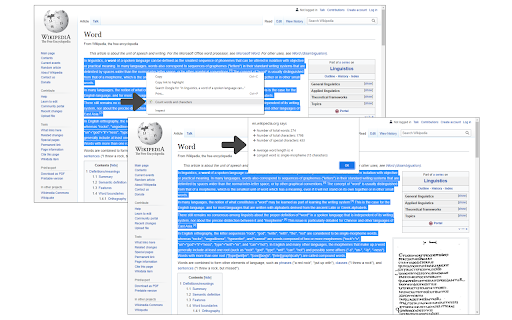
Word Counter is a simple extension that helps you get the number of words and characters in a text selection via context-menu. Simply select a text with the mouse, then right-click and select - Count words & characters - from the context menu. A popup will appear to inform you about the number of words in the selected text. Besides this number, it also informs you about average word length, number of total characters, number of special characters, and the longest word. This addon has no settings or options to adjust. Simply add it to your browser and start using it. It works on any web page as long as you can select a word or sentence. Please note that this addon does not have a toolbar icon. If you want to report bugs or have a feature request, please fill the bug report form on the addon's homepage (https://mybrowseraddon.com/word-counter.html).

Listing SEO keywords

Search intent keywords
Keyword signals for evaluating how users may discover, compare, or search for this extension category.

Core discovery

word countercharacter countertext length toolcount words in chrome

Comparison

Word Counter Plus

Problem

inaccurate word countword counter not workingcumbersome counter

Alternative

text analysis extensionword count utility

Similar extensions

Jump to related discovery paths:

FAQ

What is Word Counter mainly used for?
A Chrome extension that allows users to count words and characters in selected text through a right-click menu. It provides detailed metrics including average word length, total character count, and special character counts.
What market signals stand out?
Visible niche traction with limited review base. Last known update: 08/29/2025.
What should builders compare before entering this space?
Compare install concentration, rating quality, update recency, screenshots, developer portfolio, listing claims, and review-backed friction signals.
Is this page review-backed?
Backed by review samples. This page combines store metadata with selected review signals, while raw store metrics remain visible for comparison.

Screenshots

Word Counter screenshot

Links

Recommended Chrome extensions

Related listings from the same category, trending peers, and the same publisher portfolio.

Browse tools