Flash Player for the Web icon

Flash Player for the Web Chrome Extension Analysis

Niche Lifestyle & Gaming Hacks

Chrome extension ID: omimccinlhlkpjaeaocglgmkbelejlhj

Flash Player for the Web is a browser extension that uses a JavaScript-based emulator to render legacy Adobe Flash content. It features a simple toolbar toggle to manually enable or disable flash emulation on specific web pages.

Developer:Benni
Version:0.2.3
Size:9.05MiB
Last updated:

Overview

Installs

100K+

Rating

3.5

505 reviews

Languages

1 locales

Includes English

Market analysis

Review-backed positioning, friction, and market signals for this Chrome extension.

Backed by review samples

Macro category

Niche Lifestyle & Gaming Hacks

Pricing friction

Low review signal

Complaint intensity

Moderate review signal

Listing & review signals
Observed signals from store listing text and review samples.

Listing positioning

The product positions itself as a convenience utility that enables Flash content playback across the web. It highlights the integration of the open-source Ruffle emulator as its core technology.

Inferred product pattern

Wrapper for open-source emulation technology (Ruffle) with minimal proprietary UI.

Review-backed pain points

Users frequently report that the extension fails to load video or interactive content, results in blank screens, or requires constant manual intervention that disrupts browsing sessions.

Observed feature gaps

Users note that the extension struggles to integrate smoothly with modern web standards (HTML5) and often fails to provide a functional replacement for native Flash support.

Tags
Flash EmulatorRuffleLegacy MediaBrowser Tool
Target users

- Legacy web users

- Flash-based game players

- Users accessing older web media

Primary use cases

- Playing Flash-based games

- Viewing legacy media on older websites

Positive themes

- No specific positive themes identified in provided high-rating samples

Negative themes

- Failure to render content

- Incompatibility with modern site requirements

- Unstable performance requiring frequent toggling

- Redundant utility due to direct Ruffle availability

Observed friction

- Performance complaints detected

- No payment required; complaints focus on functionality rather than pricing.

Evidence boundary: Data is derived from user reviews highlighting consistent failure of the extension to reliably render Flash content, coupled with technical observations of the extension's reliance on the Ruffle codebase. The sample data is heavily skewed toward low-rating reviews, which may not represent the experience of users for whom the tool functions as intended.
Complaint summaries
Review-backed complaint signals grouped by operational area.

Support

Users express frustration regarding the lack of effectiveness, leading to reliance on alternative browsers or methods.

Reliability

High incidence of performance complaints; extension is frequently cited as failing to render content or turning itself off unexpectedly.

Privacy

None noted beyond generic concerns about extension site access permissions.

Access & pricing

- Free usage observed

- No account requirement observed

- Free plan or free usage claimed

Store listing facts

Listing assets

- Screenshots: 2

- Videos: 0

- Languages: 1

Trust signals

- Developer contact

- Official website

Store metadata

- Version: 0.2.3

- Size: 9.05MiB

- Last updated:

Store description excerpt
Short excerpt from the public Chrome Web Store listing; full copy is available on the official store page.
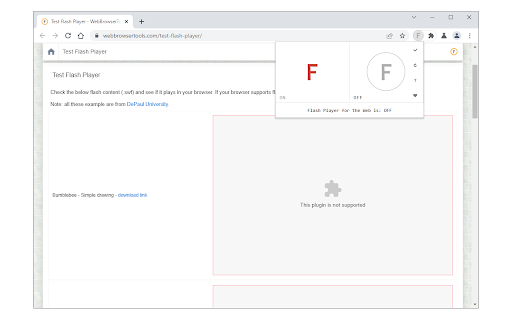
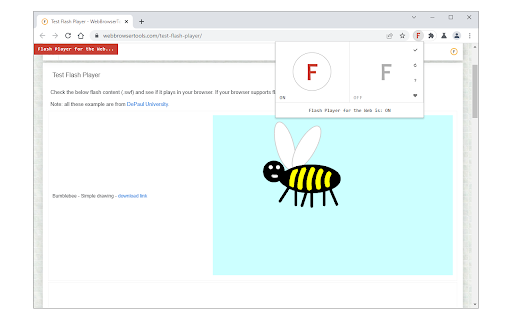
Flash Player for the Web is an extension that lets you play flash content across the web via a JavaScript flash emulator. Toolbar popup has an ON|OFF switch to enable or disable the addon. This extension uses the Ruffle emulator (https://github.com/ruffle-rs/ruffle) to compile and play flash. Toolbar popup has an ON|OFF switch to quickly enable or disable the addon. By default, the addon is disabled. Please navigate to a webpage with flash content, then, open the toolbar popup and press on the - ON - button (with red F symbol). All the flash content should start to play. Please note that there might be some bugs in playing flash as this addon is still a work in progress. To turn off the addon, please press the - OFF - button via the toolbar popup. To report bugs, please open the addon's homepage and fill out the bug report form: https://mybrowseraddon.com/flash-player-for-the-web.html

Listing SEO keywords

Search intent keywords
Keyword signals for evaluating how users may discover, compare, or search for this extension category.

Core discovery

Flash Player ChromeRuffle extensionPlay Flash gamesFlash emulator

Comparison

Flash Player alternativeRuffle vs extension

Problem

Flash not workingFlash player errorsCannot play legacy flash

Alternative

Ruffle extensionPuffin Browser

Similar extensions

Jump to related discovery paths:

FAQ

What is Flash Player for the Web mainly used for?
Flash Player for the Web is a browser extension that uses a JavaScript-based emulator to render legacy Adobe Flash content. It features a simple toolbar toggle to manually enable or disable flash emulation on specific web pages.
What market signals stand out?
Established adoption with moderate review base. Last known update: 09/09/2025.
What should builders compare before entering this space?
Compare install concentration, rating quality, update recency, screenshots, developer portfolio, listing claims, and review-backed friction signals.
Is this page review-backed?
Backed by review samples. This page combines store metadata with selected review signals, while raw store metrics remain visible for comparison.

Screenshots

Flash Player for the Web screenshot

Links

Recommended Chrome extensions

Related listings from the same category, trending peers, and the same publisher portfolio.

Browse tools