Youtube TV On PC icon

Youtube TV On PC Chrome Extension Analysis

Niche Lifestyle & Gaming Hacks

Chrome extension ID: jldjbkccldgbegjpggphaeikombjmnkh

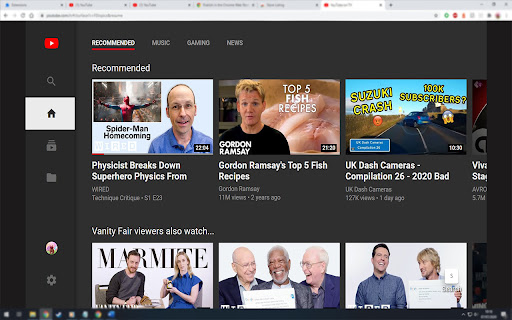
A Chrome extension that allows users to access youtube.com/tv on a desktop browser. It enables a lean-back TV experience on a computer, allowing remote control via the mobile YouTube app and F11 full-screen support.

Developer:Danny Keeley
Version:0.9
Size:43.95KiB
Last updated:

Overview

Installs

100K+

Rating

4.3

285 reviews

Languages

1 locales

Includes English (United Kingdom)

Market analysis

Review-backed positioning, friction, and market signals for this Chrome extension.

Backed by review samples

Macro category

Niche Lifestyle & Gaming Hacks

Pricing friction

Low review signal

Complaint intensity

Moderate review signal

Listing & review signals
Observed signals from store listing text and review samples.

Listing positioning

The product positions itself as a utility to enable the YouTube TV interface on a PC. It emphasizes the ability to control playback via a mobile device and automatic high-definition settings.

Inferred product pattern

User-agent or interface modifier that unlocks a restricted TV-specific web portal for desktop browsers.

Review-backed pain points

Users frequently report that the extension stops working following YouTube site updates, leading to 'An Error has Occurred' messages and QR code redirects.

Observed feature gaps

Consistent high-resolution support and integration with the user's YouTube watch history.

Tags
YouTube TVInterface MimicMedia ControllerEntertainment
Target users

- Home theater PC users

- Users preferring the TV UI over desktop UI

- Users who want to remote-control PC playback via mobile

Primary use cases

- Watching YouTube on a monitor with a TV-style interface

- Using a smartphone as a remote for PC YouTube playback

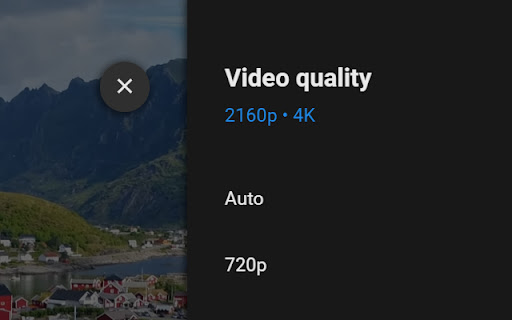
- Forcing higher video quality on the TV interface

Positive themes

- Convenience of not needing a native TV app

- Effective interface emulation when working

Negative themes

- Frequent breakage after YouTube updates

- Persistent QR code error loops

- Resolution capped at 480p

- Lack of watch history synchronization

Observed friction

- Performance complaints detected

- Privacy complaints detected

- No pricing friction observed; the product appears to be free.

Evidence boundary: Analyzed store listing data and 10 helpful reviews across English, Russian, and Spanish. The review sample is small; one severe privacy allegation is based on a single user report.
Complaint summaries
Review-backed complaint signals grouped by operational area.

Support

Users expressed uncertainty regarding how to report technical issues to the developer.

Reliability

Significant reliability issues reported, with multiple users noting the extension breaks entirely due to YouTube's frequent website updates.

Privacy

One review alleges the extension uses logged-in accounts as bots to inflate view counts for random videos.

Access & pricing

- Free usage observed

- Account required for core usage

- Free plan or free usage claimed

Store listing facts

Listing assets

- Screenshots: 2

- Videos: 0

- Languages: 1

Trust signals

- Developer contact

- Official website

Store metadata

- Version: 0.9

- Size: 43.95KiB

- Last updated:

Store description excerpt
Short excerpt from the public Chrome Web Store listing; full copy is available on the official store page.
# Enables youtube.com/tv# 1) Install plugin 2) Go to youtube.com/tv 3) Settings cog > Link with TV code 4) Open the YouTube app on your mobile device 5) Press your picture in the top right 6) Settings > Watch on TV > Enter TV code The video will automatically be set to the highest quality. Press F11 when a video is playing to make it full-screen. Enjoy :) Note - there are some videos that YouTube will not allow high quality when using youtube.com/tv, I can not find a solution. #Change Log# v0.9 October 2024 - A fix to help improve video quality using the best available v0.8 July 2024 - Rewritten due to Chrome forcing an update. v0.6 April 2021 - Allowed F11 to work for full screen. v0.5 March 2021 - Videos will now start on the highest quality YouTube has.

Listing SEO keywords

Search intent keywords
Keyword signals for evaluating how users may discover, compare, or search for this extension category.

Core discovery

Youtube TV on PCYoutube TV chrome extensioncontrol youtube from phone on pc

Comparison

Youtube TV vs Youtube DesktopYoutube TV PC emulator

Problem

Youtube TV QR code errorYoutube TV not working on chrome

Alternative

Youtube TV PC alternativeYoutube TV app for windows

Similar extensions

Jump to related discovery paths:

FAQ

What is Youtube TV On PC mainly used for?
A Chrome extension that allows users to access youtube.com/tv on a desktop browser. It enables a lean-back TV experience on a computer, allowing remote control via the mobile YouTube app and F11 full-screen support.
What market signals stand out?
Established adoption with moderate review base. Last known update: 06/18/2025.
What should builders compare before entering this space?
Compare install concentration, rating quality, update recency, screenshots, developer portfolio, listing claims, and review-backed friction signals.
Is this page review-backed?
Backed by review samples. This page combines store metadata with selected review signals, while raw store metrics remain visible for comparison.

Screenshots

Youtube TV On PC screenshot

Links

Website: dakinity.uk

Recommended Chrome extensions

Related listings from the same category, trending peers, and the same publisher portfolio.

Browse fun