
Cookie Auto Delete Chrome Extension Analysis
Privacy, Security & Ad BlockersChrome extension ID: kceglpglilklghkgofolieongaolnaob
Cookie Auto Delete is a browser extension designed to automatically remove cookies when browser tabs are closed or when the browser itself is closed. It offers options to control cookie deletion behavior and includes a whitelisting feature to exclude specific domains. The extension aims to enhance user privacy by preventing third-party cookie tracking.
Overview
Installs
20K+
Rating
★ 2.6
23 reviews
Languages
1 locales
Includes English
Market analysis
Review-backed positioning, friction, and market signals for this Chrome extension.
Macro category
Privacy, Security & Ad Blockers
Pricing friction
Low review signal
Complaint intensity
High review signal
Listing positioning
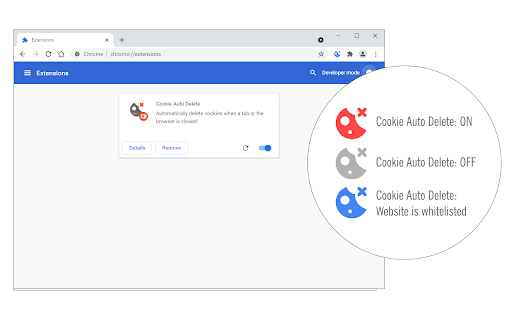
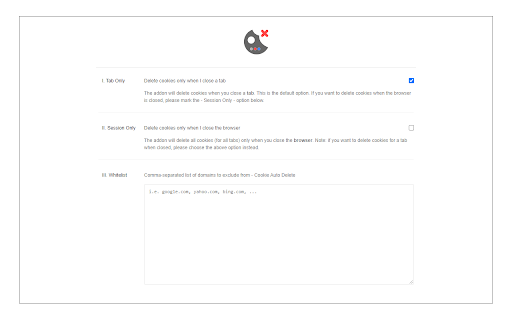
This extension is positioned as a privacy enhancement tool that automatically deletes cookies upon tab or browser closure. It aims to prevent tracking and improve user privacy by managing cookies effectively. The listing highlights features like Tab-Only and Session-Only modes, a toolbar ON/OFF switch, and a whitelisting tool.
Inferred product pattern
Cookie management extension with automated deletion features.
Review-backed pain points
Users report being logged out of websites, including critical services like Gmail, and experience constant disruptions. A significant pain point is the extension's perceived ineffectiveness in actually deleting cookies as advertised, leading to frustration and wasted time checking settings manually.
Observed feature gaps
Some users report missing functionalities like a clear 'Blacklist' option. The manual whitelisting process is described as cumbersome.
- Privacy-conscious internet users
- Users concerned about online tracking
- Individuals seeking to manage browser cookies
- Automatic cookie deletion upon tab closure
- Automatic cookie deletion upon browser closure
- Preventing website tracking via cookies
- Managing browser cookies for enhanced privacy
- Not applicable: No positive reviews identified in the provided sample.
- Causes frequent logouts from websites, including Google services.
- Does not function as advertised, failing to delete cookies.
- Perceived as a "junk" or "knock off" version of other extensions.
- Excessive permission requests (camera, location, etc.) are a concern.
- Difficult to manage whitelisting/blacklisting of cookies.
- Performance complaints detected
- Privacy complaints detected
- The extension is offered for free, and no direct pricing friction was observed in the provided reviews. However, user dissatisfaction with its functionality and perceived excessive permissions could be considered an indirect friction.
Support
One review mentions a bug report form on the addon's homepage for reporting issues.
Reliability
Multiple reviews indicate the extension does not reliably delete cookies as intended, leading to persistent cookie data and frequent logouts.
Privacy
Concerns are raised about excessive data access requests (camera, location, etc.) for the extension's stated purpose. There's also a mention of it being a "closed source knock off" compared to an open-source alternative.
- No clear monetization signal
- No account requirement observed
- Free plan or free usage claimed
Store listing facts
- Screenshots: 2
- Videos: 0
- Languages: 1
- Developer contact
- Official website
- Version: 0.1.6
- Size: 46.81KiB
- Last updated:
Listing SEO keywords
Core discovery
Comparison
Problem
Alternative
Similar extensions
Jump to related discovery paths:
FAQ
Screenshots
Links
Website: mybrowseraddon.com