Google Calendar™ on new Tab icon

Google Calendar™ on new Tab Chrome Extension Analysis

Tab & Bookmark Productivity

Chrome extension ID: keodkbefllpdgoodnnamaipiacnkpmog

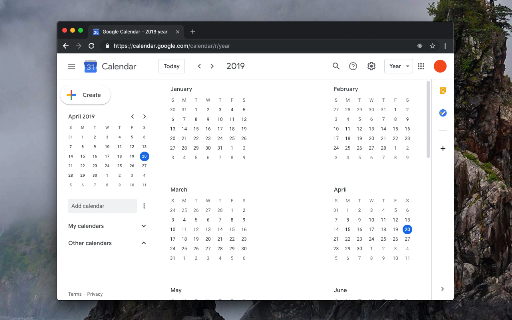
This tool replaces the Chrome new tab page with a functional Google Calendar dashboard. It allows users to access day, week, month, or agenda views immediately upon opening a new tab.

Developer:balvin.perrie
Version:0.2.4
Size:53.97KiB
Last updated:

Overview

Installs

4K+

Rating

4.8

10 reviews

Languages

11 locales

Includes Deutsch, English, Nederlands, español...

Market analysis

Review-backed positioning, friction, and market signals for this Chrome extension.

Backed by review samples

Macro category

Tab & Bookmark Productivity

Pricing friction

Low review signal

Complaint intensity

Low review signal

Listing & review signals
Observed signals from store listing text and review samples.

Listing positioning

The extension is positioned as a way to replace the default browser new tab page with a customized Google Calendar interface. It highlights the ability to view various calendar schedules and the flexibility to redirect the new tab to any custom URL.

Inferred product pattern

A lightweight redirection utility that transforms the browser's new tab page into a persistent productivity dashboard.

Review-backed pain points

Users report that the extension takes the cursor focus away from the address bar, making it difficult to quickly type a new URL after opening a tab. Some users also noted slow loading speeds and latency during the redirection process.

Observed feature gaps

The extension lacks an option to automatically focus the URL bar upon loading the new tab page to maintain standard browser workflows.

Tags
Calendar IntegrationNew Tab ReplacementProductivity Tool
Target users

- Google Calendar users

- Productivity enthusiasts

- Remote workers

Primary use cases

- Visualizing daily schedules on new tab opening

- Quick access to calendar views via context menu

- Redirecting new tabs to custom web services

Positive themes

- Ease of use

- Simplicity

- Beautiful design

- Effective for staying on track

Negative themes

- Slow loading times

- Address bar focus issues

- Redirection latency

Observed friction

- Performance complaints detected

- No pricing friction observed; product is presented as an open-source project.

Evidence boundary: Analysis based on store description and user reviews highlighting functionality and workflow friction. The sample size of reviews is relatively small.
Complaint summaries
Review-backed complaint signals grouped by operational area.

Support

No support complaints observed.

Reliability

Users reported slow loading speeds and minor latency in the redirection process.

Privacy

No privacy complaints observed.

Access & pricing

- Free usage observed

- No account requirement observed

- Free plan or free usage claimed

Store listing facts

Listing assets

- Screenshots: 1

- Videos: 0

- Languages: 11

Trust signals

- Privacy policy

- Developer contact

- Official website

Store metadata

- Version: 0.2.4

- Size: 53.97KiB

- Last updated:

Store description excerpt
Short excerpt from the public Chrome Web Store listing; full copy is available on the official store page.
This extension replaces the default new tab page with a customized Google Calendar page. You can view various calendar views, such as day, week, month, year, or agenda. Moreover, you have the flexibility to set a custom URL for the new page, which can even point to a different calendar web application. The extension directs the new tab to the specified URL, and that's it. Key Features: 1. Substitute the new tab with an external service of your choice. 2. Open the external service with a single click next to your current tab (using the action button). 3. Access common calendar views (day, week, month, year, or agenda) via a right-click context menu. 4. Access an account selector, allowing you to choose the logged-in account for displaying the calendar. 5. You can configure different pages for new tab and toolbar button click Legal Disclaimer: This extension is an open-source project that…

Listing SEO keywords

Search intent keywords
Keyword signals for evaluating how users may discover, compare, or search for this extension category.

Core discovery

Google Calendar New TabCalendar Tab ExtensionNew Tab ReplacementProductivity Dashboard

Comparison

Google CalendarNew Tab Page

Problem

Slow loading calendar extensionNew tab address bar focus issueCalendar redirection latency

Alternative

Productivity tab extensionDashboard new tab extension

Similar extensions

Jump to related discovery paths:

FAQ

What is Google Calendar™ on new Tab mainly used for?
This tool replaces the Chrome new tab page with a functional Google Calendar dashboard. It allows users to access day, week, month, or agenda views immediately upon opening a new tab.
What market signals stand out?
Early or small audience with limited review base. Last known update: 05/10/2026.
What should builders compare before entering this space?
Compare install concentration, rating quality, update recency, screenshots, developer portfolio, listing claims, and review-backed friction signals.
Is this page review-backed?
Backed by review samples. This page combines store metadata with selected review signals, while raw store metrics remain visible for comparison.

Screenshots

Google Calendar™ on new Tab screenshot

Links

Recommended Chrome extensions

Related listings from the same category, trending peers, and the same publisher portfolio.

Browse workflow