Picture in Picture | PiP | Floating Player for Youtube icon

Picture in Picture Chrome Extension Analysis

Video & Image Downloaders

Store listing title: Picture in Picture | PiP | Floating Player for Youtube

Chrome extension ID: ladkmpkpnkooecmndbadcdkpjkmbkdpa

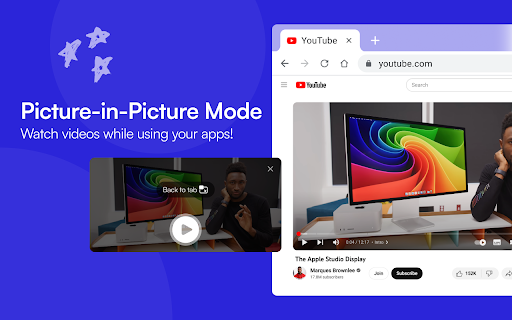
This is a browser extension that enables Picture-in-Picture (PiP) functionality for HTML5 video players across various websites. It allows users to detach videos from the web page into a floating window that stays visible while they switch between different tabs or applications.

Version:1.3.5
Size:33.19KiB
Last updated:

Overview

Installs

100K+

Rating

4.9

1,262 reviews

Languages

37 locales

Includes Deutsch, English, English (Australia), English (United Kingdom)...

Market analysis

Review-backed positioning, friction, and market signals for this Chrome extension.

Backed by review samples

Macro category

Video & Image Downloaders

Pricing friction

Low review signal

Complaint intensity

Moderate review signal

Listing & review signals
Observed signals from store listing text and review samples.

Listing positioning

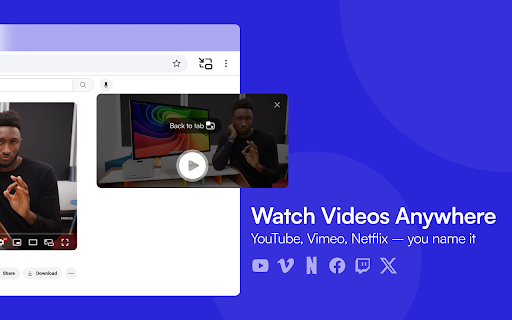
The listing positions the extension as a universal utility for popping out HTML5 videos into a resizable, always-on-top window. It emphasizes ease of use, cross-platform compatibility with major streaming services, and multi-tab functionality.

Inferred product pattern

Standard browser utility providing a wrapper for browser-native media APIs to enable floating video.

Review-backed pain points

Users struggle with navigation when videos change (auto-play queues), specifically citing desynced progress bars, inability to skip advertisements, and intermittent playback control malfunctions.

Observed feature gaps

Lack of native volume control (mute), missing ad-skipping capability, inability to toggle PiP off via keyboard shortcut, and no transparency settings for the floating window.

Tags
PiPFloating VideoMultitaskingVideo PlayerOverlay
Target users

- Multitaskers

- Students

- Remote Workers

- Casual Media Viewers

Primary use cases

- Watching videos while browsing other tabs

- Monitoring video content during work

- Viewing streaming platforms in a floating window

Positive themes

- Ease of installation

- Fluid performance

- Effective multitasking utility

- Cross-tab visibility

Negative themes

- Inability to skip ads within the PiP window

- Occasional glitches with playback controls

- Issues with progress bar/time synchronization

- Lack of volume control or mute feature

Observed friction

- Performance complaints detected

- No pricing friction observed; the extension appears to be free with no mention of premium requirements.

Evidence boundary: The extraction is based on a high volume of store reviews and the detailed product description provided by the developer. Review sample size is moderate; feedback is focused on functional UI/UX improvements rather than systemic failure.
Complaint summaries
Review-backed complaint signals grouped by operational area.

Support

No specific support or refund complaints found; user dissatisfaction is limited to functional bugs.

Reliability

Some users report occasional glitches where playback controls freeze, time sliders fail to update on new videos, or the video unexpectedly resumes after being paused.

Privacy

No privacy or security complaints found in the available review data.

Access & pricing

- Free usage observed

- No account requirement observed

- Free plan or free usage claimed

Store listing facts

Listing assets

- Screenshots: 2

- Videos: 0

- Languages: 37

Trust signals

- Privacy policy

- Developer contact

- Official website

Store metadata

- Version: 1.3.5

- Size: 33.19KiB

- Last updated:

Store description excerpt
Short excerpt from the public Chrome Web Store listing; full copy is available on the official store page.
Picture in Picture | PiP | Floating Video Player Watch any video in a floating video player — always on top, always visible. Picture in Picture (PiP) pops out video from any website into a resizable floating window that stays above all tabs and apps while you browse, work, or multitask. How it works Click the extension icon while a video is playing. The video pops out into a floating PiP window. Move it anywhere, resize it, and keep watching while you switch tabs or work in other apps. Features ✅ Floating video window — always on top of other windows ✅ Works on every website with an HTML5 video player ✅ One-click activation from the Chrome toolbar ✅ Reposition and resize the floating player freely ✅ PiP mode stays active across all tabs ✅ Keyboard shortcut: Alt+P (⌥+P on Mac) FAQ Does Picture in Picture work on YouTube? Yes. Click the icon on any YouTube video to open it in a floating P…

Listing SEO keywords

Search intent keywords
Keyword signals for evaluating how users may discover, compare, or search for this extension category.

Core discovery

Picture in Picture for ChromeFloating video playerPiP mode extensionAlways on top video

Comparison

best pip extensionchrome video overlay

Problem

video keeps playingpip not workingfloating player glitch

Alternative

video popout extensionbrowser media tools

Similar extensions

Jump to related discovery paths:

FAQ

What is Picture in Picture mainly used for?
This is a browser extension that enables Picture-in-Picture (PiP) functionality for HTML5 video players across various websites. It allows users to detach videos from the web page into a floating window that stays visible while they switch between different tabs or applications.
What market signals stand out?
Established adoption with substantial review base. Last known update: 04/09/2026.
What should builders compare before entering this space?
Compare install concentration, rating quality, update recency, screenshots, developer portfolio, listing claims, and review-backed friction signals.
Is this page review-backed?
Backed by review samples. This page combines store metadata with selected review signals, while raw store metrics remain visible for comparison.

Screenshots

Picture in Picture | PiP | Floating Player for Youtube screenshot

Links

Recommended Chrome extensions

Related listings from the same category, trending peers, and the same publisher portfolio.

Browse tools
WPS浏览器助手:文档在线阅读编辑 icon

WPS浏览器助手:文档在线阅读编辑

金山PDF

PDF、Excel、Word、PPT等文档无需下载即可在线预览,还能对文档进行编辑、打印、转换等处理。

Installs

2.0M+

Rating

3.0

Planet Search icon

Planet Search

Free VPN Planet

Enchanced default search engine.

Installs

2.0M+

Rating

3.4

Lightshot (screenshot tool) icon

Lightshot (screenshot tool)

Skillbrains

Simple and convenient screenshot tool. Select an area, edit your screenshot and upload it to the server.

Installs

2.0M+

Rating

4.4

PrintFriendly: Print Clean Pages, Save as PDF & Screenshot, AI Tools icon

PrintFriendly: Print Clean Pages, Save as PDF & Screenshot, AI Tools

PrintFriendly

Print clean web pages, save as PDF, take screenshots, or use reader mode. AI summaries & ad removal. Works on ChatGPT & Gemini.

Installs

1.0M+

Rating

4.6

Mobile simulator - responsive testing tool icon

Mobile simulator - responsive testing tool

François Duprat

Smartphone and tablet simulator on computer with several models to test mobile responsive websites.

Installs

1.0M+

Rating

4.9

Chat with all AI models (Gemini, Claude, DeepSeek…) & AI Agents | AITOPIA icon

Chat with all AI models (Gemini, Claude, DeepSeek…) & AI Agents | AITOPIA

AITOPIA AI Sidebar

AI Agent Marketplace & AI Sidebar with all AI models (Gemini, Claude, DeepSeek & more) and hundreds of AI Agents

Installs

1.0M+

Rating

4.9

Codex icon

Codex

OpenAI

Control Chrome with Codex.

Installs

1.0M+

Rating

3.8

HID Credential Management Extension icon

HID Credential Management Extension

hid-global-chrome-web-store

Browser extension for HID credential management solution.

Installs

1.0M+

Rating

1.3

Keywords Everywhere - Keyword Tool icon

Keywords Everywhere - Keyword Tool

Axeman Technology Solutions LLP

Keyword search volume, cpc and competition for 15+ websites like Google™ Search Console, YouTube™, Amazon™ & more

Installs

1.0M+

Rating

4.5

WebChatGPT: Prompt library with web access icon

WebChatGPT: Prompt library with web access

WebChatGPT

Augment your ChatGPT prompts with relevant web search results through web browsing.

Installs

1.0M+

Rating

4.2