Battery Status icon

Battery Status Chrome Extension Analysis

Automation & Workflow Efficiency

Chrome extension ID: lncamcnihkpmnbpioiooedpmmpaaohnb

Battery Status is a Chrome extension that displays real-time battery percentage and charging status via the extension icon and a popup page. It provides visual cues (green/red colors) and allows users to set custom alerts for specific battery levels.

Version:3.0.1
Size:146KiB
Last updated:

Overview

Installs

9K+

Rating

4.5

45 reviews

Languages

2 locales

Includes English, 中文(中国)

Market analysis

Review-backed positioning, friction, and market signals for this Chrome extension.

Backed by review samples

Macro category

Automation & Workflow Efficiency

Pricing friction

Low review signal

Complaint intensity

Low review signal

Listing & review signals
Observed signals from store listing text and review samples.

Listing positioning

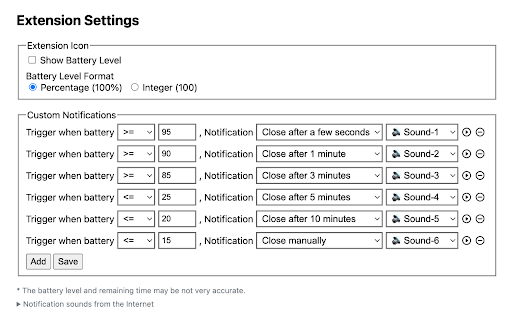
The product is positioned as a simple utility to monitor battery levels and charging status directly from the browser toolbar. It highlights visual indicators like color-coded icons and the ability to configure custom notifications.

Inferred product pattern

Single-purpose system utility providing visual and audible alerts for hardware status.

Review-backed pain points

Users report that the percentage text on the icon is too small to read easily. There is also frustration regarding notifications not remaining on screen long enough to be noticed.

Observed feature gaps

Lack of adjustable text size for the icon, absence of 'sticky' or persistent notification windows, and a need for more diverse or looping audio alerts.

Tags
Battery MonitorSystem UtilityBattery NotificationsChromebook Tool
Target users

- Chromebook users

- Laptop users

- Users focused on battery longevity

Primary use cases

- Monitoring battery percentage without opening system settings

- Setting custom alerts for low or full battery

- Visual tracking of charging status via the browser icon

Positive themes

- Customizable notifications

- General utility and usefulness

- Simple setup and operation

Negative themes

- Small font size on the icon

- Transient notifications that disappear too quickly

- Limited audio alert options

Observed friction

- No pricing friction observed as the tool appears to be free.

Evidence boundary: Analysis based on the Chrome Web Store listing and a sample of 10 reviews. Small review sample size; specific hardware behavior varies across different OS/device types.
Complaint summaries
Review-backed complaint signals grouped by operational area.

Support

No major support complaints; one user noted the developer responded to a bug report.

Reliability

Some reports of custom notifications not triggering or disappearing too quickly due to browser behavior.

Privacy

No privacy complaints observed.

Access & pricing

- Free usage observed

- No account requirement observed

- Free plan or free usage claimed

Store listing facts

Listing assets

- Screenshots: 2

- Videos: 0

- Languages: 2

Trust signals

- Privacy policy

- Developer contact

- Official website

Store metadata

- Version: 3.0.1

- Size: 146KiB

- Last updated:

Store description excerpt
Short excerpt from the public Chrome Web Store listing; full copy is available on the official store page.
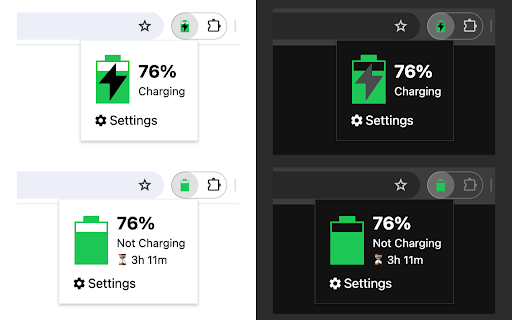
Display battery status on the extension icon and popup page, and support custom notifications. Updates: ● Version 3.0.0 (2024/02/23): upgrade to manifest v3, and requires Chrome version >= 118. ● Version 2.0.2 (2023/02/08): support playing sound with notifications! ● Version 2.0.0 (2020/12/20): support custom notifications! State of the extension icon: ● Green color: power level > 15%, Red color: power level <= 15% ● ⚡️flag: charging or fully charged, without ⚡️flag: not charged ● The battery icon itself reflects the overall power level ● Hover over the icon to display battery percentage The popup page displays detailed information, and you can set whether to show battery percentage on the extension icon.

Listing SEO keywords

Search intent keywords
Keyword signals for evaluating how users may discover, compare, or search for this extension category.

Core discovery

Chrome battery monitorBattery percentage extensionLaptop battery alertsChromebook battery status

Comparison

Battery Status vs system trayBest battery monitor extension

Problem

Chromebook battery notification missingHow to see battery percentage in ChromeBattery health alerts

Alternative

Battery monitor alternativeBattery status tool

Similar extensions

Jump to related discovery paths:

FAQ

What is Battery Status mainly used for?
Battery Status is a Chrome extension that displays real-time battery percentage and charging status via the extension icon and a popup page. It provides visual cues (green/red colors) and allows users to set custom alerts for specific battery levels.
What market signals stand out?
Early or small audience with limited review base. Last known update: 02/27/2024.
What should builders compare before entering this space?
Compare install concentration, rating quality, update recency, screenshots, developer portfolio, listing claims, and review-backed friction signals.
Is this page review-backed?
Backed by review samples. This page combines store metadata with selected review signals, while raw store metrics remain visible for comparison.

Screenshots

Battery Status screenshot

Links

Website: guokai.dev

Privacy policy: https://guokai.dev/privacy/

Recommended Chrome extensions

Related listings from the same category, trending peers, and the same publisher portfolio.

Browse tools
Tab Groups Extension icon

Tab Groups Extension

Jackie(Guokai) Han

Automatically group tabs, save tabs/groups, and provide shortcuts for tabs/groups.

Installs

100K+

Rating

4.4

QR Code icon

QR Code

Jackie(Guokai) Han

Generate and Scan QR Code.

Installs

80K+

Rating

4.7

Smallpdf—Edit, Convert, Compress, & AI Summarize PDF icon

Smallpdf—Edit, Convert, Compress, & AI Summarize PDF

Smallpdf AG

Easy-to-use PDF tools to compress, convert, merge, chat to, split, e-sign, and edit PDF files in your browser.

Installs

2.0M+

Rating

4.6

Google Dictionary (by Google) icon

Google Dictionary (by Google)

dictionary-extension-dev

View definitions easily as you browse the web.

Installs

2.0M+

Rating

4.4

AI Chat for Search icon

AI Chat for Search

AI Chat for Search Team

Display AI Chat response alongside search engine results

Installs

2.0M+

Rating

4.6

WPS浏览器助手:文档在线阅读编辑 icon

WPS浏览器助手:文档在线阅读编辑

金山PDF

PDF、Excel、Word、PPT等文档无需下载即可在线预览,还能对文档进行编辑、打印、转换等处理。

Installs

2.0M+

Rating

3.0

Planet Search icon

Planet Search

Free VPN Planet

Enchanced default search engine.

Installs

2.0M+

Rating

3.4

Lightshot (screenshot tool) icon

Lightshot (screenshot tool)

Skillbrains

Simple and convenient screenshot tool. Select an area, edit your screenshot and upload it to the server.

Installs

2.0M+

Rating

4.4

PrintFriendly: Print Clean Pages, Save as PDF & Screenshot, AI Tools icon

PrintFriendly: Print Clean Pages, Save as PDF & Screenshot, AI Tools

PrintFriendly

Print clean web pages, save as PDF, take screenshots, or use reader mode. AI summaries & ad removal. Works on ChatGPT & Gemini.

Installs

1.0M+

Rating

4.6

Mobile simulator - responsive testing tool icon

Mobile simulator - responsive testing tool

François Duprat

Smartphone and tablet simulator on computer with several models to test mobile responsive websites.

Installs

1.0M+

Rating

4.9