Find The Recipe icon

Find The Recipe Chrome Extension Analysis

Niche Lifestyle & Gaming Hacks

Chrome extension ID: naaffooocnnodpcmppdjhpjiogkljkch

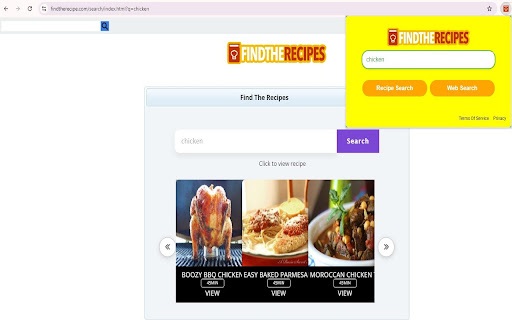
This browser extension allows users to search for culinary recipes directly from their Chrome omnibox by typing a specific keyword or by utilizing the extension's popup modal. To facilitate this function, the extension alters the browser's default search settings to Yahoo. It provides an integrated lookup flow for users wanting immediate search results for food recipes.

Version:1.15
Size:135KiB
Last updated:

Overview

Installs

10K+

Rating

0 reviews

Languages

1 locales

Includes English (United States)

Market analysis

Review-backed positioning, friction, and market signals for this Chrome extension.

No review samples found

Macro category

Niche Lifestyle & Gaming Hacks

Pricing friction

Low review signal

Complaint intensity

Low review signal

Listing & review signals
Observed signals from store listing text and review samples.

Listing positioning

The store listing positions "Find The Recipe" as a convenient shortcut tool to search for recipes directly from the browser's address bar or extension modal. It transparently discloses that it changes the browser's default search provider to Yahoo to power these specialized queries. The messaging focuses on easy access to web and recipe search capabilities with minimal setup.

Inferred product pattern

Search-monetizing browser utility that redirects default search traffic to Yahoo under the utility of specialized recipe search shortcuts.

Review-backed pain points

Review-backed data is not available as no user reviews have been submitted for this extension.

Observed feature gaps

No feature gaps can be verified through review-backed data; however, the listing indicates it is limited to Yahoo search integration without alternative search engine choices.

Tags
Recipe FinderOmnibox SearchBrowser Utility
Target users

- Home cooks looking for fast recipe search utilities

- Casual web users seeking quick browser-based search shortcuts

Primary use cases

- Searching for food recipes using the browser address bar with hotkeys

- Performing general web and recipe searches via the extension's popup modal

Positive themes

- review-backed data is not available

Negative themes

- review-backed data is not available

Observed friction

- No pricing complaints or friction points are documented due to a lack of user reviews, and the extension is marketed as free.

Evidence boundary: The analysis is based entirely on the public Chrome Web Store listing metadata, developer descriptions, and permissions detailed by VPP Technologies L.L.C. There are no user reviews or rating scores available, which prevents verification of real-world functionality, performance issues, or user satisfaction.
Complaint summaries
Review-backed complaint signals grouped by operational area.

Support

No customer support or refund issues are available due to the absence of user reviews.

Reliability

No reliability or performance issues are reported as no reviews are available.

Privacy

No user-submitted privacy complaints exist, though the extension explicitly modifies the browser's default search settings to Yahoo.

Access & pricing

- Free usage observed

- No account requirement observed

- Free plan or free usage claimed

Store listing facts

Listing assets

- Screenshots: 2

- Videos: 0

- Languages: 1

Trust signals

- Privacy policy

- Developer contact

- Official website

- Support link

Store metadata

- Version: 1.15

- Size: 135KiB

- Last updated:

Store description excerpt
Short excerpt from the public Chrome Web Store listing; full copy is available on the official store page.
"Find the Recipes” extension updates the browser search provider and allows users to get results for Recipes. How to search for Recipes? 1.Type "Recipes" in the browser address bar and press "space" or "Tab" on your keyboard. 2.Input the search keyword and press "Enter" You may also search for recipes by clicking on the extension icon on the browser and use the input box in the extension Modal. Easily get access to web search and recipes search with this extension. This extension updates your browser default search in the following ways: 1. Allows for recipes search directly from your browser address bar 2. Sets Yahoo as the default search settings in your browser By installing this extension, you agree to the Terms of Use (https://findtherecipe.com/terms.html) and Privacy Policy (https://findtherecipe.com/privacy.html) List of Features: - Perform Recipes search in your omnibox and brow…

Listing SEO keywords

Search intent keywords
Keyword signals for evaluating how users may discover, compare, or search for this extension category.

Core discovery

recipe search browser extensionfind recipes from omniboxchrome recipe finder utility

Comparison

recipe search extensions vs default search

Problem

extension changed search to yahoo

Alternative

recipe finderrecipe search shortcut

Similar extensions

Jump to related discovery paths:

FAQ

What is Find The Recipe mainly used for?
This browser extension allows users to search for culinary recipes directly from their Chrome omnibox by typing a specific keyword or by utilizing the extension's popup modal. To facilitate this function, the extension alters the browser's default search settings to Yahoo. It provides an integrated lookup flow for users wanting immediate search results for food recipes.
What market signals stand out?
Visible niche traction with limited review base. Last known update: 11/04/2024.
What should builders compare before entering this space?
Compare install concentration, rating quality, update recency, screenshots, developer portfolio, listing claims, and review-backed friction signals.
Is this page review-backed?
No review samples found. This page combines store metadata with selected review signals, while raw store metrics remain visible for comparison.

Screenshots

Find The Recipe screenshot

Links

Recommended Chrome extensions

Related listings from the same category, trending peers, and the same publisher portfolio.

Browse household