Pasterboy - Paste Formatted Text to X.com icon

Pasterboy Chrome Extension Analysis

Social Media Growth & Marketing

Store listing title: Pasterboy - Paste Formatted Text to X.com

Chrome extension ID: ncoladehodmkfaabolhdanljjnmndnhg

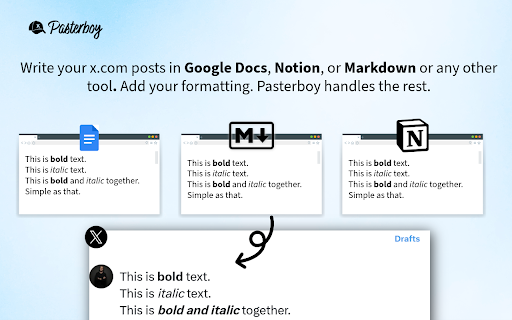
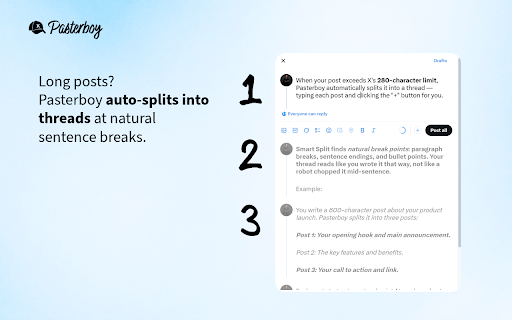
Pasterboy is a Chrome extension that allows users to transfer formatted text from Markdown, Google Docs, Notion, or Word into X.com. It supports native rich text formatting for X Premium users and includes a smart-split feature to turn long text into threads.

Developer:michal.wlosik
Version:1.3.0
Size:189KiB
Last updated:

Overview

Installs

4

Rating

5.0

3 reviews

Languages

1 locales

Includes English

Market analysis

Review-backed positioning, friction, and market signals for this Chrome extension.

Backed by review samples

Macro category

Social Media Growth & Marketing

Pricing friction

Low review signal

Complaint intensity

Low review signal

Listing & review signals
Observed signals from store listing text and review samples.

Listing positioning

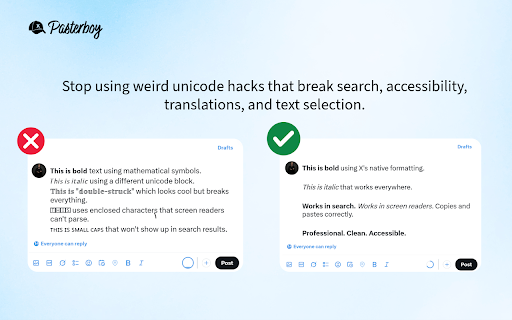
The product positions itself as a professional alternative to Unicode hacks for formatting text on X.com. It emphasizes native bold and italic styling for Premium users and automatic thread splitting for all users.

Inferred product pattern

Format-bridge utility that converts rich text sources to a specific platform's native editor capabilities.

Review-backed pain points

No review-backed pain points available.

Observed feature gaps

No feature gaps explicitly identified in reviews; native formatting is restricted by X's own Premium requirement.

Tags
X Formatting ToolTwitter Thread MakerMarkdown to XContent Creator Utility
Target users

- X (Twitter) Content Creators

- X Premium Subscribers

- Digital Marketers

- Markdown users

Primary use cases

- Pasting formatted text from external editors to X

- Converting long documents into X threads

- Maintaining accessibility and SEO by using native formatting instead of Unicode

Positive themes

- General reliability

- Ease of use

Negative themes

- No negative themes observed

Observed friction

- No pricing friction observed; the tool is claimed to be completely free with optional Ko-fi support.

Evidence boundary: Analysis based on the store listing and two high-rating user reviews. Very small sample size of reviews limits the depth of sentiment and pain point analysis.
Complaint summaries
Review-backed complaint signals grouped by operational area.

Support

No support complaints found in provided reviews.

Reliability

No reliability complaints found; positive reviews indicate the tool works well.

Privacy

No privacy complaints; listing claims local storage and no data collection.

Access & pricing

- Free usage observed

- No account requirement observed

- Free plan or free usage claimed

Store listing facts

Listing assets

- Screenshots: 3

- Videos: 0

- Languages: 1

Trust signals

- Privacy policy

- Developer contact

- Official website

Store metadata

- Version: 1.3.0

- Size: 189KiB

- Last updated:

Store description excerpt
Short excerpt from the public Chrome Web Store listing; full copy is available on the official store page.
Here's the updated description for the Chrome Web Store: Pasterboy lets you paste formatted text into X.com (Twitter) with native bold and italic styling — no Unicode hacks required. ⚠️ Important: X.com Premium Required for Formatting Bold and italic formatting on X.com is only available to Premium subscribers. Free X.com accounts can still use Pasterboy for plain text posting and thread splitting. 🚫 Why Not Unicode? Unicode "bold" text (like 𝘁𝗵𝗶𝘀) breaks search, accessibility, screen readers, translations, copy-paste, and SEO. Pasterboy uses X.com's native formatting for real bold and italic that works everywhere. ✨ Key Features Paste from Markdown (bold, italic, both) Paste from Google Docs, Notion, Word, or any rich text source Auto-splits long posts into threads (for free X.com accounts) Smart Split finds natural break points at bullet points, sentences, and paragraphs Works wi…

Listing SEO keywords

Search intent keywords
Keyword signals for evaluating how users may discover, compare, or search for this extension category.

Core discovery

paste formatted text to XTwitter bold italic toolMarkdown to X.comX thread splitter

Comparison

Pasterboy vs Unicode boldbest X formatting extension

Problem

X.com bold textTwitter thread splitterformatting lost on X

Alternative

Twitter formatting toolsX thread makerUnicode text generator

Similar extensions

Jump to related discovery paths:

FAQ

What is Pasterboy mainly used for?
Pasterboy is a Chrome extension that allows users to transfer formatted text from Markdown, Google Docs, Notion, or Word into X.com. It supports native rich text formatting for X Premium users and includes a smart-split feature to turn long text into threads.
What market signals stand out?
Early or small audience with limited review base. Last known update: 02/17/2026.
What should builders compare before entering this space?
Compare install concentration, rating quality, update recency, screenshots, developer portfolio, listing claims, and review-backed friction signals.
Is this page review-backed?
Backed by review samples. This page combines store metadata with selected review signals, while raw store metrics remain visible for comparison.

Screenshots

Pasterboy - Paste Formatted Text to X.com screenshot

Links

Recommended Chrome extensions

Related listings from the same category, trending peers, and the same publisher portfolio.

Browse tools
Sidecue - AI Meeting & Interview Copilot icon

Sidecue - AI Meeting & Interview Copilot

michal.wlosik

Real-time AI cues for meetings and interviews. Works with Google Meet, Zoom, and Teams in Chrome.

Installs

112

Rating

Sumbox - YouTube & web summarizer icon

Sumbox - YouTube & web summarizer

michal.wlosik

Summarize YouTube videos and articles with one click. Get TL;DR, detailed summaries, and full transcripts.

Installs

54

Rating

5.0

Wordtune: AI Paraphrasing and Grammar Tool icon

Wordtune: AI Paraphrasing and Grammar Tool

Wordtune

Unlock your potential with Wordtune's free AI writer – paraphrase, rewrite, translate, fix grammar, and more.

Installs

1.0M+

Rating

4.6

AIPRM for ChatGPT icon

AIPRM for ChatGPT

AIPRM

AIPRM is your cheat code for ChatGPT. Adds a list of curated prompt templates and advanced features. Try today.

Installs

1.0M+

Rating

3.9

Enhancer for YouTube™ icon

Enhancer for YouTube™

Max RF

Take control of YouTube and boost your user experience!

Installs

1.0M+

Rating

4.7

Поиск Яндексa icon

Поиск Яндексa

Yandex

Вводите запросы в адресную строку и получайте ответы от Яндекса

Installs

1.0M+

Rating

3.3

Bing Search and Homepage icon

Bing Search and Homepage

Microsoft Corporation

Set Microsoft Bing as your default homepage and default search engine

Installs

1.0M+

Rating

1.8

uberAgent icon

uberAgent

Cloud Software Group, Inc.

Enables uberAgent to collect web app usage and performance data (e.g., foreground tab, page load duration) from Chrome.

Installs

1.0M+

Rating

5.0

Ace Script icon

Ace Script

Ace Stream

Everything can be scripted, allowing your browser to do more!

Installs

1.0M+

Rating

3.4

MSN + Bing for Chrome icon

MSN + Bing for Chrome

Microsoft Corporation

Set MSN as your homepage and Bing as your search engine

Installs

1.0M+

Rating

4.1