Block Image|Video icon

Block Image Chrome Extension Analysis

Privacy, Security & Ad Blockers

Store listing title: Block Image|Video

Chrome extension ID: njclihbmkjiklhnhpmajjjkahhnbnpca

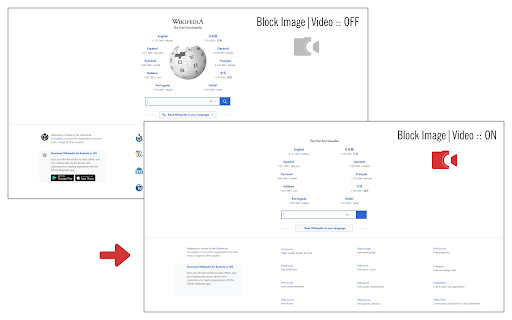
This extension allows users to toggle the visibility and loading of images and videos on websites. It features two modes: a 'hide' option that makes elements invisible after loading, and a 'block' option designed to prevent elements from loading at all. It is controlled via a simple red/green status icon in the browser toolbar.

Developer:Jorvi
Version:0.1.7
Size:32.23KiB
Last updated:

Overview

Installs

40K+

Rating

3.7

60 reviews

Languages

1 locales

Includes English

Market analysis

Review-backed positioning, friction, and market signals for this Chrome extension.

Backed by review samples

Macro category

Privacy, Security & Ad Blockers

Pricing friction

Low review signal

Complaint intensity

High review signal

Listing & review signals
Observed signals from store listing text and review samples.

Listing positioning

Block Image|Video is positioned as an easy, one-click browser extension to block or hide specific web elements like images and videos. The store listing claims it can either visually hide media or prevent it from loading entirely to speed up web page load times. Users are directed to configure their blocking preferences via an options page before activating the extension via a toolbar toggle.

Inferred product pattern

A content-filtering utility that uses content-blocking rules and visual hiding styling to selectively suppress media elements.

Review-backed pain points

The most significant pain point is that the video blocking feature fails to actually stop media playback and network data consumption, rendering it ineffective for users on metered connections. Additionally, the UI is criticized for requiring users to dive deep into options panels instead of supporting quick, on-the-fly site configuration.

Observed feature gaps

Reviews highlight a lack of a domain-level whitelist or blacklist, an inability to block HTML5 video streams at the network level, a lack of an indicator showing what specific content has been blocked, and UI updates that forced a visually unappealing dark mode/toolbar icon.

Tags
Image BlockerVideo BlockerContent Filter
Target users

- Users on metered or limited internet connections

- Users seeking distraction-free reading environments

- Browsers looking to optimize page load speeds

Primary use cases

- Preventing images from loading to save data bandwidth

- Hiding video players and thumbnails on web pages

- Disabling media background elements to clean up page layouts

Positive themes

- Ability to hide both images and frames for cleaner layouts

- Provides clear count of blocked items when functional

Negative themes

- Videos are only visually hidden rather than fully blocked from playing or downloading

- Cumbersome user interface requiring users to open options menus repeatedly

- Lack of domain-specific whitelist or blacklist features

- HTML5 video elements and background CSS images fail to be blocked effectively

Observed friction

- Performance complaints detected

- No pricing friction was observed in the reviews, as the extension is listed and discussed as a completely free tool.

Evidence boundary: Analysis is based on the official Chrome Web Store listing details and 12 user reviews focusing on usability issues, performance gaps, and actual versus claimed media blocking capabilities. The dataset is limited to a small selection of self-reported user reviews on the Chrome Web Store and may not cover recent patches or specific browser configuration factors.
Complaint summaries
Review-backed complaint signals grouped by operational area.

Support

There are no direct complaints about customer support, but users express frustration that bugs with HTML5 video blocking and UI/UX issues have not been resolved.

Reliability

Reliability complaints are highly prevalent. Users report that the extension fails to block video playback (only hiding the thumbnail), background media continues to consume bandwidth, and certain elements like CSS background images require manual page refreshes to hide.

Privacy

No privacy or data security complaints were identified in the user reviews.

Access & pricing

- Free usage observed

- No account requirement observed

- Free plan or free usage claimed

Store listing facts

Listing assets

- Screenshots: 2

- Videos: 0

- Languages: 1

Trust signals

- Developer contact

- Official website

Store metadata

- Version: 0.1.7

- Size: 32.23KiB

- Last updated:

Store description excerpt
Short excerpt from the public Chrome Web Store listing; full copy is available on the official store page.
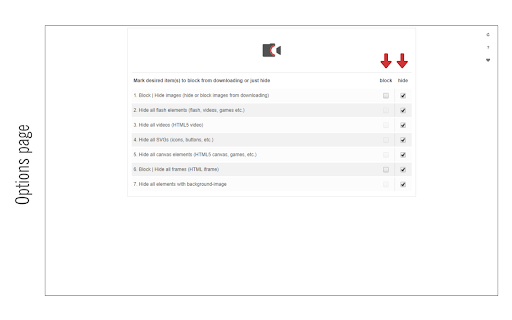
Block Image|Video is an extension that lets you easily block or hide desired items (image, video, etc.) with just one click. Once you add this addon to your browser, a button will appear in the toolbar. This button shows that the addon is active (with red color). Now, before using the addon, please visit the options page and choose a desired item(s) to block or hide (i.e. image). Within the options page, if you choose to - hide - items, the addon allows these item(s) to be loaded in the browser, but, will make them invisible. On the other hand, if you choose to - block - any item, the addon prevents that specific item from loading into your browser. This way, loading the web pages may become faster, and you need to turn off the addon and reload the page to make them visible again. Note: before using the addon, please visit the addon's options page and adjust the item(s) you want to bloc…

Listing SEO keywords

Search intent keywords
Keyword signals for evaluating how users may discover, compare, or search for this extension category.

Core discovery

block images chromedisable video loading browserstop media loading chromesave bandwidth extension

Comparison

QuickBlock

Problem

how to block images in chromereduce data usage browserhide video playback chrome

Alternative

uBlock OriginAdGuard

Similar extensions

Jump to related discovery paths:

FAQ

What is Block Image mainly used for?
This extension allows users to toggle the visibility and loading of images and videos on websites. It features two modes: a 'hide' option that makes elements invisible after loading, and a 'block' option designed to prevent elements from loading at all. It is controlled via a simple red/green status icon in the browser toolbar.
What market signals stand out?
Visible niche traction with limited review base. Last known update: 05/12/2026.
What should builders compare before entering this space?
Compare install concentration, rating quality, update recency, screenshots, developer portfolio, listing claims, and review-backed friction signals.
Is this page review-backed?
Backed by review samples. This page combines store metadata with selected review signals, while raw store metrics remain visible for comparison.

Screenshots

Block Image|Video screenshot

Links

Recommended Chrome extensions

Related listings from the same category, trending peers, and the same publisher portfolio.

Browse tools
Block Site icon

Block Site

Jorvi

Easily block websites of your choice!

Installs

100K+

Rating

3.8

Sider: Chat with all AI: GPT-5, Claude, DeepSeek, Gemini, Grok icon

Sider: Chat with all AI: GPT-5, Claude, DeepSeek, Gemini, Grok

ChatGPT Sidebar

ChatGPT, DeepSeek, Gemini, Claude, Grok all in one AI sidebar, for AI search, read, and write.

Installs

5.0M+

Rating

4.9

Norton Safe Search icon

Norton Safe Search

NortonLifeLock Inc

Search safely online by enabling Norton Safe Search as your default search provider for maximum protection on Chrome.

Installs

5.0M+

Rating

2.4

Shazam: Find song names from your browser icon

Shazam: Find song names from your browser

Shazam

Identify music, search lyrics & more

Installs

5.0M+

Rating

4.7

IE Tab icon

IE Tab

Blackfish Software

Display web pages using IE within Chrome. Use Java, Silverlight, ActiveX, Sharepoint, and more.

Installs

4.0M+

Rating

4.3

Microsoft Bing Homepage & Search for Chrome icon

Microsoft Bing Homepage & Search for Chrome

Microsoft Corporation

Set Microsoft Bing as your default homepage and default search engine

Installs

4.0M+

Rating

3.8

Monica: All-In-One AI Assist & Smartest  AI Agent icon

Monica: All-In-One AI Assist & Smartest AI Agent

Monica Team

One stop AI Assistant with GPT, Claude, Gemini: Chat, Write, Translate, Search, Summarize, image generator, video generation

Installs

3.0M+

Rating

4.9

Immersive Translate: AI Web, PDF & Video Translator icon

Immersive Translate: AI Web, PDF & Video Translator

Immersive Translate

Free Translate Website, Translate PDF & Epub eBook, Translate Video Subtitles in Bilingual

Installs

3.0M+

Rating

4.0

BetterTTV icon

BetterTTV

NightDev, LLC

BetterTTV enhances Twitch and YouTube with new features, emotes, and more.

Installs

3.0M+

Rating

4.6

Ad Blocker: Stands AdBlocker icon

Ad Blocker: Stands AdBlocker

Stands

Stands AdBlocker – it's a free ad blocker for YouTube, Twitch, Pop-Ups, Video Ads, and websites. Block ads everywhere with Stands!

Installs

3.0M+

Rating

4.8