Block Site icon

Block Site Chrome Extension Analysis

Tab & Bookmark Productivity

Chrome extension ID: nkedbnokglppcmiencngilkkhhnpcfjb

Block Site is a Chrome extension designed to help users block access to specific websites or redirect them to other URLs. It aims to improve focus by removing distractions, offering options to block entire domains or particular iframes through a user-managed list.

Developer:Jorvi
Version:0.2.5
Size:62.03KiB
Last updated:

Overview

Installs

100K+

Rating

3.8

281 reviews

Languages

1 locales

Includes English

Market analysis

Review-backed positioning, friction, and market signals for this Chrome extension.

Backed by review samples

Macro category

Tab & Bookmark Productivity

Pricing friction

High review signal

Complaint intensity

High review signal

Listing & review signals
Observed signals from store listing text and review samples.

Listing positioning

The store listing positions 'Block Site' as an easy-to-use browser extension for blocking chosen websites. It highlights the ability to block entire domains via a right-click context menu, customize the block list, and set redirect URLs for blocked sites. The extension also states it can block specific iframes.

Inferred product pattern

A utility-focused browser extension that aims to block or redirect specified websites, operating on a freemium model where basic functionality is offered for a very limited period before requiring payment for continued use.

Review-backed pain points

The most significant pain point is the reported unreliability or complete failure of the extension's core blocking functionality. Users also express frustration with being quickly prompted to pay after limited free use and concerns about being redirected to 'spyware' sites. Furthermore, a lack of advanced features like regular expression support and import/export capabilities is noted.

Observed feature gaps

Observed feature gaps include the absence of regular expression support for blocking, which would allow for more flexible subdomain management. There is also a lack of import/export functionality for rules, which could lead to data loss. From a user experience perspective, some users also perceive a lack of differentiation from other similar blockers.

Tags
Website BlockerProductivity ToolDistraction BlockerSite RedirectFocus Tool
Target users

- Individuals seeking to reduce online distractions

- Users needing to manage internet access for specific sites

- Anyone looking to improve personal productivity and focus

Primary use cases

- Blocking distracting social media or entertainment websites

- Redirecting users from blocked sites to productive resources

- Preventing access to specific content embedded in iframes

Positive themes

No positive theme data.

Negative themes

- Core functionality does not work or stops working

- Allegations of redirection to 'spyware' sites

- Limited free usage followed by payment prompts

- Lack of advanced features like regular expressions or import/export

Observed friction

- Payment required for meaningful usage

- Free-tier complaints detected

- Performance complaints detected

- Privacy complaints detected

- A review indicates significant pricing friction, where the product, initially appearing free, quickly limits usage to two blocked websites before prompting for an upgrade. This approach is described as annoying and perceived as 'shady'.

Evidence boundary: This analysis is based on the Chrome Web Store listing, including the short and long descriptions, and a sample of 12 user reviews. The reviews include 'helpful' and 'low_rating' samples. The provided review samples are predominantly negative, with many reporting functional issues. This sample may not fully represent the overall sentiment distribution of all 278 user reviews, and thus may overstate negative aspects.
Complaint summaries
Review-backed complaint signals grouped by operational area.

Support

Review-backed data does not contain specific complaints regarding customer support, account blocking, or refund processes.

Reliability

Multiple reviews strongly indicate severe reliability issues, with many users stating that the extension 'doesn't work' at all or 'stopped working' after a short period. This suggests a fundamental problem with its core blocking functionality.

Privacy

One review raises a serious privacy concern, explicitly mentioning 'extension redirection to spyware sites,' which indicates potential security risks associated with the product's behavior.

Access & pricing

- Free entry with paid features

- No account requirement observed

- Limited free usage observed

Store listing facts

Listing assets

- Screenshots: 4

- Videos: 1

- Languages: 1

Trust signals

- Developer contact

- Official website

Store metadata

- Version: 0.2.5

- Size: 62.03KiB

- Last updated:

Store description excerpt
Short excerpt from the public Chrome Web Store listing; full copy is available on the official store page.
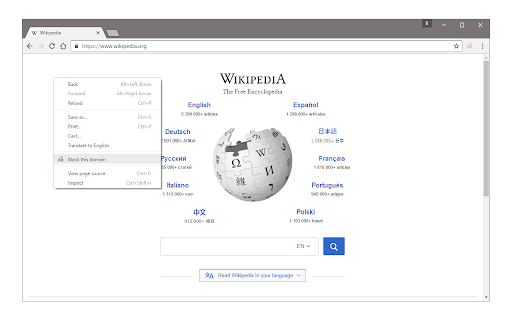
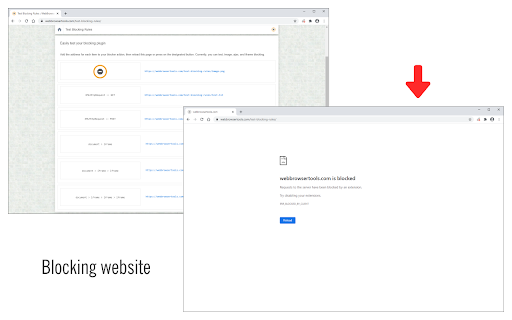
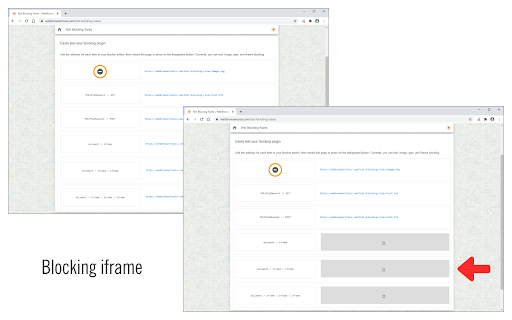
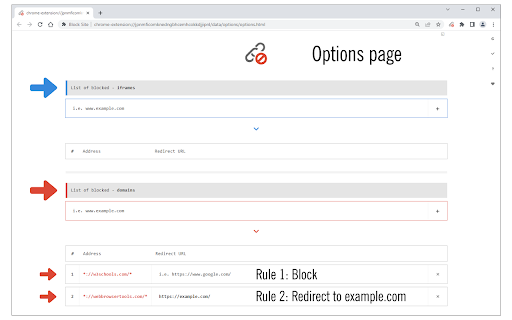
Block Site is a browser extension to help you block desired websites (domains). To work with this addon, simply right-click on any webpage and then click on the "Block this website" via the context-menu item. The website's domain address will be added to the block list (see options page). Please note, the whole domain will be added to the block list, not just a URL. To change this list, open the options page, remove the desired item, or add a new one. For any blocked domain, you can add a redirect URL on the options page. To do so, please first add a domain to the blocked list, and then add a redirect URL in the second column (as shown in the last screenshot). Now, instead of blocking a domain, the website will be redirected to the redirect URL. There is also an option to block desired iframes. To do so, please add the URL (for the iframe) in the designated area on the options page (top…

Listing SEO keywords

Search intent keywords
Keyword signals for evaluating how users may discover, compare, or search for this extension category.

Core discovery

block website chromewebsite blocker extensiondistraction blockerfocus browser extensioninternet control tool

Comparison

block site vsblock website alternative

Problem

can't block websiteswebsite distractionhow to block a website

Alternative

website blocker alternativesite blocking extension similar to

Similar extensions

Jump to related discovery paths:

FAQ

What is Block Site mainly used for?
Block Site is a Chrome extension designed to help users block access to specific websites or redirect them to other URLs. It aims to improve focus by removing distractions, offering options to block entire domains or particular iframes through a user-managed list.
What market signals stand out?
Established adoption with moderate review base. Last known update: 06/23/2026.
What should builders compare before entering this space?
Compare install concentration, rating quality, update recency, screenshots, developer portfolio, listing claims, and review-backed friction signals.
Is this page review-backed?
Backed by review samples. This page combines store metadata with selected review signals, while raw store metrics remain visible for comparison.

Screenshots

Block Site screenshot

Links

Website: mybrowseraddon.com

Videos: Watch

Recommended Chrome extensions

Related listings from the same category, trending peers, and the same publisher portfolio.

Browse tools
Block Image|Video icon

Block Image|Video

Jorvi

Easily block all images & videos within a website!

Installs

40K+

Rating

3.7

BetterTTV icon

BetterTTV

NightDev, LLC

BetterTTV enhances Twitch and YouTube with new features, emotes, and more.

Installs

3.0M+

Rating

4.6

Ad Blocker: Stands AdBlocker icon

Ad Blocker: Stands AdBlocker

Stands

Stands AdBlocker – it's a free ad blocker for YouTube, Twitch, Pop-Ups, Video Ads, and websites. Block ads everywhere with Stands!

Installs

3.0M+

Rating

4.8

Google Input Tools icon

Google Input Tools

cloud-input-team

Input Tools lets you type in the language of your choice.

Installs

3.0M+

Rating

4.0

Microsoft Bing Search with Rewards icon

Microsoft Bing Search with Rewards

Microsoft Corporation

Use the Microsoft Rewards extension to find new ways to earn every day, easily track your points and set your default search to Bing

Installs

3.0M+

Rating

4.4

Google Scholar Button icon

Google Scholar Button

scholar-chrome-extensions

Lookup scholarly articles as you browse the web.

Installs

3.0M+

Rating

4.6

ЮБуст - VPN для YouTube. Обход блокировки Ютуб без ВПН. VPN для браузера icon

ЮБуст - VPN для YouTube. Обход блокировки Ютуб без ВПН. VPN для браузера

Uboost

Ускоритель Ютуб без ВПН, VPN для браузера Яндекс, Chrome, Opera, Edge. Обход замедления Ютуба.

Installs

2.0M+

Rating

4.2

Pie Adblock - A Powerful Free Ad Blocker icon

Pie Adblock - A Powerful Free Ad Blocker

Pie Extensions

Pie Adblock blocks ads & pop-ups, plus YouTube & Twitch video ads. You can customize your ad experience with Pie!

Installs

2.0M+

Rating

4.9

Smallpdf—Edit, Convert, Compress, & AI Summarize PDF icon

Smallpdf—Edit, Convert, Compress, & AI Summarize PDF

Smallpdf AG

Easy-to-use PDF tools to compress, convert, merge, chat to, split, e-sign, and edit PDF files in your browser.

Installs

2.0M+

Rating

4.6

Google Dictionary (by Google) icon

Google Dictionary (by Google)

dictionary-extension-dev

View definitions easily as you browse the web.

Installs

2.0M+

Rating

4.4