Recent Tabs icon

Recent Tabs Chrome Extension Analysis

Tab & Bookmark Productivity

Chrome extension ID: ocllfmhjhfmogablefmibmjcodggknml

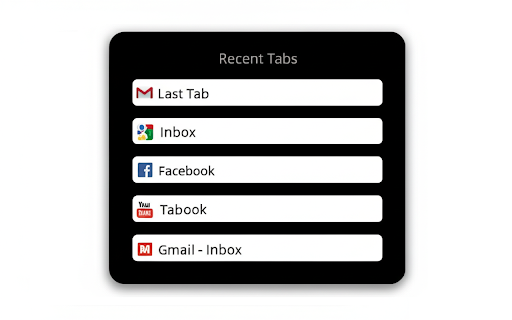
Recent Tabs is a Chrome extension that allows users to toggle between their most recently used browser tabs using configurable keyboard hotkeys. It is designed to emulate the operating system's window-switching behavior within the browser environment.

Developer:JasonSavard.com
Version:5.0
Size:137KiB
Last updated:

Overview

Installs

20K+

Rating

3.6

382 reviews

Languages

6 locales

Includes Deutsch, English, español, français...

Market analysis

Review-backed positioning, friction, and market signals for this Chrome extension.

Backed by review samples

Macro category

Tab & Bookmark Productivity

Pricing friction

Low review signal

Complaint intensity

High review signal

Listing & review signals
Observed signals from store listing text and review samples.

Listing positioning

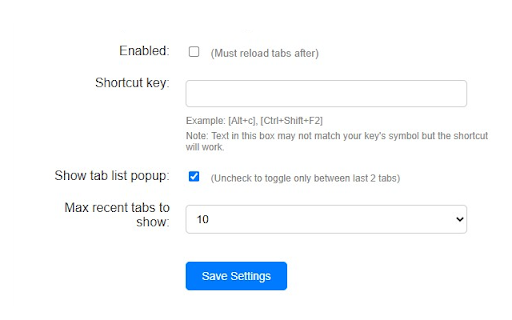
The extension positions itself as a productivity utility that brings 'Alt+Tab' style functionality to browser tabs. It offers customizable keyboard shortcuts to cycle through recently used tabs, aiming to streamline navigation for power users.

Inferred product pattern

Utility extension providing tab navigation shortcuts that appears to suffer from technical debt and lack of maintenance.

Review-backed pain points

Users frequently report that the extension fails to track tab history accurately, becomes unresponsive during navigation, or causes significant input lag in web-based editing tools.

Observed feature gaps

Lack of reliable performance on modern Chrome builds, failure to handle basic 'switch-back' logic consistently, and poor platform-specific (macOS) key handling.

Tags
Tab SwitcherMRU TabsProductivityKeyboard ShortcutsBrowser Utility
Target users

- Power users

- Multitaskers

- Browser-heavy professionals

Primary use cases

- Quickly switching between the last two active tabs

- Navigating a large number of open tabs

- Replacing default browser navigation with custom hotkeys

Positive themes

- Utility of MRU (Most Recently Used) navigation

- Improved workflow efficiency when functioning correctly

Negative themes

- Persistent tab-tracking failure

- UI elements getting stuck on screen

- Performance degradation/input lag in web apps like Google Docs

- Incompatibility or poor support for macOS shortcut conventions

Observed friction

- Performance complaints detected

- None reported; the extension appears to be free/not monetized via direct payment.

Evidence boundary: Based on a high volume of recent and historical user feedback documenting critical functional regressions and performance issues. Reviews cover a wide timespan (2014-2026), suggesting the extension's issues have persisted over many years.
Complaint summaries
Review-backed complaint signals grouped by operational area.

Support

Multiple users express frustration with developer support, noting that suggested fixes are often ineffective or ignore specific platform nuances.

Reliability

High; users report the extension frequently breaks, stops tracking tabs, and causes UI artifacts to stick on screen.

Privacy

No privacy-related complaints found.

Access & pricing

- Free usage observed

- No account requirement observed

- Free plan or free usage claimed

Store listing facts

Listing assets

- Screenshots: 2

- Videos: 1

- Languages: 6

Trust signals

- Privacy policy

- Developer contact

- Official website

Store metadata

- Version: 5.0

- Size: 137KiB

- Last updated:

Store description excerpt
Short excerpt from the public Chrome Web Store listing; full copy is available on the official store page.
Just like using Alt+Tab for Windows except now for your browser tabs. Use Ctrl+Tab or Ctrl+Q or Ctrl+`(~) or assign your own shortcut key for swapping back and forth between your last viewed tabs.

Listing SEO keywords

Search intent keywords
Keyword signals for evaluating how users may discover, compare, or search for this extension category.

Core discovery

Chrome recent tabsMRU tab switcherAlt tab for browserChrome tab hotkeys

Comparison

Firefox tab switching vs Chromebrowser tab manager alternatives

Problem

extension not workingChrome extension input lagtab navigation glitch

Alternative

best tab switcher chrometab management extensions

Similar extensions

Jump to related discovery paths:

FAQ

What is Recent Tabs mainly used for?
Recent Tabs is a Chrome extension that allows users to toggle between their most recently used browser tabs using configurable keyboard hotkeys. It is designed to emulate the operating system's window-switching behavior within the browser environment.
What market signals stand out?
Visible niche traction with moderate review base. Last known update: 05/21/2026.
What should builders compare before entering this space?
Compare install concentration, rating quality, update recency, screenshots, developer portfolio, listing claims, and review-backed friction signals.
Is this page review-backed?
Backed by review samples. This page combines store metadata with selected review signals, while raw store metrics remain visible for comparison.

Screenshots

Recent Tabs screenshot

Links

Recommended Chrome extensions

Related listings from the same category, trending peers, and the same publisher portfolio.

Browse tools
Checker Plus for Gmail™ icon

Checker Plus for Gmail™

JasonSavard.com

Get notifications, read, listen to or delete emails without opening Gmail and easily manage multiple accounts.

Installs

900K+

Rating

4.7

Checker Plus for Google Calendar™ icon

Checker Plus for Google Calendar™

JasonSavard.com

See your next events, get meeting notifications and snooze events without opening the Google Calendar page!

Installs

300K+

Rating

4.4

Lightshot (screenshot tool) icon

Lightshot (screenshot tool)

Skillbrains

Simple and convenient screenshot tool. Select an area, edit your screenshot and upload it to the server.

Installs

2.0M+

Rating

4.4

PrintFriendly: Print Clean Pages, Save as PDF & Screenshot, AI Tools icon

PrintFriendly: Print Clean Pages, Save as PDF & Screenshot, AI Tools

PrintFriendly

Print clean web pages, save as PDF, take screenshots, or use reader mode. AI summaries & ad removal. Works on ChatGPT & Gemini.

Installs

1.0M+

Rating

4.6

Mobile simulator - responsive testing tool icon

Mobile simulator - responsive testing tool

François Duprat

Smartphone and tablet simulator on computer with several models to test mobile responsive websites.

Installs

1.0M+

Rating

4.9

Chat with all AI models (Gemini, Claude, DeepSeek…) & AI Agents | AITOPIA icon

Chat with all AI models (Gemini, Claude, DeepSeek…) & AI Agents | AITOPIA

AITOPIA AI Sidebar

AI Agent Marketplace & AI Sidebar with all AI models (Gemini, Claude, DeepSeek & more) and hundreds of AI Agents

Installs

1.0M+

Rating

4.9

Codex icon

Codex

OpenAI

Control Chrome with Codex.

Installs

1.0M+

Rating

3.8

HID Credential Management Extension icon

HID Credential Management Extension

hid-global-chrome-web-store

Browser extension for HID credential management solution.

Installs

1.0M+

Rating

1.3

Keywords Everywhere - Keyword Tool icon

Keywords Everywhere - Keyword Tool

Axeman Technology Solutions LLP

Keyword search volume, cpc and competition for 15+ websites like Google™ Search Console, YouTube™, Amazon™ & more

Installs

1.0M+

Rating

4.5

WebChatGPT: Prompt library with web access icon

WebChatGPT: Prompt library with web access

WebChatGPT

Augment your ChatGPT prompts with relevant web search results through web browsing.

Installs

1.0M+

Rating

4.2