Zight Screen Recorder, Screenshot App icon

Zight Screen Recorder, Screenshot App Chrome Extension Analysis

Automation & Workflow Efficiency

Chrome extension ID: ojnikmlgjpfiogeijjkpeakbedjhjcch

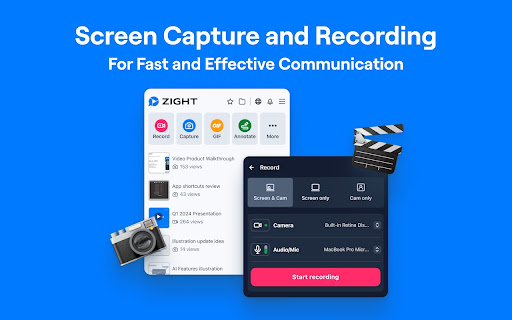
Zight Screen Recorder is a Chrome extension designed for capturing screen activity, webcam, and audio, as well as taking and annotating screenshots. It offers features like instant sharing via short links, AI tools for generating summaries and guides from recordings, and specific functionality for bug reporting and creating instructional content.

Developer:Zight
Version:8.5.0
Size:2.07MiB
Last updated:

Overview

Installs

80K+

Rating

4.5

523 reviews

Languages

1 locales

Includes English (United States)

Market analysis

Review-backed positioning, friction, and market signals for this Chrome extension.

Backed by review samples

Macro category

Automation & Workflow Efficiency

Pricing friction

Moderate review signal

Complaint intensity

Moderate review signal

Listing & review signals
Observed signals from store listing text and review samples.

Listing positioning

The store listing positions Zight as the ultimate all-in-one screen recorder, screenshot tool, and GIF maker for Chrome. It emphasizes instant capture, annotation, and sharing capabilities, highlighting its speed, ease of use, and integration with popular communication and project management tools to boost productivity through visual communication.

Inferred product pattern

A comprehensive visual communication tool, offering screen recording, screenshot capture, and advanced annotation, complemented by AI features and seamless sharing, designed to facilitate efficient content creation, documentation, and team collaboration.

Review-backed pain points

Users express frustration with the mandatory immediate sign-in process and specific login method compatibility. Significant pain points include reported instances of long recordings failing to save, resulting in lost work, and general complaints about the extension being buggy, glitchy, or requiring payment for core recording features.

Observed feature gaps

While feature-rich, some older reviews indicate potential compatibility issues with Chrome OS or specific login method friction (e.g., Apple ID). The reliability issues around saving long recordings and reported payment requirements for core features suggest gaps in the free tier's robustness or clear feature demarcation.

Tags
Screen RecorderScreenshot ToolAnnotationVideo SharingAI Assistant
Target users

- Content creators

- Educators

- Customer support agents

- QA testers

- Product managers

- Developers

- Business professionals needing visual communication

Primary use cases

- Creating video tutorials and how-to guides for staff or clients

- Capturing and annotating screenshots for quick visual feedback and communication

- Generating step-by-step documentation and SOPs from screen recordings

- Bug reporting and QA with technical logs and video evidence

- Building searchable archives of micro-documentation and knowledge

Positive themes

- Ease of use and intuitive interface for capturing and sharing

- Reliable performance with clear recordings, avoiding lag/sync issues found in alternatives

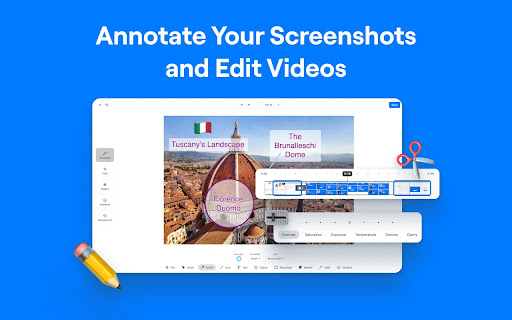
- Powerful and versatile annotation tools for screenshots and videos

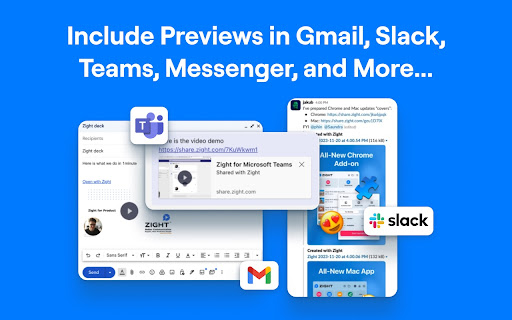
- Instant sharing capabilities with short URLs and rich previews

- Useful AI features for transcription, summaries, and converting videos into guides

- Ability to connect custom domains for branded sharing links

- Effective for creating educational content and detailed instructional videos

Negative themes

- Immediate sign-in requirement upon installation as a barrier to use

- Failure to save long video recordings, leading to data loss

- General bugginess, glitching, and performance issues

- Complaint about needing to pay to record despite a 'free' offering

- Friction with specific login methods (e.g., Apple ID)

Observed friction

- Free-tier complaints detected

- Account blocking complaints detected

- Performance complaints detected

- Some users complain about encountering paywalls for core recording functionality despite the listing indicating free availability, leading to confusion and frustration about limited free usage.

Evidence boundary: This analysis is based on the Chrome Web Store listing, including the title, short and long descriptions, and a sample of 14 user reviews, comprising both high-rating/helpful and low-rating comments. The provided review samples are from different time periods, with some being several years old, which might not reflect the current state of the extension. The sample size is limited and may not capture the full sentiment distribution across all 518 reviews.
Complaint summaries
Review-backed complaint signals grouped by operational area.

Support

Users report friction with immediate sign-in requirements and issues with specific login methods, acting as initial blockers. There are no direct complaints about customer support responsiveness or refund processes.

Reliability

Several users reported significant reliability issues, including the extension being buggy and glitchy, and critical failures where long video recordings could not be saved, leading to complete data loss. Complaints also mention lagging during recordings.

Privacy

Review-backed data is not available for privacy complaints.

Access & pricing

- Free entry with paid features

- Account required for core usage

- Limited free usage observed

Store listing facts

Listing assets

- Screenshots: 5

- Videos: 1

- Languages: 1

Trust signals

- Privacy policy

- Developer contact

- Official website

- Support link

Store metadata

- Version: 8.5.0

- Size: 2.07MiB

- Last updated:

Store description excerpt
Short excerpt from the public Chrome Web Store listing; full copy is available on the official store page.
The Ultimate Screen Recorder, Screenshot Tool, and GIF Maker for Chrome Capture your screen, webcam, annotate, and instantly share videos and screenshots in seconds. 🚀 Top 10 Reasons to Choose Zight: 1️⃣ Trusted by Over 5 Million Users Worldwide 🌍 2️⃣ Screen Recording and Screenshot Capture All-in-One 📷🎥 3️⃣ Instant Sharing with Shortlink URLs 🔗 4️⃣ Annotate Screenshots and Recordings Easily ✏️ 5️⃣ Capture Screen, Voice, and Webcam Together 🎤📹 6️⃣ Integrates Seamlessly with Your Favorite Apps 🤝 7️⃣ High-Quality HD Video Recording 🖥️ 8️⃣ Secure Sharing with Public or Private Links 🔒 9️⃣ Boost Productivity with Visual Communication ⚡ 🔟 Fast, Easy to Use, and No Ads 😊 Features: 🎥 Screen Recording • Capture your screen, webcam, and microphone at the same time • Record your desktop, a specific window, or just your webcam • Automatically upload and generate a shareable link when…

Listing SEO keywords

Search intent keywords
Keyword signals for evaluating how users may discover, compare, or search for this extension category.

Core discovery

screen recorderscreenshot toolvideo captureannotation toolvisual communicationhow-to guidesknowledge managementbug reporting softwareSOP creatoronline tutorials

Comparison

Zight vs OBS StudioZight vs LoomZight vs SnagitZight vs Droplr

Problem

screen recording lagscreenshot annotation issuesdifficult video sharingcreate how-to videos easilystreamline bug reporting

Alternative

screen recorder alternativesscreenshot app for Chromevideo annotation toolsvisual communication softwareonline tutorial creator

Similar extensions

Jump to related discovery paths:

FAQ

What is Zight Screen Recorder, Screenshot App mainly used for?
Zight Screen Recorder is a Chrome extension designed for capturing screen activity, webcam, and audio, as well as taking and annotating screenshots. It offers features like instant sharing via short links, AI tools for generating summaries and guides from recordings, and specific functionality for bug reporting and creating instructional content.
What market signals stand out?
Visible niche traction with moderate review base. Last known update: 11/22/2025.
What should builders compare before entering this space?
Compare install concentration, rating quality, update recency, screenshots, developer portfolio, listing claims, and review-backed friction signals.
Is this page review-backed?
Backed by review samples. This page combines store metadata with selected review signals, while raw store metrics remain visible for comparison.

Screenshots

Zight Screen Recorder, Screenshot App screenshot

Links

Recommended Chrome extensions

Related listings from the same category, trending peers, and the same publisher portfolio.

Browse communication
HyperWrite: AI Autocomplete App icon

HyperWrite: AI Autocomplete App

Otherside AI

Smart autocomplete for Gmail, Google Docs, ChatGPT, and more. An AI writing assistant that predicts words and sentences.

Installs

80K+

Rating

4.2

MerciApp - AI Writing Assistant icon

MerciApp - AI Writing Assistant

MerciApp

Write better, faster, wherever you work.

Installs

80K+

Rating

4.5

WA-Sender icon

WA-Sender

what-sender.com

Optimize customer loyalty and capture new audience by sending personalized messages through WhatsApp.

Installs

80K+

Rating

4.1

Multi Email Forward by cloudHQ icon

Multi Email Forward by cloudHQ

cloudHQ

Forward multiple Gmail™ emails with one click. Transfer or migrate your Gmail™ emails.

Installs

80K+

Rating

4.1

TWP - Translate [BETA] icon

TWP - Translate [BETA]

Filipe Dev

THIS EXTENSION IS FOR BETA TESTING

Installs

80K+

Rating

4.9

FlowCrypt: Encrypt Gmail with PGP icon

FlowCrypt: Encrypt Gmail with PGP

flowcrypt-release

Simple end-to-end encryption to secure email and attachments on Google.

Installs

70K+

Rating

4.7

ClassroomGo AI無邊際(學生) icon

ClassroomGo AI無邊際(學生)

雲動教育科技

1. 教師主控端支援Chrome OS、Mac、以及Windows系統,學生受控端支援已登入之Chromebook。 2. 可載入教師Google Classroom 開課資訊及上課學生清單,並可由教師主控端一覽上線學生受控端之螢幕畫面。 3.…

Installs

70K+

Rating

1.4

Voila – AI Assistant, Copilot and AI Writer icon

Voila – AI Assistant, Copilot and AI Writer

Initial condition

Seamless personal AI assistant powered by GPT-5 to help you create, write, summarize, brainstorm, and research on any website.

Installs

70K+

Rating

4.7

Grammar Checker and AI tool - Correcto icon

Grammar Checker and AI tool - Correcto

product-development-correcto

Improve your writing with the AI-powered online grammar and spelling checker in Spanish and our paraphrasing tool.

Installs

70K+

Rating

4.6

Share link via email icon

Share link via email

Cobote

Adds a button and context menu item to send the page URL or a link URL via email

Installs

70K+

Rating

3.9