uBlacklist icon

uBlacklist Chrome Extension Analysis

Privacy, Security & Ad Blockers

Chrome extension ID: pncfbmialoiaghdehhbnbhkkgmjanfhe

uBlacklist is a browser extension that allows users to blacklist specific domains from appearing in search engine results. It supports multiple search engines and provides options for both manual rule creation and public ruleset subscriptions.

Developer:iorate
Version:9.9.0
Size:2.13MiB
Last updated:

Overview

Installs

200K+

Rating

4.4

930 reviews

Languages

13 locales

Includes Deutsch, English, Türkçe, español...

Market analysis

Review-backed positioning, friction, and market signals for this Chrome extension.

Backed by review samples

Macro category

Privacy, Security & Ad Blockers

Pricing friction

Low review signal

Complaint intensity

Moderate review signal

Listing & review signals
Observed signals from store listing text and review samples.

Listing positioning

The product is positioned as a utility to clean up search results by preventing specific sites from appearing. It emphasizes flexibility through match patterns, regular expressions, and the ability to sync rulesets via Google Drive or Dropbox.

Inferred product pattern

Open-source utility for user-defined search engine filtering.

Review-backed pain points

Users report a significant regression in version 9.0.0 where previously blocked sites are now visible again and the intuitive 'block this site' buttons have disappeared or changed behavior.

Observed feature gaps

Inconsistency in blocking sites within 'quick match' dropdowns or specific search tabs (e.g., Forums tab) and intermittent failures in image search blocking.

Tags
Search FilterContent BlockerSearch CustomizationProductivity Tool
Target users

- Power searchers

- Users avoiding content farms or AI-generated sites

- Researchers seeking higher signal-to-noise ratios in search

Primary use cases

- Removing low-quality websites from search results

- Blocking AI-generated content websites

- Filtering out specific forums or social media platforms from Google searches

Positive themes

- Effective removal of generative AI websites

- Long-term utility for search cleaning

- Ability to block results in image searches

Negative themes

- Functionality breakage in version 9.0.0

- Failure to hide blacklisted sites

- Disappearance of the block button in the UI

- Ineffectiveness in specific search UI elements like dropdowns

Observed friction

- Performance complaints detected

- No pricing friction observed; the extension appears to be free.

Evidence boundary: Data extracted from the store listing and 15 review samples focusing on recent version updates. Recent review samples are heavily skewed toward complaints regarding version 9.0.0, which may not reflect the long-term stability of previous versions.
Complaint summaries
Review-backed complaint signals grouped by operational area.

Support

No direct support interaction complaints, but users express frustration over the lack of stability in the latest update.

Reliability

Severe reliability issues reported following the 9.0.0 update, with users claiming the tool 'no longer works at all' or fails to hide sites.

Privacy

No privacy or security complaints found in the provided samples.

Access & pricing

- Free usage observed

- No account requirement observed

- Free plan or free usage claimed

Store listing facts

Listing assets

- Screenshots: 4

- Videos: 0

- Languages: 13

Trust signals

- Privacy policy

- Developer contact

Store metadata

- Version: 9.9.0

- Size: 2.13MiB

- Last updated:

Store description excerpt
Short excerpt from the public Chrome Web Store listing; full copy is available on the official store page.
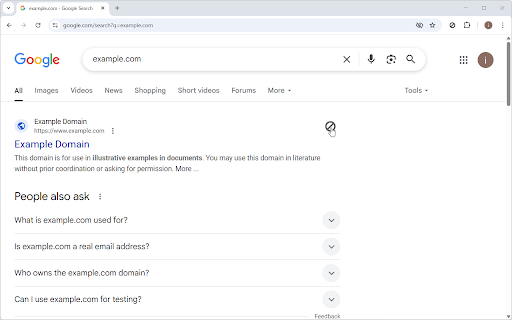
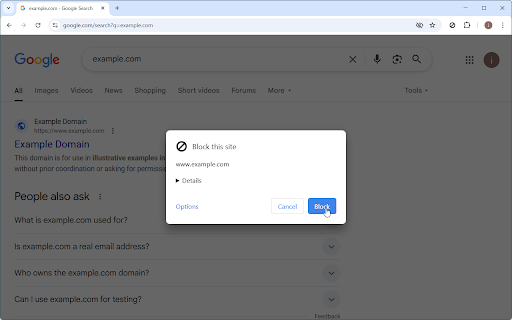
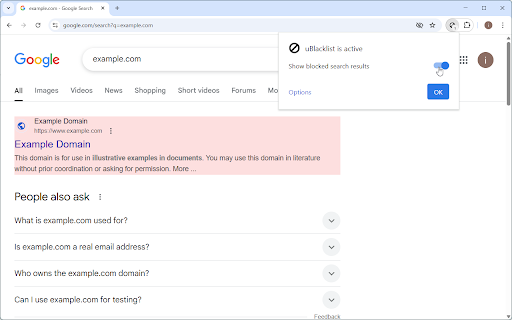
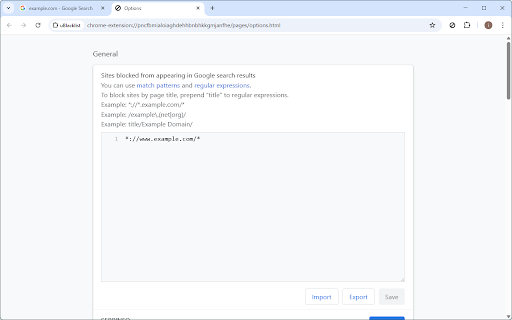
This extension prevents the sites you specify from appearing in Google search results. You can add rules on search result pages, or on sites to be blocked by clicking the toolbar icon. Rules can be specified either by match patterns (e.g. *://*.example.com/*) or by regular expressions (e.g. /example\.(net|org)/). You can use this extension in several search engines other than Google. The list of supported search engines is available at: https://github.com/iorate/ublacklist#supported-search-engines You can synchronize rulesets across devices via cloud storage. At the moment, Google Drive and Dropbox are supported. You can also subscribe to public rulesets. Some subscriptions are listed on the website: https://ublacklist.github.io/subscriptions Usage: https://ublacklist.github.io/docs/getting-started Changelog: https://github.com/iorate/ublacklist/releases

Listing SEO keywords

Search intent keywords
Keyword signals for evaluating how users may discover, compare, or search for this extension category.

Core discovery

block sites from google searchhide websites from search resultsgoogle search filter extension

Comparison

uBlacklist alternativesbest search result blocker

Problem

too many reddit resultshow to block quora from googleremove ai sites from search

Alternative

search result filtergoogle blacklist extension

Similar extensions

Jump to related discovery paths:

FAQ

What is uBlacklist mainly used for?
uBlacklist is a browser extension that allows users to blacklist specific domains from appearing in search engine results. It supports multiple search engines and provides options for both manual rule creation and public ruleset subscriptions.
What market signals stand out?
Established adoption with moderate review base. Last known update: 06/21/2026.
What should builders compare before entering this space?
Compare install concentration, rating quality, update recency, screenshots, developer portfolio, listing claims, and review-backed friction signals.
Is this page review-backed?
Backed by review samples. This page combines store metadata with selected review signals, while raw store metrics remain visible for comparison.

Screenshots

uBlacklist screenshot

Links

Recommended Chrome extensions

Related listings from the same category, trending peers, and the same publisher portfolio.

Browse tools