uSuperDrag icon

uSuperDrag Chrome Extension Analysis

Automation & Workflow Efficiency

Chrome extension ID: liikkibjjbncmbpjebipicodoegpcael

uSuperDrag is a Chrome extension that allows users to search for selected text or open links simply by dragging and dropping them. It streamlines the process of opening new tabs and performing searches via a specified search engine.

Developer:iorate
Version:1.3.0
Size:18.79KiB
Last updated:

Overview

Installs

2K+

Rating

3.9

13 reviews

Languages

2 locales

Includes English, 日本語

Market analysis

Review-backed positioning, friction, and market signals for this Chrome extension.

Backed by review samples

Macro category

Automation & Workflow Efficiency

Pricing friction

Low review signal

Complaint intensity

Moderate review signal

Listing & review signals
Observed signals from store listing text and review samples.

Listing positioning

The product is positioned as a productivity enhancement that replaces traditional right-clicking or copy-pasting with drag-and-drop actions. It specifically highlights a feature set similar to the legacy Presto Opera browser for selecting and opening links.

Inferred product pattern

A niche utility replicating legacy browser 'Super Drag' functionality for modern Chrome users.

Review-backed pain points

Users are frustrated that the browser automatically jumps to the newly opened tab instead of opening it in the background. Additionally, some users report that the extension disables the ability to drag text into input areas for pasting.

Observed feature gaps

Lack of an option to open links in background tabs, missing support for multi-selection dragging, and limited customization settings.

Tags
Super DragProductivitySearch ShortcutWeb NavigationBrowser Utility
Target users

- Browser power users

- Researchers

- Legacy Opera browser fans

Primary use cases

- Quickly searching highlighted text without right-clicking

- Fast-opening links via drag-and-drop

Positive themes

- Effective core functionality

- Simplicity and lack of bloat

- Reliability compared to similar extensions

Negative themes

- Lack of configuration options

- Forced tab switching (lack of background opening)

- Interference with standard drag-and-drop copy-pasting

Observed friction

- No pricing friction observed as the tool appears to be free.

Evidence boundary: Data extracted from the official Chrome Web Store listing and a sample of 10 user reviews. Small review sample size; some review content required translation from Chinese and Japanese.
Complaint summaries
Review-backed complaint signals grouped by operational area.

Support

No specific support or account-related complaints found.

Reliability

Occasional reports of the extension not working for some users, and frustration over the lack of configuration options.

Privacy

No privacy or security complaints observed.

Access & pricing

- Free usage observed

- No account requirement observed

- Free plan or free usage claimed

Store listing facts

Listing assets

- Screenshots: 1

- Videos: 0

- Languages: 2

Trust signals

- Privacy policy

- Developer contact

Store metadata

- Version: 1.3.0

- Size: 18.79KiB

- Last updated:

Store description excerpt
Short excerpt from the public Chrome Web Store listing; full copy is available on the official store page.
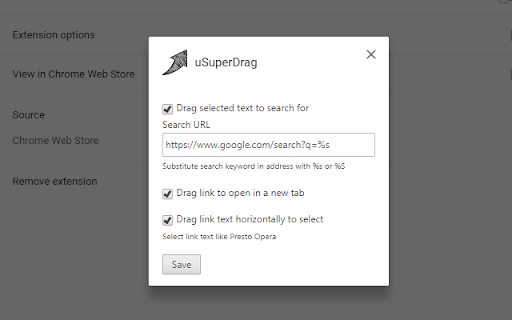
This Chrome extension provides "Super Drag" for selected text and link. If you drag-and-drop selected text or link, it will be searched for by the specified search engine (default: Google) or opened in a new tab, respectively. In addition, this extension enables us to drag link text horizontally and select it, just like Presto Opera.

Listing SEO keywords

Search intent keywords
Keyword signals for evaluating how users may discover, compare, or search for this extension category.

Core discovery

chrome super dragdrag and drop search extensiondrag text to search chrome

Comparison

uSuperDrag vs Super DragOpera Presto drag and drop for Chrome

Problem

slow web searchingtoo many clicks to open linkscannot drag search chrome

Alternative

super drag alternativesdrag search chrome extension

Similar extensions

Jump to related discovery paths:

FAQ

What is uSuperDrag mainly used for?
uSuperDrag is a Chrome extension that allows users to search for selected text or open links simply by dragging and dropping them. It streamlines the process of opening new tabs and performing searches via a specified search engine.
What market signals stand out?
Early or small audience with limited review base. Last known update: 05/10/2026.
What should builders compare before entering this space?
Compare install concentration, rating quality, update recency, screenshots, developer portfolio, listing claims, and review-backed friction signals.
Is this page review-backed?
Backed by review samples. This page combines store metadata with selected review signals, while raw store metrics remain visible for comparison.

Screenshots

uSuperDrag screenshot

Links

Recommended Chrome extensions

Related listings from the same category, trending peers, and the same publisher portfolio.

Browse tools
uBlacklist icon

uBlacklist

iorate

Blocks sites you specify from appearing in Google search results

Installs

200K+

Rating

4.4

Planet Search icon

Planet Search

Free VPN Planet

Enchanced default search engine.

Installs

2.0M+

Rating

3.4

Lightshot (screenshot tool) icon

Lightshot (screenshot tool)

Skillbrains

Simple and convenient screenshot tool. Select an area, edit your screenshot and upload it to the server.

Installs

2.0M+

Rating

4.4

PrintFriendly: Print Clean Pages, Save as PDF & Screenshot, AI Tools icon

PrintFriendly: Print Clean Pages, Save as PDF & Screenshot, AI Tools

PrintFriendly

Print clean web pages, save as PDF, take screenshots, or use reader mode. AI summaries & ad removal. Works on ChatGPT & Gemini.

Installs

1.0M+

Rating

4.6

Mobile simulator - responsive testing tool icon

Mobile simulator - responsive testing tool

François Duprat

Smartphone and tablet simulator on computer with several models to test mobile responsive websites.

Installs

1.0M+

Rating

4.9

Chat with all AI models (Gemini, Claude, DeepSeek…) & AI Agents | AITOPIA icon

Chat with all AI models (Gemini, Claude, DeepSeek…) & AI Agents | AITOPIA

AITOPIA AI Sidebar

AI Agent Marketplace & AI Sidebar with all AI models (Gemini, Claude, DeepSeek & more) and hundreds of AI Agents

Installs

1.0M+

Rating

4.9

Codex icon

Codex

OpenAI

Control Chrome with Codex.

Installs

1.0M+

Rating

3.8

HID Credential Management Extension icon

HID Credential Management Extension

hid-global-chrome-web-store

Browser extension for HID credential management solution.

Installs

1.0M+

Rating

1.3

Keywords Everywhere - Keyword Tool icon

Keywords Everywhere - Keyword Tool

Axeman Technology Solutions LLP

Keyword search volume, cpc and competition for 15+ websites like Google™ Search Console, YouTube™, Amazon™ & more

Installs

1.0M+

Rating

4.5

WebChatGPT: Prompt library with web access icon

WebChatGPT: Prompt library with web access

WebChatGPT

Augment your ChatGPT prompts with relevant web search results through web browsing.

Installs

1.0M+

Rating

4.2