BetterSEQTA+ icon

BetterSEQTA+ Chrome Extension Analysis

Automation & Workflow Efficiency

Chrome extension ID: afdgaoaclhkhemfkkkonemoapeinchel

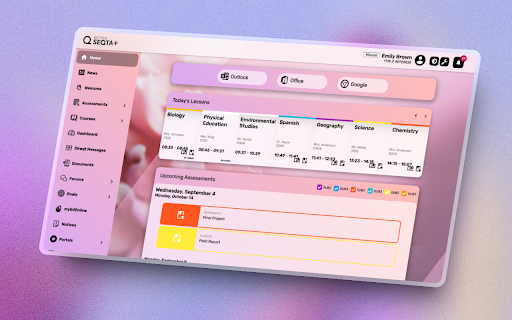
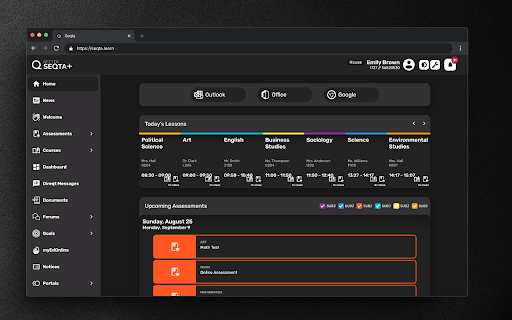
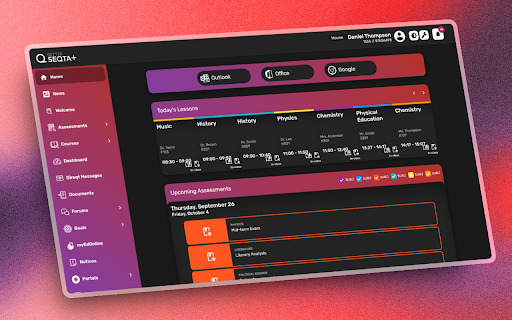
This browser extension serves as a front-end wrapper for the SEQTA Learn educational portal. It injects CSS and UI changes to allow students to modify colors, backgrounds, menu structures, and notification settings for a more personalized user experience.

Developer:BetterSEQTA+
Version:3.7.2
Size:7.38MiB
Last updated:

Overview

Installs

80K+

Rating

4.4

87 reviews

Languages

1 locales

Includes English

Market analysis

Review-backed positioning, friction, and market signals for this Chrome extension.

Backed by review samples

Macro category

Automation & Workflow Efficiency

Pricing friction

Low review signal

Complaint intensity

Moderate review signal

Listing & review signals
Observed signals from store listing text and review samples.

Listing positioning

BetterSEQTA+ positions itself as a student-led improvement tool designed to enhance the SEQTA Learn platform. It promises to transform a standard educational interface into a visually appealing and highly personalized dashboard through custom themes, dark mode, and improved layout navigation.

Inferred product pattern

UI/UX enhancement extension for a third-party enterprise educational portal.

Review-backed pain points

Users frequently report UI conflicts where text becomes unreadable (e.g., black text on dark backgrounds), elements overlap or hide critical data, and occasional 'broken' states where the extension fails to load or integrate correctly with the host site.

Observed feature gaps

Lack of granular control over automatic updates, difficulties in restoring preferred settings after layout bugs, and inconsistent rendering across different modules like direct messages and assessment results.

Tags
Student ProductivityUI CustomizationSEQTA Enhancement
Target users

- Students using SEQTA Learn

Primary use cases

- Customizing dashboard aesthetics

- Improving readability via dark mode

- Streamlining navigation to daily lessons and notices

Positive themes

- Appreciation for visual customization

- Value of the dark mode feature

- Improved dashboard layout usability

Negative themes

- UI rendering bugs causing unreadable text

- Broken elements in the timetable and assessment views

- Forced automatic updates affecting user preferences

Observed friction

- Performance complaints detected

- None; the extension is free and open-source.

Evidence boundary: The findings are based on a review of student feedback in the Chrome Web Store and the developer's provided feature list. Evidence reflects common UI bugs and user experience satisfaction. Review data is limited to user comments, which may be influenced by host platform updates that the extension cannot control.
Complaint summaries
Review-backed complaint signals grouped by operational area.

Support

Users express frustration regarding bugs in core features like timetables and direct messages, though there is no explicit mention of paid support systems.

Reliability

Frequent reports of the extension breaking after updates, including overlapping UI elements, white-screen bugs, and failure to load content properly.

Privacy

No privacy complaints observed.

Access & pricing

- Free usage observed

- No account requirement observed

- Free plan or free usage claimed

Store listing facts

Listing assets

- Screenshots: 3

- Videos: 0

- Languages: 1

Trust signals

- Privacy policy

- Developer contact

Store metadata

- Version: 3.7.2

- Size: 7.38MiB

- Last updated:

Store description excerpt
Short excerpt from the public Chrome Web Store listing; full copy is available on the official store page.
Making SEQTA Learn actually enjoyable! (yes, really!) 🎨 What's New & Awesome: - Live wallpapers that make your dashboard feel alive! Watch cherry blossoms float by while doing math (way better than staring at that blank white screen, right?) - Upload your own background images/videos because why not make SEQTA your happy place? - Pick ANY color you want! Purple SEQTA? Sure! Hot pink? Go wild! - Custom themes that transform SEQTA into something actually beautiful (we know, shocking!) ✨ All The Good Stuff You Already Love: - Dark mode that won't burn your eyes at 11PM when you remember that assignment - Reorganize the menu (goodbye, things you never use!) - Next lesson notifications so you don't accidentally walk into English with your Science books - Better-looking... well, everything! - A homepage that actually makes sense (revolutionary, we know) 🏃 Quick Access to: - Your daily lesso…

Listing SEO keywords

Search intent keywords
Keyword signals for evaluating how users may discover, compare, or search for this extension category.

Core discovery

BetterSEQTA extensionSEQTA Learn dark modeImprove SEQTA interface

Comparison

BetterSEQTA vs BetterSEQTA+SEQTA productivity tools

Problem

SEQTA UI bugBetterSEQTA brokendark mode unreadable text

Alternative

SEQTA styling tools

Similar extensions

Jump to related discovery paths:

FAQ

What is BetterSEQTA+ mainly used for?
This browser extension serves as a front-end wrapper for the SEQTA Learn educational portal. It injects CSS and UI changes to allow students to modify colors, backgrounds, menu structures, and notification settings for a more personalized user experience.
What market signals stand out?
Visible niche traction with limited review base. Last known update: 06/19/2026.
What should builders compare before entering this space?
Compare install concentration, rating quality, update recency, screenshots, developer portfolio, listing claims, and review-backed friction signals.
Is this page review-backed?
Backed by review samples. This page combines store metadata with selected review signals, while raw store metrics remain visible for comparison.

Screenshots

BetterSEQTA+ screenshot

Links

Recommended Chrome extensions

Related listings from the same category, trending peers, and the same publisher portfolio.

Browse education
xFanatical Safe Doc icon

xFanatical Safe Doc

xFanatical

xFanatical Safe Doc smooths the way for schools managing Google Workspace for Education features (Docs, Sheets, Slides, Classroom,…

Installs

200K+

Rating

1.4

Mouse Tooltip Translator - PDF & Netflix YouTube dual subs icon

Mouse Tooltip Translator - PDF & Netflix YouTube dual subs

ttop324

Mouse Tooltip Translator translate mouseover text using google translate. Support OCR, TTS, manga translator & pdf translator.

Installs

200K+

Rating

4.6

Paperpile Extension icon

Paperpile Extension

Paperpile

Collect, organize, annotate and cite your research papers in Chrome.

Installs

200K+

Rating

4.6

Rapid Journal Quality Check icon

Rapid Journal Quality Check

jrk.devgit

Displays rankings and h-index for academic journals next to Google Scholar search results.

Installs

200K+

Rating

4.2

OpenDyslexic for Chrome icon

OpenDyslexic for Chrome

OpenDyslexic

Format pages using the OpenDyslexic font and low contrast help

Installs

200K+

Rating

4.1

Google Meet Breakout by Robert Hudek icon

Google Meet Breakout by Robert Hudek

Unknown developer

Only the teacher needs to install. Completely Free and your Data is Private. Google Classroom integration, Slider Control.

Installs

200K+

Rating

4.4

Reverso – Translation, dictionary icon

Reverso – Translation, dictionary

Reverso Technologies Inc.

Translate and learn languages while browsing and watching movies, it’s free.

Installs

200K+

Rating

4.6

Toucan by Babbel - Language Learning icon

Toucan by Babbel - Language Learning

jointoucan.com

Learn a new language just by browsing the internet.

Installs

200K+

Rating

4.6

Add to Google Classroom icon

Add to Google Classroom

Canopy

This extension adds the current site to Google Classroom

Installs

200K+

Rating

4.2

Knowt: Quizlet Import, AI Notes & Flashcards icon

Knowt: Quizlet Import, AI Notes & Flashcards

Knowt

Automatically import flashcards and notes from any video, PDF, article, or flashcard site. Knowt is the fastest way to study.

Installs

100K+

Rating

4.9