WebToEpub icon

WebToEpub Chrome Extension Analysis

Web Scraping & Data Extraction

Chrome extension ID: akiljllkbielkidmammnifcnibaigelm

WebToEpub is a tool that scrapes content from web fiction sites to generate EPUB files. It allows users to archive online stories and read them on dedicated e-reader devices like Kindle.

Developer:dteviot
Version:1.0.12.0
Size:505KiB
Last updated:

Overview

Installs

100K+

Rating

4.7

485 reviews

Languages

4 locales

Includes English, Tiếng Việt, русский, українська

Market analysis

Review-backed positioning, friction, and market signals for this Chrome extension.

Backed by review samples

Macro category

Web Scraping & Data Extraction

Pricing friction

Low review signal

Complaint intensity

Moderate review signal

Listing & review signals
Observed signals from store listing text and review samples.

Listing positioning

The extension positions itself as a utility for converting web novels and other web pages into EPUB files for offline reading. It emphasizes broad compatibility with popular sites like AO3, FanFiction.net, and RoyalRoad.

Inferred product pattern

Open-source content aggregator and format converter for web fiction.

Review-backed pain points

Users report the extension frequently stops working due to site changes, specifically citing parser errors (TypeError) and browser crashes on Vivaldi.

Observed feature gaps

Difficulty parsing modern layouts (e.g., Medium) and inconsistent ad-stripping on certain platforms like RoyalRoad.

Tags
Web Novel DownloaderEPUB ConverterE-book CreatorOffline ReadingWeb Scraping
Target users

- Web novel readers

- Fanfiction enthusiasts

- E-reader users

- Digital archivists

Primary use cases

- Converting online stories to EPUB

- Backing up web content for offline use

- Reading web-based novels on physical e-readers

Positive themes

- Efficient watermark removal

- High compatibility across various sites

- Ease of use with minimal clicks

- Availability of advanced settings for power users

Negative themes

- Parser failures following site updates

- Browser instability and crashes

- Poor handling of specific page layouts like Medium

- Failure to remove some platform-specific ads

Observed friction

- Performance complaints detected

- No pricing friction observed; the tool is described as free and open-source (GPL v3).

Evidence boundary: Extracted data from store listing and 20 representative user reviews. Some negative reviews are outdated (dating back to 2017), which may not reflect current software stability.
Complaint summaries
Review-backed complaint signals grouped by operational area.

Support

No direct support channel complaints, though users use reviews to report technical breakage.

Reliability

Reliability issues reported when websites update their layouts, leading to 'no chapters found' or parser errors.

Privacy

No privacy or security complaints observed.

Access & pricing

- Free usage observed

- No account requirement observed

- Free plan or free usage claimed

Store listing facts

Listing assets

- Screenshots: 1

- Videos: 0

- Languages: 4

Trust signals

- Privacy policy

- Developer contact

- Support link

Store metadata

- Version: 1.0.12.0

- Size: 505KiB

- Last updated:

Store description excerpt
Short excerpt from the public Chrome Web Store listing; full copy is available on the official store page.
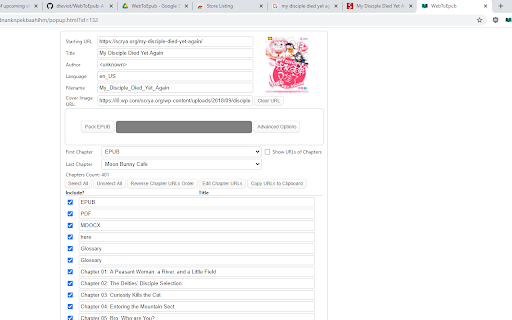
Extension that converts Web Novels (and other web pages) into an EPUB for offline reading. Works with many sites, including: 1. Baka-Tsuki.org 2. ArchiveOfOurOwn.org 3. FanFiction.net. 4. royalroad.com 5. www.readlightnovel.com (partial support) 6. Numerous other light novel sites To use with Baka-Tsuki: 1. Browse to a Baka-Tsuki web page that has the full text of a story. 2. Click on the WebToEpub icon on top right of the Chrome window. 3. Check story details are correct. 4. Select image to use for cover. 5. Click the "Pack EPUB" button. 6. Wait for progress bar to finish (indicating the images being downloaded) and the generated EPUB to be placed in your downloads directory. To use with Archive Of Our Own: 1. Browse to first chapter of story you want. 2. Click on the WebToEpub icon on top right of the Chrome window. 3. Check story details are correct. 5. Click the "Pack EPUB" button.…

Listing SEO keywords

Search intent keywords
Keyword signals for evaluating how users may discover, compare, or search for this extension category.

Core discovery

convert web novel to epubdownload fanfiction as epubweb to epub extensionsave web pages as ebook

Comparison

web to epub vs calibrebest web novel downloader

Problem

how to read web novels on kindlesave online stories offlineconvert AO3 to epub

Alternative

FanFiction.net downloaderRoyalRoad epub converter

Similar extensions

Jump to related discovery paths:

FAQ

What is WebToEpub mainly used for?
WebToEpub is a tool that scrapes content from web fiction sites to generate EPUB files. It allows users to archive online stories and read them on dedicated e-reader devices like Kindle.
What market signals stand out?
Established adoption with moderate review base. Last known update: 03/05/2026.
What should builders compare before entering this space?
Compare install concentration, rating quality, update recency, screenshots, developer portfolio, listing claims, and review-backed friction signals.
Is this page review-backed?
Backed by review samples. This page combines store metadata with selected review signals, while raw store metrics remain visible for comparison.

Screenshots

WebToEpub screenshot

Links

Recommended Chrome extensions

Related listings from the same category, trending peers, and the same publisher portfolio.

Browse fun