ScoreGap — LSAT Wrong Answer Journal icon

ScoreGap Chrome Extension Analysis

Automation & Workflow Efficiency

Store listing title: ScoreGap — LSAT Wrong Answer Journal

Chrome extension ID: bjiajdjbnhelfcompimoegajnmmlgedn

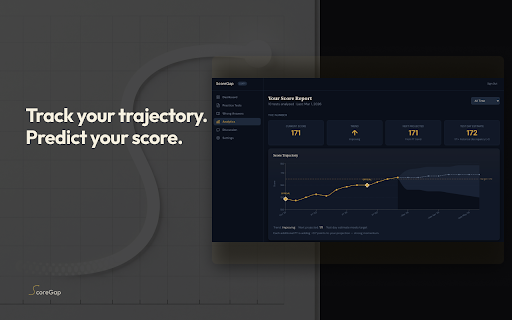
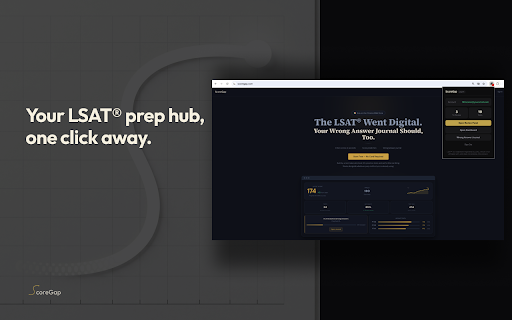
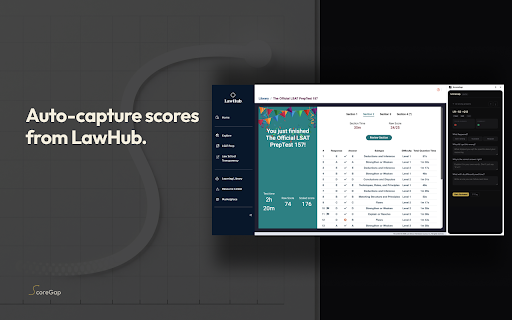
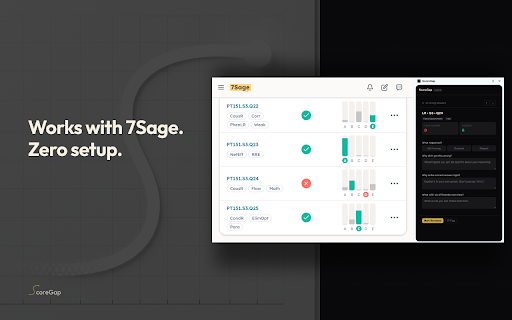
ScoreGap is a Chrome extension that automatically captures LSAT practice test results, timing, and question details from major prep sites. It transforms this data into a detailed wrong-answer journal with predictive scoring and performance analytics.

Developer:ScoreGap
Version:1.0.8
Size:42.62KiB
Last updated:

Overview

Installs

10K+

Rating

5.0

20 reviews

Languages

1 locales

Includes English

Market analysis

Review-backed positioning, friction, and market signals for this Chrome extension.

Backed by review samples

Macro category

Automation & Workflow Efficiency

Pricing friction

Low review signal

Complaint intensity

Low review signal

Listing & review signals
Observed signals from store listing text and review samples.

Listing positioning

ScoreGap positions itself as an automation layer for LSAT preparation that eliminates the need for manual data entry into spreadsheets. It promises to bridge the gap between practice test platforms like LawHub and a centralized, automated error journal.

Inferred product pattern

Automated data extraction and analytics tool for specialized educational test prep.

Review-backed pain points

Users noted that while core features are available, heavy users will need to pay for the unlimited version to accommodate large volumes of practice tests.

Observed feature gaps

No significant gaps observed from reviews; advanced analytics are explicitly listed as part of a paid plan.

Tags
LSAT PrepStudy AutomationTest AnalyticsWrong Answer Journal
Target users

- LSAT test takers

- Law school applicants

- Serious LSAT students

Primary use cases

- Automating LSAT error tracking

- Analyzing test performance patterns

- Predicting LSAT scores based on practice data

Positive themes

- Seamless automation of manual data entry

- Effective data bridging between prep sites and dashboard

- Useful side-panel review functionality

Negative themes

- Requirement to pay for unlimited features

Observed friction

- Users mentioned that intensive study sessions requiring unlimited tracking require a paid Pro plan.

Evidence boundary: Evidence derived from product listing details and highly positive user reviews emphasizing automation and time-saving features. Review sample size is relatively small (20 comments).
Complaint summaries
Review-backed complaint signals grouped by operational area.

Support

no_review_fallback

Reliability

no_review_fallback

Privacy

no_review_fallback

Access & pricing

- Free entry with paid features

- Account required for core usage

- Limited free usage observed

Store listing facts

Listing assets

- Screenshots: 5

- Videos: 0

- Languages: 1

Trust signals

- Privacy policy

- Developer contact

- Official website

Store metadata

- Version: 1.0.8

- Size: 42.62KiB

- Last updated:

Store description excerpt
Short excerpt from the public Chrome Web Store listing; full copy is available on the official store page.
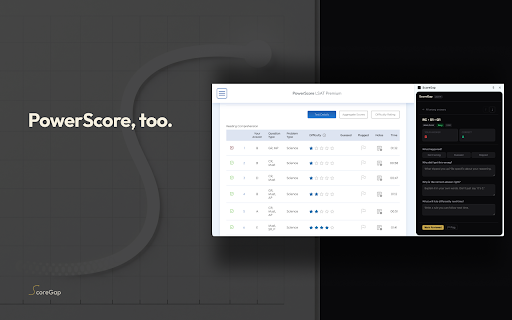
Every LSAT® tutor recommends a wrong answer journal. But nobody keeps one. Building it by hand takes longer than the test itself. ScoreGap automates the entire process. Take a practice test on LawHub, 7Sage, or PowerScore, and the extension captures your answers, timing, and score automatically. No copy-pasting. No spreadsheets. WHAT'S NEW Major journal updates since v1.0.5: • Priority tiers replace the flag button: mark wrong answers as Revisit, Important, or Critical • Edit notes after marking reviewed: refine your reflections anytime as you revisit errors • Notes auto-save as you type: closing the panel or hitting a session timeout won't lose your work • Inline reconnect: session-expired banner lets you sign back in without leaving the journal • Clearer duplicate handling: "already in your journal" message when re-opening a synced test • Status reliability: connection indicator stays…

Listing SEO keywords

Search intent keywords
Keyword signals for evaluating how users may discover, compare, or search for this extension category.

Core discovery

LSAT wrong answer journalLawHub score capture7Sage automationLSAT performance analytics

Comparison

manual LSAT error logLSAT spreadsheet tracking

Problem

LSAT data entrymanual LSAT journaling

Alternative

LSAT prep toolsLSAT study analytics

Similar extensions

Jump to related discovery paths:

FAQ

What is ScoreGap mainly used for?
ScoreGap is a Chrome extension that automatically captures LSAT practice test results, timing, and question details from major prep sites. It transforms this data into a detailed wrong-answer journal with predictive scoring and performance analytics.
What market signals stand out?
Visible niche traction with limited review base. Last known update: 06/13/2026.
What should builders compare before entering this space?
Compare install concentration, rating quality, update recency, screenshots, developer portfolio, listing claims, and review-backed friction signals.
Is this page review-backed?
Backed by review samples. This page combines store metadata with selected review signals, while raw store metrics remain visible for comparison.

Screenshots

ScoreGap — LSAT Wrong Answer Journal screenshot

Links

Recommended Chrome extensions

Related listings from the same category, trending peers, and the same publisher portfolio.

Browse education
Card Wizard icon

Card Wizard

ScoreGap

Score your Wizard card games as you play.

Installs

3

Rating

AnswerAI - Homework AI Tutor & Study Helper icon

AnswerAI - Homework AI Tutor & Study Helper

AnswerAI Team

Your AI assistant ChatGPT Plugin.Answer questions and get AI answers quickly,write emails,articles,chatbot,learning assistant.

Installs

100K+

Rating

4.9

Rememberry - Translate and Memorize with Flashcards icon

Rememberry - Translate and Memorize with Flashcards

rememberry

Translate words while browsing and turn them into spaced repetition flashcards to build foreign language vocabulary.

Installs

100K+

Rating

4.6

Transcript - AI Homework Helper icon

Transcript - AI Homework Helper

Transcript

Streamline your study experience with AI: Instant answers, deep insights, and personalized learning across subjects.

Installs

100K+

Rating

3.4

Revision History: Writing Process Visibility for Google Docs & Slides icon

Revision History: Writing Process Visibility for Google Docs & Slides

Revision History

Built for teachers: See how students write, not just what they wrote. View the writing process in Google Docs & Slides.

Installs

100K+

Rating

3.7

Passei Direto – Ferramentas de Estudo icon

Passei Direto – Ferramentas de Estudo

pd.services

A extensão que te ajuda a achar as respostas para suas perguntas, utilizando a maior rede de estudantes do Brasil.

Installs

100K+

Rating

3.7

SolvelyAI - AI Homework Tutor &  Study Helper icon

SolvelyAI - AI Homework Tutor & Study Helper

cws-test-group-1

SolvelyAI is your AI Homework Helper—instant screenshot solving, step-by-step AI Answers, AI Summary, and Study Helper tools.

Installs

100K+

Rating

4.6

Readlang Web Reader icon

Readlang Web Reader

readlang

Read websites in the language you're learning, translate words you don't know, and we'll create flashcards to help you remember.

Installs

100K+

Rating

4.3

Talk & Comment - Voice notes anywhere icon

Talk & Comment - Voice notes anywhere

TalkandComment.com

Voice notes for classrooms and teams. Give feedback students actually hear.

Installs

100K+

Rating

4.1

You Shall Not Pass by TeacherMagic.org icon

You Shall Not Pass by TeacherMagic.org

JamesTyler

Blocks proxy sites, filter evasion exploits, tab spam, and Google Sites abuse on student Chromebooks. Free forever.

Installs

100K+

Rating

1.7