Readlang Web Reader icon

Readlang Web Reader Chrome Extension Analysis

AI & Writing Assistants

Chrome extension ID: odpdkefpnfejbfnmdilmfhephfffmfoh

Readlang is a browser extension that allows users to translate words and phrases while reading foreign language websites. It automatically generates vocabulary lists and flashcards based on the user's translations to facilitate language acquisition.

Developer:readlang
Version:0.9.36
Size:541KiB
Last updated:

Overview

Installs

100K+

Rating

4.3

218 reviews

Languages

1 locales

Includes English

Market analysis

Review-backed positioning, friction, and market signals for this Chrome extension.

Backed by review samples

Macro category

AI & Writing Assistants

Pricing friction

Moderate review signal

Complaint intensity

Moderate review signal

Listing & review signals
Observed signals from store listing text and review samples.

Listing positioning

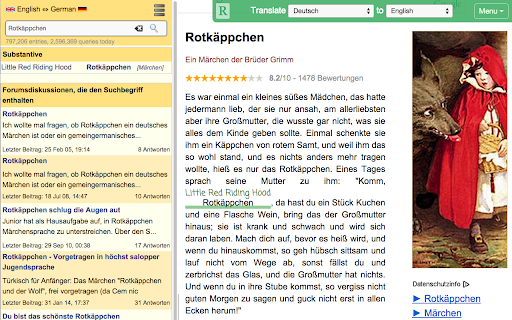
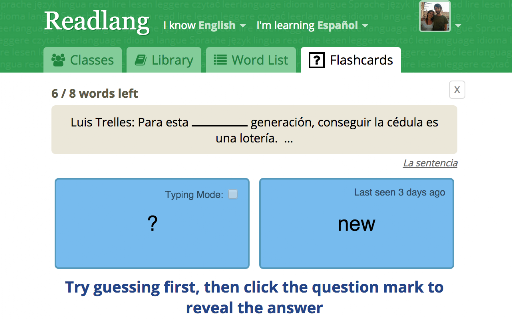
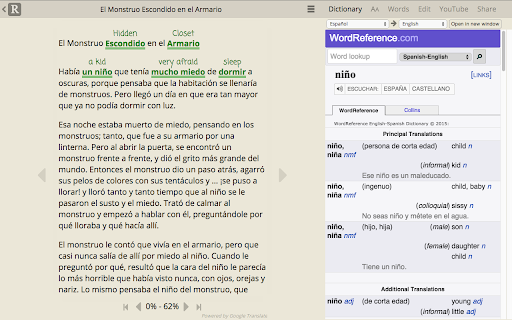
The product is positioned as an immersive language learning tool that turns web browsing into a study session. It emphasizes the ability to translate unknown words and phrases instantly and convert them into flashcards for long-term retention.

Inferred product pattern

Immersive reading tool combining real-time translation with an integrated vocabulary management system.

Review-backed pain points

Users express frustration over the transition from free single-word translation to a paid model for phrase translation, describing it as a 'bait and switch.' There are also significant technical complaints regarding text recognition in languages like Japanese and Arabic.

Observed feature gaps

Lack of support for specific regional languages (e.g., Tamil), absence of advanced word boundary detection for CJK languages, and poor compatibility with dynamic sites like Google News.

Tags
Language LearningWeb TranslatorFlashcardsVocabulary BuilderReading Assistant
Target users

- Language learners

- Students

- Polyglots

- Foreign language readers

Primary use cases

- Translating web articles in real-time

- Building personalized vocabulary lists from web content

- Creating flashcards for spaced repetition learning

Positive themes

- Review-backed positive themes not available in provided samples.

Negative themes

- Paywalls for phrase translation

- Technical issues with text capture and word boundaries

- Compatibility problems with major news sites

- Account stability and logout issues

Observed friction

- Free-tier complaints detected

- Performance complaints detected

- Privacy complaints detected

- Users feel misled by the limitation of 10 phrases per day, requiring a subscription for unlimited phrase translation.

Evidence boundary: Analysis based on store listing data and a sample of 10 low-rating/helpful user reviews. The review sample provided consisted entirely of low-rating feedback, which does not reflect the overall 4.34 store score.
Complaint summaries
Review-backed complaint signals grouped by operational area.

Support

Some users report the absence of a reachable support email.

Reliability

Reports of the extension failing to work on specific news homepages and frequent involuntary logouts during use.

Privacy

Users expressed skepticism regarding the broad 'read and change all your data on all websites' permission requirement.

Access & pricing

- Free entry with paid features

- Login needed for core features

- Limited free usage observed

Store listing facts

Listing assets

- Screenshots: 4

- Videos: 1

- Languages: 1

Trust signals

- Privacy policy

- Developer contact

- Official website

- Support link

Store metadata

- Version: 0.9.36

- Size: 541KiB

- Last updated:

Store description excerpt
Short excerpt from the public Chrome Web Store listing; full copy is available on the official store page.
Learn a language while surfing the web! Visit articles in the language you're learning. Use Readlang to translate the words and phrases you don't understand. And we'll create flashcards and vocab lists for you. - Visit a webpage in the language you are learning. - Click the "R" button to open Readlang. - Click on any word, or drag across any phrase to translate. Supercharge your language learning! Alternatively, right click on any webpage and select "Import to Readlang" to import a plain text version to read on readlang.com Featured on Lifehacker and Tim Ferriss' Five-Bullet Friday.

Listing SEO keywords

Search intent keywords
Keyword signals for evaluating how users may discover, compare, or search for this extension category.

Core discovery

web page translatorlanguage learning extensiontranslate to flashcardsvocabulary builder extension

Comparison

Readlang vs Google Translatebest reader for language learning

Problem

how to learn vocabulary from webtranslate phrases on website for learners

Alternative

Readlang alternativesweb translation flashcard tools

Similar extensions

Jump to related discovery paths:

FAQ

What is Readlang Web Reader mainly used for?
Readlang is a browser extension that allows users to translate words and phrases while reading foreign language websites. It automatically generates vocabulary lists and flashcards based on the user's translations to facilitate language acquisition.
What market signals stand out?
Established adoption with moderate review base. Last known update: 06/03/2026.
What should builders compare before entering this space?
Compare install concentration, rating quality, update recency, screenshots, developer portfolio, listing claims, and review-backed friction signals.
Is this page review-backed?
Backed by review samples. This page combines store metadata with selected review signals, while raw store metrics remain visible for comparison.

Screenshots

Readlang Web Reader screenshot

Links

Recommended Chrome extensions

Related listings from the same category, trending peers, and the same publisher portfolio.

Browse education
Spanish Immersion Homepage icon

Spanish Immersion Homepage

Steve Ridout

Turn your New Tab page Spanish to cultivate a productive web-browsing habit and learn faster.

Installs

1K+

Rating

4.9

Google Translate icon

Google Translate

google-translate-chrome-extension-owners

View translations easily as you browse the web. By the Google Translate team.

Installs

32.0M+

Rating

4.2

Kami for Google Chrome™ icon

Kami for Google Chrome™

Kami

Kami is an interactive learning platform empowering students and enhancing the way teachers teach, feedback, and assess.

Installs

5.0M+

Rating

4.6

EndNote Click icon

EndNote Click

EndNote Click

Fast, one-click access to millions of research papers.

Installs

5.0M+

Rating

4.1

Equatio - Math made digital icon

Equatio - Math made digital

Texthelp

Easily create mathematical equations, formulas and quizzes. Intuitively type or handwrite, with no tricky math code to learn.

Installs

2.0M+

Rating

3.9

Language Reactor icon

Language Reactor

Dioco

Learn languages effectively by watching films and series in your target language.

Installs

2.0M+

Rating

4.2

Brisk Teaching - AI that Works Where Teachers Work icon

Brisk Teaching - AI that Works Where Teachers Work

Brisk Teaching

Brisk works inside Google Docs, Slides, and YouTube, saving teachers 10+ hours weekly on planning, feedback, and resource creation.

Installs

1.0M+

Rating

4.7

BetterCampus (prev. BetterCanvas) icon

BetterCampus (prev. BetterCanvas)

BetterCampus

Feature packed extension for Canvas.

Installs

1.0M+

Rating

4.7

LibKey Nomad icon

LibKey Nomad

Third Iron LLC

One-click access to millions of scholarly articles.

Installs

1.0M+

Rating

4.5

MyBib: Free Citation Generator icon

MyBib: Free Citation Generator

MyBib

Automatically create APA style, MLA format, and Harvard referencing style citations with our citation generator add-on for Chrome.

Installs

1.0M+

Rating

4.8