Revision History: Writing Process Visibility for Google Docs & Slides icon

Revision History Chrome Extension Analysis

Automation & Workflow Efficiency

Store listing title: Revision History: Writing Process Visibility for Google Docs & Slides

Chrome extension ID: dlepebghjlnddgihakmnpoiifjjpmomh

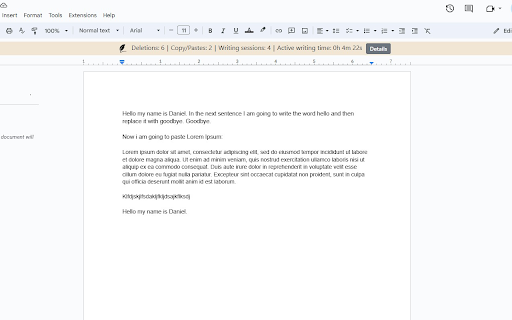
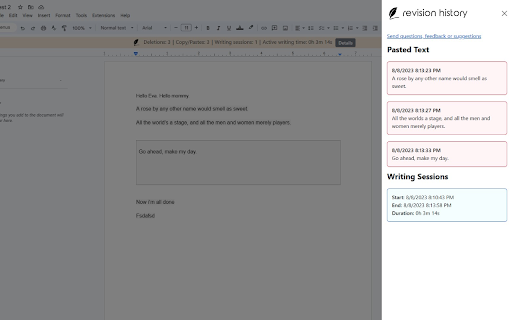
This extension records the editing lifecycle of Google Docs and Slides, providing teachers with a visual replay and data analytics of how an assignment was completed. It helps distinguish between authentic student effort and potential external copying or AI-generated text.

Version:1.10.2
Size:3.49MiB
Last updated:

Overview

Installs

100K+

Rating

3.7

232 reviews

Languages

19 locales

Includes Deutsch, English, Nederlands, dansk...

Market analysis

Review-backed positioning, friction, and market signals for this Chrome extension.

Backed by review samples

Macro category

Automation & Workflow Efficiency

Pricing friction

High review signal

Complaint intensity

Moderate review signal

Listing & review signals
Observed signals from store listing text and review samples.

Listing positioning

Revision History positions itself as an essential classroom tool for educators to monitor student writing processes, specifically to identify AI usage and plagiarism. It emphasizes local data processing for privacy and offers features like document replay, copy-paste detection, and writing pattern analysis to foster academic integrity.

Inferred product pattern

Specialized B2B/EdTech utility that provides forensic visibility into document creation to ensure academic honesty.

Review-backed pain points

Teachers express significant frustration regarding the document limit, citing that their own lesson planning and template creation consumes their limited 'free' quota, forcing unwanted subscription upgrades.

Observed feature gaps

Users desire better control over which documents are tracked, the ability to download reports or replay videos for administrative evidence, and cross-browser support beyond Chrome.

Tags
Teacher ToolsAcademic IntegrityWriting AnalyticsGoogle ClassroomAI Detection
Target users

- K-12 Teachers

- University Faculty

- School Administrators

Primary use cases

- Reviewing student writing history

- Detecting unauthorized copy-paste actions

- Analyzing writing time and patterns

- Conducting formative assessments

Positive themes

- Effective at identifying potential academic misconduct

- Valuable for productive conversations with students about writing processes

- Intuitive interface for viewing document history

- Highly useful alternative to standard AI detectors

Negative themes

- Frustration with usage limits on the free tier

- Inconsistent flag accuracy (false positives or negatives)

- Billing transparency and mid-year feature locking

- Inability to easily toggle analysis on/off for personal documents

Observed friction

- Payment required for meaningful usage

- Free-tier complaints detected

- Performance complaints detected

- Strong friction exists due to the 150-document monthly limit, which users feel is consumed too quickly, especially when it tracks teacher-created documents instead of just student submissions.

Evidence boundary: Data gathered from 233 user reviews, including both highly satisfied educators praising the tool's effectiveness and frustrated users highlighting restrictive free-tier limitations. Review sentiments are split between extreme utility for pedagogical purposes and dissatisfaction with the monetization strategy.
Complaint summaries
Review-backed complaint signals grouped by operational area.

Support

Complaints focus on the perceived lack of transparency regarding the transition from a free model to a restricted freemium model, with users feeling misled by prior developer promises.

Reliability

Occasional technical issues where analytics fail to generate, displaying 'unable to analyze' or 'too short for evaluation' errors for valid documents.

Privacy

No specific privacy violation complaints; the extension is generally praised for its local analysis model.

Access & pricing

- Free entry with paid features

- Account required for core usage

- Limited free usage observed

Store listing facts

Listing assets

- Screenshots: 3

- Videos: 1

- Languages: 19

Trust signals

- Privacy policy

- Developer contact

- Official website

Store metadata

- Version: 1.10.2

- Size: 3.49MiB

- Last updated:

Store description excerpt
Short excerpt from the public Chrome Web Store listing; full copy is available on the official store page.
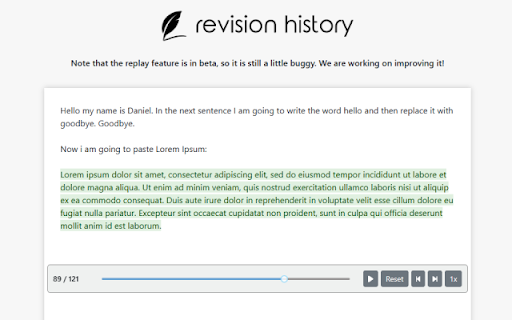
Revision History helps 200k+ teachers see students' writing process in Google Docs and Slides - especially useful in the AI age. Track authentic writing development and guide meaningful revisions while ensuring academic integrity. Key Features: ✍️ Complete Writing Timeline: Track editing sessions, time spent writing, and revision patterns in Google Docs & Google Slides. 🎥 Video Replay: Watch documents being written from start to finish with large paste/deletion moments highlighted 📋 Copy/Paste Detection: See what content was pasted from external sources 🏫 Google Classroom Integration: Works seamlessly with submitted assignments, so long as they were written in Docs. 🔍 Enhanced Video Navigation: Important paste/deletion events now highlighted with icons for quick access 💡 Unusual Writing Pattern Detection: Identify atypical writing patterns that may benefit from additional guidance…

Listing SEO keywords

Search intent keywords
Keyword signals for evaluating how users may discover, compare, or search for this extension category.

Core discovery

check student writing historyGoogle Docs plagiarism checker for teachersRevision History for Google Classroomdetect AI writing in student papers

Comparison

Draftback alternativeOriginality.ai reviewProcess Feedback comparison

Problem

student plagiarism detectionhow to tell if a student used AItrack Google Doc editing history

Alternative

best teacher tools for academic integrityGoogle Docs revision history tracker

Similar extensions

Jump to related discovery paths:

FAQ

What is Revision History mainly used for?
This extension records the editing lifecycle of Google Docs and Slides, providing teachers with a visual replay and data analytics of how an assignment was completed. It helps distinguish between authentic student effort and potential external copying or AI-generated text.
What market signals stand out?
Established adoption with moderate review base. Last known update: 06/06/2026.
What should builders compare before entering this space?
Compare install concentration, rating quality, update recency, screenshots, developer portfolio, listing claims, and review-backed friction signals.
Is this page review-backed?
Backed by review samples. This page combines store metadata with selected review signals, while raw store metrics remain visible for comparison.

Screenshots

Revision History: Writing Process Visibility for Google Docs & Slides screenshot

Links

Recommended Chrome extensions

Related listings from the same category, trending peers, and the same publisher portfolio.

Browse education
TeacherTab icon

TeacherTab

Revision History

Transform every new tab into a digital breakroom for teachers. Access essential tools, daily tips, and community resources.

Installs

2K+

Rating

4.4

rikaikun icon

rikaikun

Erek Speed

rikaikun shows the reading and English definition of Japanese words when you hover over Japanese text in the browser.

Installs

200K+

Rating

4.7

xFanatical Safe Doc icon

xFanatical Safe Doc

xFanatical

xFanatical Safe Doc smooths the way for schools managing Google Workspace for Education features (Docs, Sheets, Slides, Classroom,…

Installs

200K+

Rating

1.4

Mouse Tooltip Translator - PDF & Netflix YouTube dual subs icon

Mouse Tooltip Translator - PDF & Netflix YouTube dual subs

ttop324

Mouse Tooltip Translator translate mouseover text using google translate. Support OCR, TTS, manga translator & pdf translator.

Installs

200K+

Rating

4.6

Paperpile Extension icon

Paperpile Extension

Paperpile

Collect, organize, annotate and cite your research papers in Chrome.

Installs

200K+

Rating

4.6

Rapid Journal Quality Check icon

Rapid Journal Quality Check

jrk.devgit

Displays rankings and h-index for academic journals next to Google Scholar search results.

Installs

200K+

Rating

4.2

OpenDyslexic for Chrome icon

OpenDyslexic for Chrome

OpenDyslexic

Format pages using the OpenDyslexic font and low contrast help

Installs

200K+

Rating

4.1

Google Meet Breakout by Robert Hudek icon

Google Meet Breakout by Robert Hudek

Unknown developer

Only the teacher needs to install. Completely Free and your Data is Private. Google Classroom integration, Slider Control.

Installs

200K+

Rating

4.4

Reverso – Translation, dictionary icon

Reverso – Translation, dictionary

Reverso Technologies Inc.

Translate and learn languages while browsing and watching movies, it’s free.

Installs

200K+

Rating

4.6

Toucan by Babbel - Language Learning icon

Toucan by Babbel - Language Learning

jointoucan.com

Learn a new language just by browsing the internet.

Installs

200K+

Rating

4.6