Omnibug icon

Omnibug Chrome Extension Analysis

Developer & Designer Tools

Chrome extension ID: bknpehncffejahipecakbfkomebjmokl

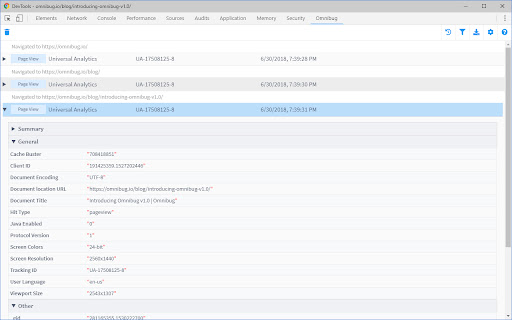
This extension functions as a network traffic analyzer specifically optimized for marketing and analytics tags. It allows users to monitor real-time events sent to various MarTech platforms directly within the browser, simplifying technical validation and data quality assurance.

Developer:Philip Lawrence
Version:2.1.0
Size:1.36MiB
Last updated:

Overview

Installs

200K+

Rating

4.3

55 reviews

Languages

1 locales

Includes English

Market analysis

Review-backed positioning, friction, and market signals for this Chrome extension.

Backed by review samples

Macro category

Developer & Designer Tools

Pricing friction

Low review signal

Complaint intensity

Moderate review signal

Listing & review signals
Observed signals from store listing text and review samples.

Listing positioning

Omnibug positions itself as an essential utility for developers and QA engineers working with digital marketing technologies. It focuses on capturing, decoding, and displaying outgoing network requests from major platforms like Google Marketing Cloud and Adobe Experience Cloud in a human-readable format.

Inferred product pattern

Free open-source utility focused on niche developer workflow automation.

Review-backed pain points

Users frequently report technical reliability issues, specifically the extension failing to load within Chrome DevTools or becoming unresponsive when applying data filters.

Observed feature gaps

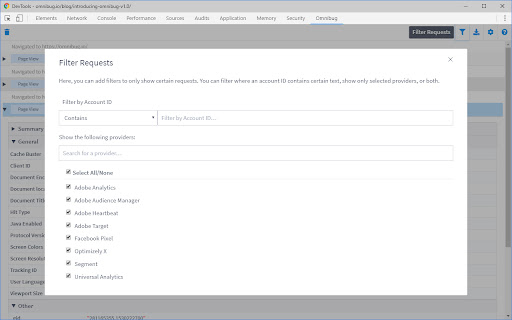
Users desire more granular customization for hiding/showing fields and improved support for visualizing specific batched requests, such as GA4 batching or Adobe rule names.

Tags
Analytics DebuggerMarTech DebuggerDeveloper ToolTag Manager
Target users

- Analytics Developers

- QA Engineers

- Digital Marketers

- CRO Specialists

Primary use cases

- Debugging analytics tags

- Validating Google Analytics events

- Testing Adobe Analytics implementations

- Auditing network request data

Positive themes

- Indispensable for daily maintenance

- Valuable time-saving utility

- Clear decoding of complex marketing tags

Negative themes

- Failure to appear in DevTools

- Crashes during filtering

- Inability to parse specific batched request types

Observed friction

- Performance complaints detected

- None; the product is free to use with no observed payment gates.

Evidence boundary: Evidence based on a mix of developer-focused feedback and technical bug reports regarding DevTools integration and stability. Review sample size is small relative to the user base, potentially biasing results toward users experiencing technical failures.
Complaint summaries
Review-backed complaint signals grouped by operational area.

Support

No specific support or refund complaints noted, though users express frustration with technical stability.

Reliability

Significant reports of the extension failing to initialize or crashing during data filtering operations.

Privacy

No privacy or security-related complaints found.

Access & pricing

- Free usage observed

- No account requirement observed

- Free plan or free usage claimed

Store listing facts

Listing assets

- Screenshots: 3

- Videos: 0

- Languages: 1

Trust signals

- Privacy policy

- Developer contact

- Official website

- Support link

Store metadata

- Version: 2.1.0

- Size: 1.36MiB

- Last updated:

Store description excerpt
Short excerpt from the public Chrome Web Store listing; full copy is available on the official store page.
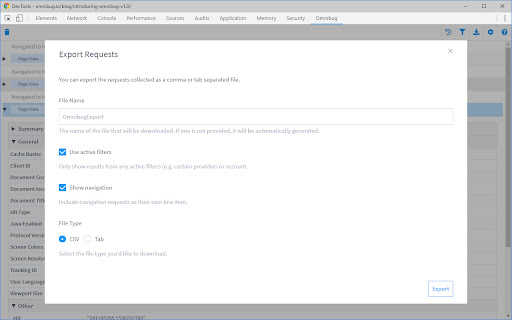
Omnibug is a Chrome extension built to ease developing with, debugging, and providing quality assurance to today's analytics, UX/CRO tools, and many other marketing technologies. These tags include the Google Marketing Cloud (including Google Analytics, Google Tag Manager, Doubleclick, and Google Ads), the Adobe Experience Cloud (including Adobe Analytics, Adobe Launch, Adobe Target, Web SDK), Tealium iQ, and many more! Events sent to these MarTech platforms are captured and decoded into a human-readable format, which can be filtered and/or exported. You can view all of our release notes at https://omnibug.io/help/changelog/ and a list of providers we support at https://omnibug.io/help/supported-tags/

Listing SEO keywords

Search intent keywords
Keyword signals for evaluating how users may discover, compare, or search for this extension category.

Core discovery

analytics debuggertag manager debuggerdebug GA4 tagsnetwork request inspector

Comparison

Omnibug vs DataSlayerGoogle Analytics debugger extension

Problem

extension not showing in devtoolsOmnibug crashing

Alternative

DataslayerTag AssistantCharles Proxy alternative

Similar extensions

Jump to related discovery paths:

FAQ

What is Omnibug mainly used for?
This extension functions as a network traffic analyzer specifically optimized for marketing and analytics tags. It allows users to monitor real-time events sent to various MarTech platforms directly within the browser, simplifying technical validation and data quality assurance.
What market signals stand out?
Established adoption with limited review base. Last known update: 01/03/2025.
What should builders compare before entering this space?
Compare install concentration, rating quality, update recency, screenshots, developer portfolio, listing claims, and review-backed friction signals.
Is this page review-backed?
Backed by review samples. This page combines store metadata with selected review signals, while raw store metrics remain visible for comparison.

Screenshots

Omnibug screenshot
Omnibug screenshot
Omnibug screenshot

Links

Recommended Chrome extensions

Related listings from the same category, trending peers, and the same publisher portfolio.

Browse developer