Ddict: AI Translation & Writing Assistant icon

Ddict Chrome Extension Analysis

AI & Writing Assistants

Store listing title: Ddict: AI Translation & Writing Assistant

Chrome extension ID: bpggmmljdiliancllaapiggllnkbjocb

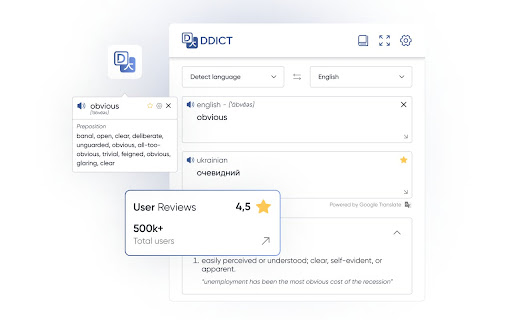
Ddict is a browser extension that enables instant text translation, vocabulary building, and AI-driven writing suggestions. It allows users to interact with text on any webpage to retrieve definitions, synonyms, and translations while providing speech-to-text functionality for language practice.

Developer:Ddo
Version:6.2.19
Size:236KiB
Last updated:

Overview

Installs

100K+

Rating

4.2

741 reviews

Languages

1 locales

Includes English

Market analysis

Review-backed positioning, friction, and market signals for this Chrome extension.

Backed by review samples

Macro category

AI & Writing Assistants

Pricing friction

Low review signal

Complaint intensity

High review signal

Listing & review signals
Observed signals from store listing text and review samples.

Listing positioning

Ddict positions itself as an all-in-one browser utility for real-time text translation, AI-powered writing enhancement, and language learning. It emphasizes seamless integration with web browsing to help users understand content and improve communication through dictionary and text-to-speech tools.

Inferred product pattern

A legacy browser tool undergoing 'feature bloat' and aggressive monetization that is impacting core user experience and stability.

Review-backed pain points

Users report frequent, intrusive new-tab notifications regarding updates, intermittent translation service failures, and UI changes that obscure reading text.

Observed feature gaps

Lack of reliable PDF support despite claims, missing core language translation functionality in certain versions, and poor UX regarding automatic text-to-speech triggers.

Tags
AI TranslationLanguage LearningBrowser TranslatorWriting Aid
Target users

- Language Learners

- Content Readers

- International Professionals

Primary use cases

- Webpage translation

- Writing improvement

- Vocabulary building

- Text-to-speech reading

Positive themes

- Helpful dictionary features

- Previously clean user interface

- Effective for quick word lookups

Negative themes

- Intrusive update notifications

- Unreliable translation services

- UI clutter and performance degradation

- Unexpected behavior when typing

Observed friction

- Performance complaints detected

- Users expressed significant dissatisfaction with high annual subscription costs (referenced as ~$90/year) compared to the perceived utility of a browser extension.

Evidence boundary: Evidence is derived from a diverse sample of user reviews highlighting both historical positive sentiment and recent frustration with updates, performance, and pricing models. Reviews span several years; older feedback may reflect versions of the product that have since been modified or patched.
Complaint summaries
Review-backed complaint signals grouped by operational area.

Support

Frequent complaints regarding lack of response to outage reports and persistent bugs post-update.

Reliability

Repeated reports of 'Oops, there is a problem with the internet' errors, browser crashes, and functionality breaking after updates.

Privacy

No specific privacy complaints found in analyzed samples.

Access & pricing

- Free entry with paid features

- Login needed for core features

- Trial or limited free usage before paid plan

Store listing facts

Listing assets

- Screenshots: 1

- Videos: 1

- Languages: 1

Trust signals

- Privacy policy

- Developer contact

- Official website

Store metadata

- Version: 6.2.19

- Size: 236KiB

- Last updated:

Store description excerpt
Short excerpt from the public Chrome Web Store listing; full copy is available on the official store page.
Discover Ddict, your friendly AI-powered tool for seamless translation and writing enhancement on any website. Enjoy smooth and uninterrupted reading with real-time text translations and smart writing suggestions. Ddict offers a variety of features: - Instantly translate text to effortlessly understand web content. - Enhance your writing with AI-driven tips for clearer, more engaging communication. - Improve language learning with automatic text-to-speech functionality. - Expand your vocabulary using our comprehensive dictionary with definitions, synonyms, and examples. - Dark mode with other theme options. Perfect for language learners, professionals, and anyone who loves exploring the web, Ddict is your go-to tool for translation and writing assistance. Experience how Ddict can make your online communication more effective and enjoyable today!

Listing SEO keywords

Search intent keywords
Keyword signals for evaluating how users may discover, compare, or search for this extension category.

Core discovery

Chrome translation extensionAI writing assistant browserLearn languages while browsingBest dictionary extension

Comparison

Ddict vs Google TranslateAlternative to DdictFree browser translator

Problem

Ddict not workingDdict crashing browserHow to fix Ddict translation

Alternative

DeepL extensionLanguage Reactor alternative

Similar extensions

Jump to related discovery paths:

FAQ

What is Ddict mainly used for?
Ddict is a browser extension that enables instant text translation, vocabulary building, and AI-driven writing suggestions. It allows users to interact with text on any webpage to retrieve definitions, synonyms, and translations while providing speech-to-text functionality for language practice.
What market signals stand out?
Established adoption with moderate review base. Last known update: 11/27/2025.
What should builders compare before entering this space?
Compare install concentration, rating quality, update recency, screenshots, developer portfolio, listing claims, and review-backed friction signals.
Is this page review-backed?
Backed by review samples. This page combines store metadata with selected review signals, while raw store metrics remain visible for comparison.

Screenshots

Ddict: AI Translation & Writing Assistant screenshot

Links

Website: ddict.me

Privacy policy: https://ddict.me/privacy

Videos: Watch

Recommended Chrome extensions

Related listings from the same category, trending peers, and the same publisher portfolio.

Browse communication
Auto BCC for Gmail™ by cloudHQ icon

Auto BCC for Gmail™ by cloudHQ

cloudHQ

Setup automatic blind copies to your CRM or any other email address

Installs

60K+

Rating

4.2

Kommodo Screen Recorder & SOP icon

Kommodo Screen Recorder & SOP

kgrauer

Record screen and get a magical SOP with an AI Summary

Installs

50K+

Rating

4.6

CrankWheel Screen Sharing icon

CrankWheel Screen Sharing

CrankWheel

Easier screen sharing. No app needed for viewers, even on their mobile. Record your screen or webcam.

Installs

50K+

Rating

4.8

Reminders for Google Calendar™ icon

Reminders for Google Calendar™

SMS Reminder for Google Calendar™

Send reminders by SMS/Text from your Google Calendar™. Use it for your customers or your own appointments.

Installs

50K+

Rating

3.6

HTML Editor for Gmail by cloudHQ icon

HTML Editor for Gmail by cloudHQ

cloudHQ

HTML Editor for Gmail™ - code HTML email directly from Gmail

Installs

50K+

Rating

4.1

Amazon Q Business icon

Amazon Q Business

Amazon Q Business by Amazon Web Services

An enterprise AI assistant available to assist you when browsing the web.

Installs

50K+

Rating

5.0

Fax.Plus - HIPAA Fax Online icon

Fax.Plus - HIPAA Fax Online

Alohi SA

Secure HIPAA fax service to send fax online and receive online fax on local, toll-free, and International fax numbers.

Installs

50K+

Rating

3.5

SendSafely Encryption for Chrome and Gmail icon

SendSafely Encryption for Chrome and Gmail

SendSafely.com

Chrome extension that provides end-to-end encryption for Gmail. Encrypt private emails and securely share files up to 10GB.

Installs

40K+

Rating

4.9

InTouchApp Phone Contacts & Data Saver icon

InTouchApp Phone Contacts & Data Saver

Volare Tech. Pvt. Ltd.

Save unknown numbers & other data from WhatsApp, LinkedIn, Gmail to your phone instantly. Make phone call from web + much more!

Installs

40K+

Rating

4.0

Conversation Thread Reversal for Gmail™ by cloudHQ icon

Conversation Thread Reversal for Gmail™ by cloudHQ

cloudHQ

How to reverse your Gmail conversation threads to show in chronological order

Installs

40K+

Rating

3.6