Auto BCC for Gmail™ by cloudHQ icon

Auto BCC for Gmail™ by cloudHQ Chrome Extension Analysis

Automation & Workflow Efficiency

Chrome extension ID: bfhaienophdigbdknjamfcbhinmmnbha

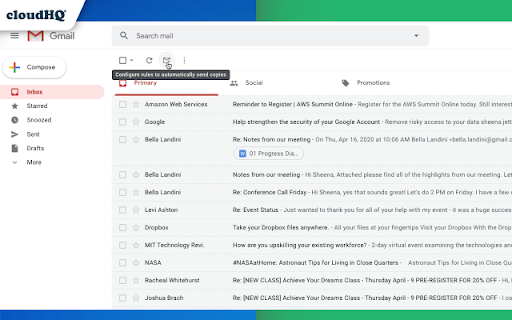
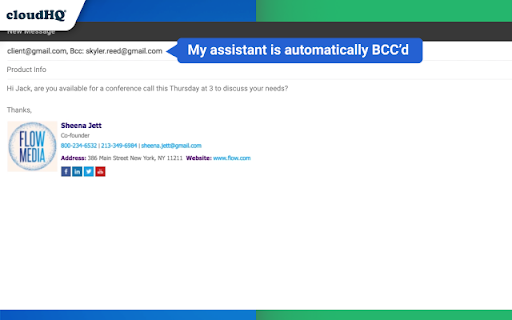
Auto BCC for Gmail provides automated email copying functionality within the Gmail interface. It enables users to create custom rules to ensure specific contacts or CRM systems automatically receive copies of sent messages.

Developer:cloudHQ
Version:1.0.2.7
Size:578KiB
Last updated:

Overview

Installs

60K+

Rating

4.2

122 reviews

Languages

11 locales

Includes Deutsch, English, Nederlands, español...

Market analysis

Review-backed positioning, friction, and market signals for this Chrome extension.

Backed by review samples

Macro category

Automation & Workflow Efficiency

Pricing friction

Moderate review signal

Complaint intensity

High review signal

Listing & review signals
Observed signals from store listing text and review samples.

Listing positioning

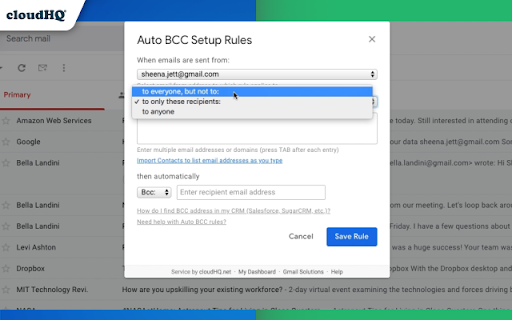
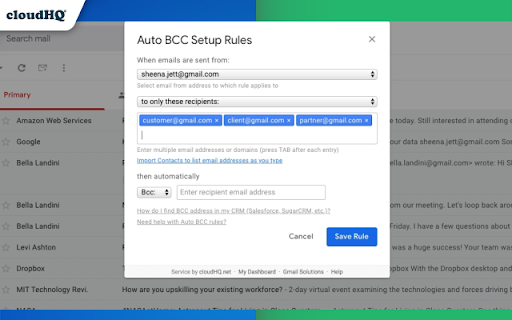
The extension positions itself as a professional tool to automate blind copies or CCs to specific email addresses or CRMs like Salesforce and HubSpot. It emphasizes rule-based logic, allowing users to filter automation based on sender or receiver domains.

Inferred product pattern

A utility-driven automation tool using a trial-to-subscription model with high-intensity conversion prompts.

Review-backed pain points

Users report frustration with unexpected subscription fees, annoying pop-ups to remove ads, and the tool occasionally stopping work after Gmail updates.

Observed feature gaps

Users requested the ability to exclude replies from BCC rules to avoid duplicating existing conversation threads; some reported lack of support for BCCing to certain providers like Yahoo Mail.

Tags
Auto BCCGmail AutomationCRM IntegrationEmail Productivity
Target users

- Sales professionals

- CRM users

- Administrative assistants

- Small business owners

Primary use cases

- Automatic CRM logging

- Automated email auditing for managers

- Syncing Gmail with secondary email accounts

Positive themes

- Effective email synchronization

- Reliable functionality for managing multiple email addresses

Negative themes

- Lack of pricing transparency

- Aggressive upselling pop-ups

- Sudden functional breakage

Observed friction

- Free-tier complaints detected

- Performance complaints detected

- Privacy complaints detected

- High friction due to users reporting a lack of prominent pricing information during installation and aggressive pop-ups requiring payment to remove interruptions.

Evidence boundary: Evidence drawn from the official store description and user reviews highlighting pricing, feature functionality, and reliability issues. Review data is limited to a sample size of 123 and includes non-English reviews.
Complaint summaries
Review-backed complaint signals grouped by operational area.

Support

Not explicitly detailed in available reviews.

Reliability

Users have reported the extension stops functioning unexpectedly, potentially due to changes in Gmail's specifications.

Privacy

One user reported concerns regarding the extension accessing Google accounts and enrolling them in mailing lists without explicit consent.

Access & pricing

- Subscription model observed

- Account required for core usage

- Trial or limited free usage before paid plan

Store listing facts

Listing assets

- Screenshots: 4

- Videos: 1

- Languages: 11

Trust signals

- Privacy policy

- Developer contact

- Official website

- Support link

Store metadata

- Version: 1.0.2.7

- Size: 578KiB

- Last updated:

Store description excerpt
Short excerpt from the public Chrome Web Store listing; full copy is available on the official store page.
With the Auto BCC for Gmail by cloudHQ Chrome extension, you can automatically blind copy (or copy) specific people on specific emails so that you can rest assured that whoever should have a copy of your email, automatically does. Here's a list of features: ✅ Automatically CC or BCC another email address (like another one of your email addresses, your boss, your assistant, etc). ✅ Multiple rules based on your "from" email address: —Only email messages that you send from your professional email address will be CC or BCC'ed to an email address of your choice. ✅ Multiple rules based on your receiver's email address or domain: — Emails sent to certain contacts (for example, important clients) automatically have a CC or BCC included in your emails. ✅ Exclusion rules based on your receiver's email address or domain: — Emails that you send to your private contacts or internal company contacts…

Listing SEO keywords

Search intent keywords
Keyword signals for evaluating how users may discover, compare, or search for this extension category.

Core discovery

Auto BCC GmailGmail BCC automationEmail to CRMAutomatic CC Gmail

Comparison

Salesforce Gmail integrationHubSpot Gmail BCC

Problem

Gmail automatic BCCcopy email to CRM automatically

Alternative

Gmail BCC extensionAuto CC for Gmail

Similar extensions

Jump to related discovery paths:

FAQ

What is Auto BCC for Gmail™ by cloudHQ mainly used for?
Auto BCC for Gmail provides automated email copying functionality within the Gmail interface. It enables users to create custom rules to ensure specific contacts or CRM systems automatically receive copies of sent messages.
What market signals stand out?
Visible niche traction with moderate review base. Last known update: 11/29/2025.
What should builders compare before entering this space?
Compare install concentration, rating quality, update recency, screenshots, developer portfolio, listing claims, and review-backed friction signals.
Is this page review-backed?
Backed by review samples. This page combines store metadata with selected review signals, while raw store metrics remain visible for comparison.

Screenshots

Auto BCC for Gmail™ by cloudHQ screenshot

Links

Recommended Chrome extensions

Related listings from the same category, trending peers, and the same publisher portfolio.

Browse communication
Save Emails as PDF by cloudHQ icon

Save Emails as PDF by cloudHQ

cloudHQ

Export, convert and save Gmail™ emails as a PDF document

Installs

100K+

Rating

4.3

Gmail™ Email Templates by cloudHQ icon

Gmail™ Email Templates by cloudHQ

cloudHQ

Beautiful email templates for Gmail. Design your templates or import templates from Mailchimp. With team sharing!

Installs

100K+

Rating

4.2

Mail Merge for Gmail - Mailmeteor icon

Mail Merge for Gmail - Mailmeteor

Mailmeteor

Free mail merge with email tracker and auto follow-ups.

Installs

60K+

Rating

4.8

Cursorful - Screen Recorder with Auto Zoom icon

Cursorful - Screen Recorder with Auto Zoom

Cursorful

Cursorful creates beautiful screen recordings with automatic zooms and pans that keep the viewer engaged.

Installs

60K+

Rating

4.9

Kommodo Screen Recorder & SOP icon

Kommodo Screen Recorder & SOP

kgrauer

Record screen and get a magical SOP with an AI Summary

Installs

50K+

Rating

4.6

CrankWheel Screen Sharing icon

CrankWheel Screen Sharing

CrankWheel

Easier screen sharing. No app needed for viewers, even on their mobile. Record your screen or webcam.

Installs

50K+

Rating

4.8

Reminders for Google Calendar™ icon

Reminders for Google Calendar™

SMS Reminder for Google Calendar™

Send reminders by SMS/Text from your Google Calendar™. Use it for your customers or your own appointments.

Installs

50K+

Rating

3.6

HTML Editor for Gmail by cloudHQ icon

HTML Editor for Gmail by cloudHQ

cloudHQ

HTML Editor for Gmail™ - code HTML email directly from Gmail

Installs

50K+

Rating

4.1

Amazon Q Business icon

Amazon Q Business

Amazon Q Business by Amazon Web Services

An enterprise AI assistant available to assist you when browsing the web.

Installs

50K+

Rating

5.0

Fax.Plus - HIPAA Fax Online icon

Fax.Plus - HIPAA Fax Online

Alohi SA

Secure HIPAA fax service to send fax online and receive online fax on local, toll-free, and International fax numbers.

Installs

50K+

Rating

3.5