AI Chat Blur icon

AI Chat Blur Chrome Extension Analysis

Privacy, Security & Ad Blockers

Chrome extension ID: cemfhmnfgpcknjmbjabcobjhcfmipdki

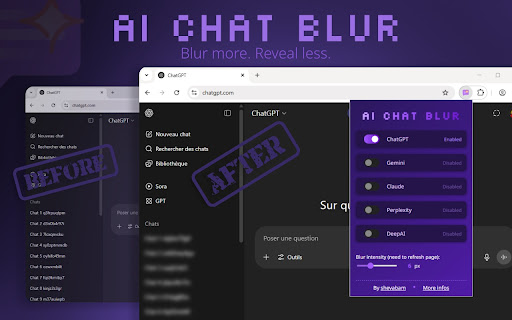
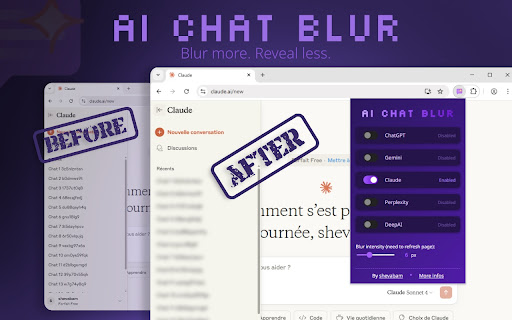
AI Chat Blur is an open-source browser extension that applies a customizable blur effect to the sidebars of ChatGPT, Gemini, Claude, Perplexity, and DeepAI. It allows users to toggle the blur effect independently per platform and adjust the blur intensity. Settings are synchronized automatically across devices using the user's Chrome profile.

Developer:shevabam
Version:1.0.3
Size:1.42MiB
Last updated:

Overview

Installs

64

Rating

0 reviews

Languages

10 locales

Includes Deutsch, English, español, français...

Market analysis

Review-backed positioning, friction, and market signals for this Chrome extension.

No review samples found

Macro category

Privacy, Security & Ad Blockers

Pricing friction

Low review signal

Complaint intensity

Low review signal

Listing & review signals
Observed signals from store listing text and review samples.

Listing positioning

AI Chat Blur positions itself as a specialized privacy utility designed to blur chat history and sidebar titles across prominent AI platforms. It targets professionals and privacy-conscious users who want to protect sensitive conversations during screen sharing or in public spaces. The listing highlights its customizability, local processing, and open-source codebase.

Inferred product pattern

Free open-source browser privacy utility altering third-party web interface elements locally.

Review-backed pain points

Review-backed data is not available because no reviews have been submitted for this extension.

Observed feature gaps

Review-backed data is not available. From the listing details, a potential gap is that some configuration changes do not update dynamically and require a manual page refresh to take effect.

Tags
Privacy BlurAI ChatScreen SharingData Protection
Target users

- Professionals sharing screens during video presentations

- Remote workers using AI assistants in public locations

- Privacy-conscious AI power users

Primary use cases

- Blurring ChatGPT chat titles to prevent accidental exposure of sensitive project names during screen shares

- Concealing Gemini and Claude chat history while working in open-office environments or cafes

- Reducing visual clutter on AI platform interfaces by blurring background sidebar elements

Positive themes

- No positive review themes available as there are no user reviews.

Negative themes

- No negative review themes available as there are no user reviews.

Observed friction

- No pricing friction observed as the product is listed as a free, open-source tool with no premium upgrades or hidden costs.

Evidence boundary: The analysis is based strictly on the developer's Chrome Web Store listing claims, technical description, supported platforms list, and the associated public GitHub repository link. There is a complete absence of public user ratings or review comments to corroborate the software's performance, usability, or platform compatibility in real-world scenarios.
Complaint summaries
Review-backed complaint signals grouped by operational area.

Support

No support or account complaints are available due to a lack of user reviews.

Reliability

No reliability or performance complaints are available due to a lack of user reviews.

Privacy

No privacy complaints are available. The listing claims a local-only execution model with zero data tracking or analytics.

Access & pricing

- Free usage observed

- No account requirement observed

- Free plan or free usage claimed

Store listing facts

Listing assets

- Screenshots: 2

- Videos: 1

- Languages: 10

Trust signals

- Privacy policy

- Developer contact

- Official website

Store metadata

- Version: 1.0.3

- Size: 1.42MiB

- Last updated:

Store description excerpt
Short excerpt from the public Chrome Web Store listing; full copy is available on the official store page.
AI Chat Blur blurs chat titles on popular AI chat platforms (ChatGPT, Gemini, Claude, Perplexity, and DeepAI) to protect your privacy, boost focus, and enhance visual clarity. # Key Features - Blur Chat Titles & Sidebars Instantly apply a blur effect to the sidebar or chat history on ChatGPT, Gemini, Claude, Perplexity, and DeepAI. - Per-Service Control Enable or disable the blur effect individually for each supported platform. - Customizable Blur Intensity Adjust the blur strength (2–15px) with a simple slider — tailored to your preference. - Sync Settings Across Devices Your preferences are automatically saved and synced via your Google account in Chrome. # Settings - Service Toggles: Enable or disable blur on ChatGPT, Gemini, Claude, Perplexity, and DeepAI independently. - Blur Slider: Adjust blur from 2px to 15px. Some changes may require a page refresh. - All preferences are stored…

Listing SEO keywords

Search intent keywords
Keyword signals for evaluating how users may discover, compare, or search for this extension category.

Core discovery

blur chat titleschatgpt sidebar blurclaude chat blurgemini history blurperplexity privacy extension

Comparison

AI Chat Blur vs chat hideAI Chat Blur alternative

Problem

how to hide chatgpt sidebarhide chat titles when screen sharingblur chat history in public

Alternative

ChatGPT privacy extensionAI sidebar hider

Similar extensions

Jump to related discovery paths:

FAQ

What is AI Chat Blur mainly used for?
AI Chat Blur is an open-source browser extension that applies a customizable blur effect to the sidebars of ChatGPT, Gemini, Claude, Perplexity, and DeepAI. It allows users to toggle the blur effect independently per platform and adjust the blur intensity. Settings are synchronized automatically across devices using the user's Chrome profile.
What market signals stand out?
Early or small audience with limited review base. Last known update: 06/17/2026.
What should builders compare before entering this space?
Compare install concentration, rating quality, update recency, screenshots, developer portfolio, listing claims, and review-backed friction signals.
Is this page review-backed?
No review samples found. This page combines store metadata with selected review signals, while raw store metrics remain visible for comparison.

Screenshots

AI Chat Blur screenshot

Links

Recommended Chrome extensions

Related listings from the same category, trending peers, and the same publisher portfolio.

Browse tools